Microsoft is retiring Power BI Premium P SKUs at the end of each customer’s agreement. What happens on day 1, day 31 and day 91 after your term ends, how P1 maps to F64, the one licensing line that decides whether to land like for like or right-size, and what we would do with the saving.
If your business bought Power BI Premium as a P1 or P2 capacity, you have a date in your diary whether you know it or not. Microsoft no longer sells P SKUs, and it is retiring the existing ones at the end of each customer’s current agreement term. The replacement is a Fabric F SKU. The decision is not whether to move. It is how to land.
This post sets out what Microsoft has said will happen, how the SKUs map, and the one licensing line that decides whether the move saves you money or costs you more.
What happens when the P SKU term ends?
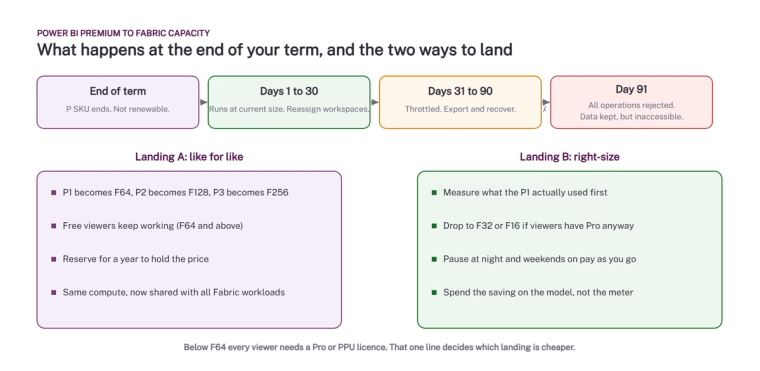
Microsoft’s published timeline is specific. When your agreement term ends, the P SKU subscription ends and cannot be renewed. For the first 30 days the capacity keeps running at its current size and you can still reassign workspaces. From day 31 to day 90 access is throttled and interactive operations are delayed, though you can still export and recover content. From day 91 all operations are rejected. The data is retained but you cannot reach it until you have moved it to a Fabric capacity.
Customers on an active Enterprise Agreement can keep running existing P capacity and renew it annually until the EA itself ends. Pro and Premium Per User licences are not affected. Sovereign cloud customers are not affected either, because Fabric is not there yet.
How do P SKUs map to F SKUs?
Microsoft publishes a compute reference: P1 is F64, P2 is F128, P3 is F256, P4 is F512 and P5 is F1024. Each P v-core is 8 Fabric capacity units. Microsoft is careful to say this is a compute comparison, not a statement of functional or licensing equivalence, and that care is justified. The same compute now runs lakehouses, warehouses, pipelines, notebooks and Copilot as well as Power BI, so a P1 that was 40% busy with reports can be 90% busy as an F64 once other workloads arrive.
The one line that decides the bill
To view Power BI content with a free licence, the capacity must be F64 or larger. On anything smaller than F64, every viewer needs a Pro or Premium Per User licence.
That is the whole decision. If you bought a P1 so that 400 people could view reports without Pro licences, F64 preserves that. If most of your viewers already hold Pro licences through Microsoft 365 E5 or because they build content, the free-viewer benefit was never worth much to you, and a smaller F SKU with Pro licences may be cheaper. Authors need Pro or PPU either way; Microsoft requires at least one Pro licence in any tenant using Power BI within Fabric.
Landing A: like for like
P1 becomes F64. Buy a one-year reservation to hold the price, assign the workspaces, keep the free viewers. The capacity is now shared with every Fabric workload, so the Capacity Metrics app becomes something you look at every week rather than never. This is the right landing for businesses with hundreds of viewers and no appetite for a licensing project.
Landing B: right-size
Measure what the P1 actually used over a month. If it ran at 30% and your viewers have Pro licences anyway, an F32 or an F16 on pay-as-you-go, paused overnight and at weekends, can cost a fraction of the P1. F SKUs bill per second with a one-minute minimum and can be scaled up on a busy day. The saving is real, and the better use of it is the model underneath the reports rather than a bigger meter. Our Fabric pricing checker gives the numbers for each SKU, and this post sets out UK prices for 2026.
What should you do before the term ends?
- Find the end date of your agreement and work back 90 days. That is your deadline for having workspaces on an F capacity.
- Count your viewers and check how many already hold Pro licences. This decides Landing A or B.
- Measure the P capacity’s real utilisation for a month in the Capacity Metrics app.
- Decide the region of the new capacity, because it cannot be changed after creation.
- List every workspace on the P capacity and who owns it. Reassignment is quick; finding the owners is not.
If you want someone to do the measurement and present the two landings with real numbers, talk to us. It is a short piece of work, and it is better done six months before the term ends than six weeks.
Microsoft’s pages: Power BI Premium migration decision guide and Microsoft Fabric licenses.
Related reading
- Fabric pricing checker
- How much does Microsoft Fabric cost? UK prices for 2026
- Power BI and Fabric licensing explained: Pro, PPU, and Fabric capacity costs compared
- Per-User Or Capacity? The One Threshold That Decides
- Fabric capacity: a plain-English guide to not getting a shock on your invoice
Maurice Deegan
Commercial Director
Part of the Hopton Analytics team, delivering governed analytics programmes for UK mid-market organisations.