
Orbit is Hopton's managed monitoring for Power BI, Microsoft Fabric and Azure. Before anyone approves it, the same questions come up: what access does it need, can it see our data, can it change anything, where do findings go and what does it cost. Here are the straight answers, with screens from the portal.
When we introduce Orbit, the conversation follows the same path almost every time. People like the idea of someone watching their Power BI and Fabric estate. Then the IT lead asks what access we need. Then someone asks whether we'll be able to see their data. Then finance asks what it costs.
They're the right questions. This post answers them plainly, so you can take it to your IT team and your finance director before we talk. If you want the background first, What Orbit watches so you do not have to explains the problem it solves.
How Orbit works
Orbit is managed monitoring for Power BI, Microsoft Fabric and Azure. It keeps a continuous, read-only watch over your estate, and over the Microsoft 365 identity layer that controls access to it, using 95 checks across ten areas: refresh, Fabric, security, identity, governance, tenant settings, capacity, model design, Azure and cost, plus usage and lineage. Security checks run daily and best-practice checks run weekly.
Everything it finds is ranked by its impact on your business and reviewed by a Hopton consultant before you see it. You never get a raw alert feed. You get a short list of what's wrong, what it affects, what it would take to fix, and a named consultant already working on the serious items.
What access does Orbit need?
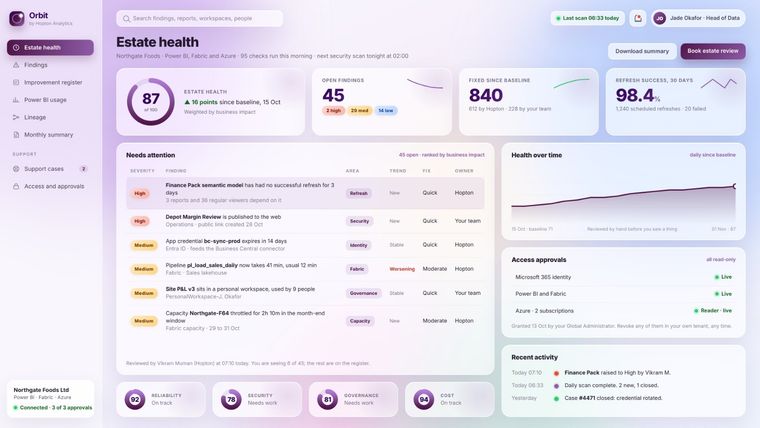
Three read-only approvals, using Microsoft's own mechanisms. Each one is separate, so you grant only the areas you want watched.
- Microsoft Entra admin consent for the Hopton monitoring application, so Orbit can read identity and configuration information such as administrator accounts, MFA registration, guests and app credentials.
- The Power BI and Fabric read-only admin API, enabled in your tenant settings for a security group, so Orbit can read workspace and report inventories, refresh and pipeline history, capacity metrics, lineage and the activity log.
- The Azure Reader role on the subscriptions you choose, only if you want Azure resources and cost watched.
There's no software to install, no passwords to share, no network changes and nothing your users will notice. Your administrator can approve it in minutes. We send a short written guide first, and we'll walk your security team through the permission list line by line before anything is approved.
Can Orbit see our data?
No. Orbit reads the results of your data estate, not the contents of your data. It sees how a dataset is configured and whether it refreshed, not the rows inside it. It sees that a report was opened, not what the report shows. It sees that an account has no MFA, not that account's mailbox.
It can't see emails, files, Teams messages, OneDrive or SharePoint content, or the data inside any report, dataset, lakehouse or warehouse.
Can Orbit change anything?
No. Every permission is read-only. Orbit has no write access of any kind to your tenant or your Azure subscriptions. When a finding needs fixing, a person fixes it, through your normal support process and with your agreement.
Who is in control of the access?
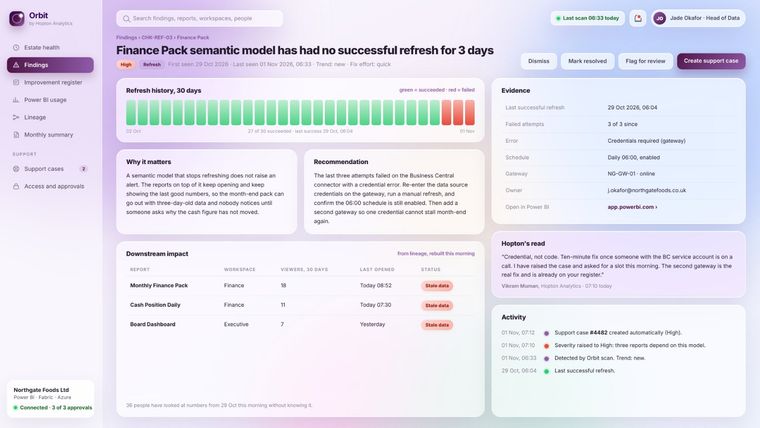
You are. You're in control of our access, not us. Remove the approval in your own tenant and Orbit stops straight away, or ask us and we'll disconnect and confirm in writing. There's no notice period on the monitoring, and nothing is kept after disconnection.
Where are findings stored?
Only findings leave your tenant: a sentence about configuration and the evidence behind it, such as a last refresh time, a count, or the name of an item and its owner. No credentials, no report content and no file content.
Findings are held on Hopton's monitoring platform in the United States under the UK-US data bridge, the UK extension to the EU-US Data Privacy Framework, and our Data Processing Agreement. Access is limited to the Hopton consultants on your account and the people you nominate for the portal.
What does Orbit cost?
Orbit is included for clients on our Analytics Acceleration Programme, or where we've agreed to provide it as part of your Hopton service. There is nothing else to pay, whatever the size of your estate, however many checks run and however many findings they produce.
What will we actually see?
- A secure client portal with estate health, findings ranked by severity and business impact, usage, lineage and the status of each access approval.
- A monthly summary in business language: what changed, what was fixed and by whom, and what to prioritise next.
- An improvement register that turns findings into a costed, sequenced plan.
- Support cases raised for you. Serious findings become cases the same day, under your Hopton support plan.
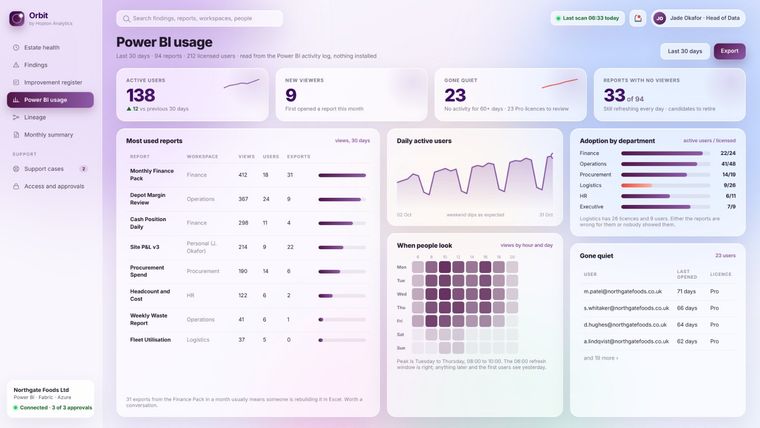
Usage is often the part clients value most: who opens which reports, who has gone quiet, which reports nobody uses and where licences sit idle. It's read from the Power BI activity log, with nothing installed.
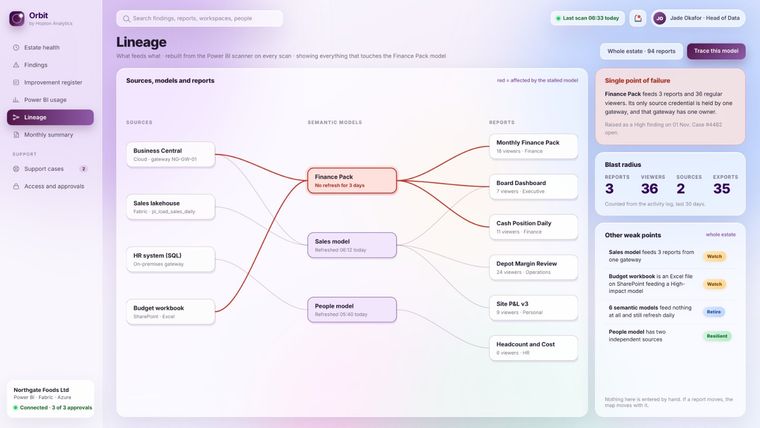
Lineage shows what depends on what, so when a source breaks you can see every report it affects and who relies on them, before anyone complains.
We already have Microsoft's tools. Why do we need Orbit?
Orbit reads from the same sources: the Power BI admin APIs and activity log, Fabric capacity metrics, Entra sign-in and audit logs, Azure Resource Graph and Cost Management. Microsoft gives you the signals, hundreds of them, in several different places. Orbit decides which of them matter to your business, explains them plainly and gives you a consultant to fix them. The difference isn't the data. It's that someone is looking.
We didn't build our estate with Hopton. Can you still watch it?
Yes. Orbit watches what's there, whoever built it. The first scan is often most useful on an estate nobody has looked at as a whole for a while.
How much of our time does it take?
Minutes to approve, then a regular estate review with your consultant, usually monthly and usually under an hour. Serious items are handled as support cases without waiting for the review.
If you'd like a walk through the portal, or the access guide for your IT team, get in touch or ask your Hopton contact.
Related reading
- What Orbit watches so you do not have to
- Why our AAP is not a traditional retainer
- How to control Azure and Fabric costs on a data platform
- Microsoft Fabric governance in 2026
Vikram Muman
Analytics Optimisation Consultant
Part of the Hopton Analytics team, delivering governed analytics programmes for UK mid-market organisations.