
The first question procurement asks about Fabric is where the data sits and who can reach it. The home region, what stays in it, what Copilot sends and where, and the five security settings a UK or Irish business should turn on before the first workspace.
Before anyone asks about medallion layers or Direct Lake, procurement and IT ask two questions. Where will our data be stored, and who can get at it. For Microsoft Fabric the answers are good, but they are not one sentence, and the exceptions are the part people trip over.
This post gives the plain version for a UK or Irish mid-market business, with the Microsoft wording where it matters.
Where is Fabric data stored?
Every Fabric tenant has a home region. It is the Azure region chosen when the tenant was created, and it is where your data is stored by default. For most UK businesses that is UK South. You can check it in seconds: in Fabric, open the Help menu, choose About, and read the line that says "Your data is stored in".
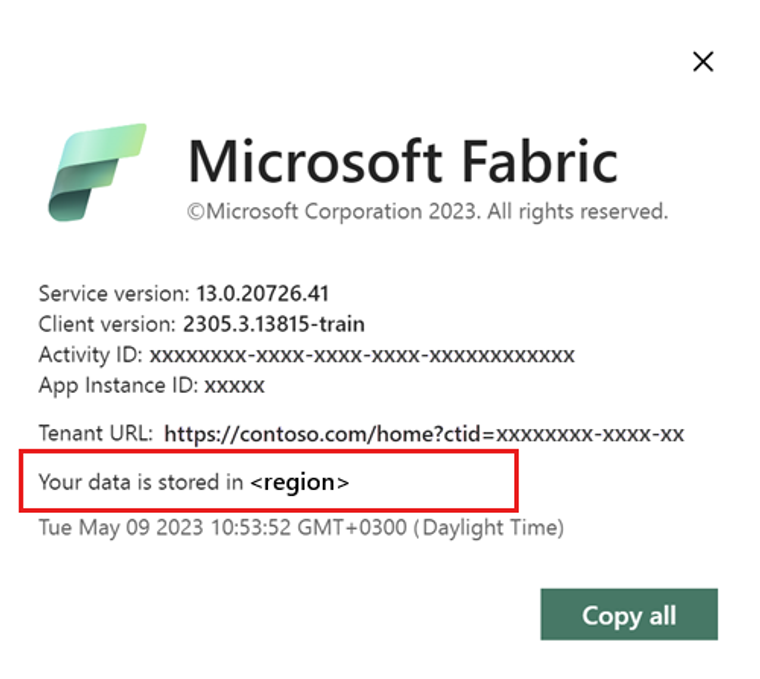
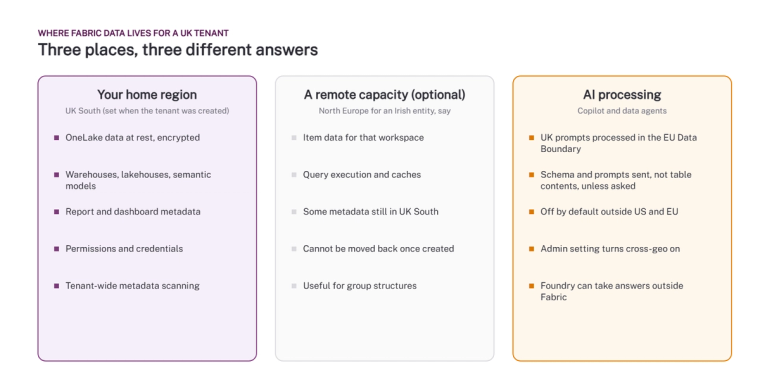
Everything in OneLake is encrypted at rest, and Microsoft states that all data at rest is stored in your home region, or in a capacity in another region you have chosen. That second option is Multi-Geo. If a group has an Irish entity that must keep its data in Ireland, you create a capacity in North Europe and assign that entity’s workspaces to it. Item data, query execution and caches for those workspaces stay in that region.
Two caveats. Some metadata stays in the home region regardless: report and dashboard definitions, permissions, semantic model credentials, and the detailed metadata that tenant-wide scanning collects. And a capacity cannot change region after it is created, so decide the layout before the first workspace, not after the fiftieth.
What does Copilot send, and where does it go?
This is the exception that matters. Copilot in Fabric and Fabric data agents use Azure OpenAI, and Microsoft hosts that service in US datacentres and in the EU Data Boundary. For a UK capacity, Microsoft’s table says prompts are processed in the EU Data Boundary. For capacities outside the US and EU, Copilot is off until a Fabric administrator turns on the setting that allows data to be processed outside the capacity’s region.
What is sent is narrower than people fear. Microsoft lists user prompts, meta prompts, the structure of the data (its schema) and conversation history. Table contents are not sent unless the user directs it, for example by asking Copilot to summarise rows. Conversation history for data agents outside the US and EU boundaries is kept for 28 days unless cleared.
One more line worth reading twice: when a Fabric data agent is used from Microsoft Foundry, Microsoft warns that responses may be sent outside Fabric’s compliance boundary or geographic region. If you connect agents to your data, that is the sentence to put in front of your data protection officer.
Who can get at the data?
Fabric has no logins of its own. Every connection is authenticated with Microsoft Entra ID, which means your existing joiners, movers and leavers process already governs Fabric. On top of that, five settings do most of the work for a mid-market business:
- Conditional Access. Require multi-factor authentication, restrict by device compliance, and block sign-in from countries you do not trade in. This applies to Fabric the same as to Outlook.
- Workspace roles and item permissions. Admin, Member, Contributor and Viewer at workspace level, with share links turned off for anything sensitive. Most leaks we see are a workspace with 40 Members where 35 should be Viewers.
- Row-level and column-level security on the semantic model, so a regional manager sees one region and a salary column is hidden from everyone who is not in finance. These rules also apply when a data agent answers a question, because the agent runs as the user.
- Private Link and managed virtual networks, if your policy says traffic must not cross the public internet. Private Link covers notebooks, lakehouses, warehouses and databases. It also disables some features, such as the Govern view in the OneLake catalog, so decide whether you need it rather than assuming you do.
- Customer-managed keys, if you must hold the key. Workspace-level keys from Azure Key Vault add a layer over Microsoft’s own encryption.
Where does Purview fit?
Purview is how you prove the above. Sensitivity labels travel with the data from a lakehouse into a report and into an exported Excel file. Data loss prevention policies can flag a semantic model that contains personal data. The Govern section of the OneLake catalog shows label coverage and the percentage of unlabelled items across the estate, refreshed daily. For most mid-market businesses the included capability is enough; the paid Purview tiers matter when you need lineage and classification across systems outside Microsoft. Our post on Fabric governance in 2026 covers what each gives you.
What should a UK business do before the first workspace?
- Confirm the home region and write it into the contract.
- Decide now whether any entity needs a separate region, and create that capacity first.
- Decide the Copilot position: on, on with cross-geo processing, or off until the data protection review is done.
- Set Conditional Access, default workspace roles and the share-link policy before anyone builds.
- Agree which labels exist and who applies them, then turn on the Govern view and check it monthly.
None of this is hard. All of it is harder to retrofit. If you want someone to walk through it with your IT and data protection people before you commit, talk to us, or start with the free data assessment, which includes a read of these settings on an existing estate.
Microsoft’s own pages: Security in Microsoft Fabric, Find your Fabric home region, Multi-Geo support and Overview of Copilot in Fabric.
Related reading
- Microsoft Fabric consultancy
- Microsoft Fabric governance in 2026: OneLake catalog, Policies and access audit
- Row-level security done right
- Microsoft Fabric policies explained: tenant and capacity rules
- AI, your data and UK data protection: what a leader needs to get right
Shauna Duffy
Director of Professional Services
Part of the Hopton Analytics team, delivering governed analytics programmes for UK mid-market organisations.