
Capacity billing is where most Fabric customers first meet an unexpected cost. Smoothing, throttling, the 3x overage meter and the new zero-provisioned SKU, explained in plain English with the rules we apply across client estates.
Most organisations meet Fabric capacity twice. The first time is at the start, when somebody picks an F SKU from a dropdown and it looks reasonable. The second is three months later, when a report is slow at month-end or an invoice arrives with a line nobody recognises.
Capacity is the part of Fabric that behaves least like the software people are used to buying, and it is where the avoidable costs live. This post explains how it actually works in plain English: smoothing, throttling, overage, reservations and the new on-demand options announced at FabCon Europe 2026. We monitor capacity utilisation continuously across client estates through Orbit, our own monitoring layer, so the patterns here are not theoretical.
Capacity units, and why your usage looks flat when it is not
A Fabric capacity is a pool of compute measured in capacity units. An F64 gives you 64 CUs at any moment, and every operation consumes them: a dataflow refresh, a Spark notebook, a Direct Lake query, a semantic model refresh.
The part that surprises people is smoothing. Fabric does not charge you for a spike at the moment it happens. It spreads the cost of operations over a following window, up to 24 hours for background operations. The intent is kind, because it stops one heavy overnight load from throttling your reports at 9am. The consequence is that your utilisation chart looks calmer than your actual demand.
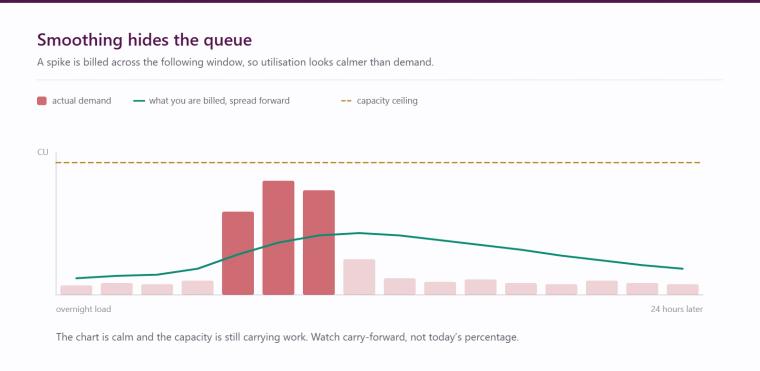
This is why a single utilisation percentage is a poor health check. What matters is the trend across a full business cycle, month-end included, and whether smoothed work is accumulating faster than it drains.
Throttling, and the warning you get before it
When smoothed demand exceeds what the capacity can absorb, Fabric throttles. It happens in defined stages, based on how much future capacity the work has already consumed.
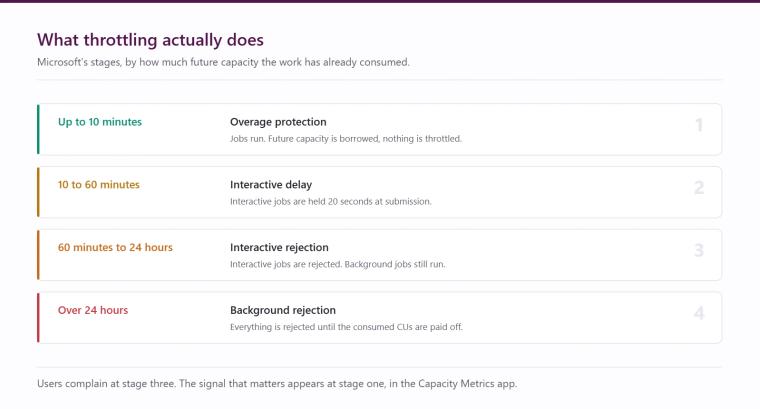
- Up to 10 minutes of future capacity consumed. Overage protection. Jobs run normally and nothing is throttled.
- 10 to 60 minutes. Interactive delay. Interactive jobs are held for 20 seconds at submission.
- 60 minutes to 24 hours. Interactive rejection. Interactive jobs are rejected, though background operations can still start and run.
- Over 24 hours. Background rejection. All requests are rejected until the consumed CUs are paid off.
The practical point is that throttling is a lagging indicator. By the time users are complaining that reports will not load, the capacity has been over-committed for some time. The leading indicator is the carry-forward of smoothed work, visible in the Fabric Capacity Metrics app. If you only look when somebody complains, you are looking too late.
Overage, and why pausing a capacity can cost you
Capacity overage is now generally available, and it is the mechanism most likely to produce the invoice line nobody expected. When demand exceeds what you have provisioned, the excess can be billed on a separate meter at around three times the pay-as-you-go rate, with no reservation discount applied.
The trap sits with pausing and scaling down. Because of smoothing, a capacity carries unbilled work forward. Pause it, or scale it down sharply, and that carried work has to settle immediately and be added to your Azure bill, instead of being spread over the following hours. Teams that pause capacities overnight or at weekends to save money sometimes find they have done the opposite.
The rule we apply is simple. Before pausing or scaling down, let the smoothed work drain: check the metrics app, confirm there is no significant carry-forward, then act. If you scale down on a schedule, set it to follow your heaviest workload by several hours rather than immediately after it.
Reservations versus pay-as-you-go
Fabric capacity can be bought as a reservation, typically a one-year commitment, or consumed pay-as-you-go. Reserved capacity is around 40% cheaper than the pay-as-you-go rate, and that discount sets the crossover.
- Pay-as-you-go only wins if the capacity genuinely runs for a minority of the month. Past roughly 59% sustained usage, the reservation is cheaper and the gap widens.
- The pay-as-you-go case is strong for development and test capacities that are genuinely paused outside working hours.
- It is weak for any production capacity serving reports to a business that works normal hours. A capacity people expect to be available during the day is a reservation, almost without exception.
The new zero-provisioned option
The announcement that changes the entry point is F0, a zero-provisioned capacity SKU with true on-demand billing. Nothing is reserved up front. You get access to Fabric and OneLake and pay for what you consume, measured in CU-hours without smoothing, with spend limits you set over a rolling 24-hour window.
On-demand billing also extends beyond F0: on an F2 or higher, individual billing categories can move to on-demand while the rest stay provisioned. Microsoft had not published the on-demand pricing multiplier at the time of the announcement, so check the economics before building a plan around it, and remember the reserved discount still makes provisioned capacity the cheaper home for steady production load.
Where this genuinely helps is at the two ends of the range. It lowers the cost of starting, so a small organisation or a single department can stand up a real Fabric estate without committing to a monthly floor. And it suits spiky, isolated workloads where provisioning for the peak was always wasteful. Our Fabric licensing calculator and the do you need Fabric guide are the quickest way to get a realistic figure for your own estate.
Workspace tiering: the practical control
The most effective cost control we deploy is not a billing setting. It is deciding which workloads are allowed to share a capacity.
- Mission-critical. Finance, operations, anything with an executive audience or a regulatory deadline. Reserved capacity, monitored with alerting, and never the place somebody tests a new Spark notebook.
- Operational. Departmental reporting and day-to-day analytics work. Can share capacity, but needs headroom reserved for month-end, and is the first place to look when utilisation climbs.
- Sandbox. Experiments, proofs of concept and training. Separate capacity, ideally on-demand, with a spend limit set.
The point of the third tier is not to discourage experimentation. It is to make sure an experiment can never throttle the finance pack. Getting this separation right costs a little more in licence terms and saves far more in incidents, and it is the structural fix for the workspace sprawl that quietly degrades Fabric estates over the first year.
What we would do this week
Three actions give you most of the benefit:
- Open the Capacity Metrics app and look at carry-forward across a full month-end, not today's utilisation.
- Check whether any capacity is being paused or scaled down while smoothed work is still outstanding.
- Confirm sandbox work is not sharing capacity with reporting the business depends on.
Hopton monitors Fabric capacity continuously for the clients we look after, through the Analytics Acceleration Programme. If you want a view on whether your capacity is sized and structured correctly, a free audit is the easiest place to start, and we are happy to talk it through.
Jenson Jolly
Analytics Consultant
Part of the Hopton Analytics team, delivering governed analytics programmes for UK mid-market organisations.