
Direct Lake lets a Power BI semantic model read Delta tables in OneLake directly, with Import-like speed and no scheduled data refresh. How it works, the difference between Direct Lake on OneLake and on SQL endpoints, the guardrails by capacity size, and when Import is still better.
For most of Power BI's life you had two choices. Import copies the data into the model: fast to query, but you schedule refreshes and wait for them. DirectQuery leaves the data in the source: always current, but every click becomes a query and reports can crawl.
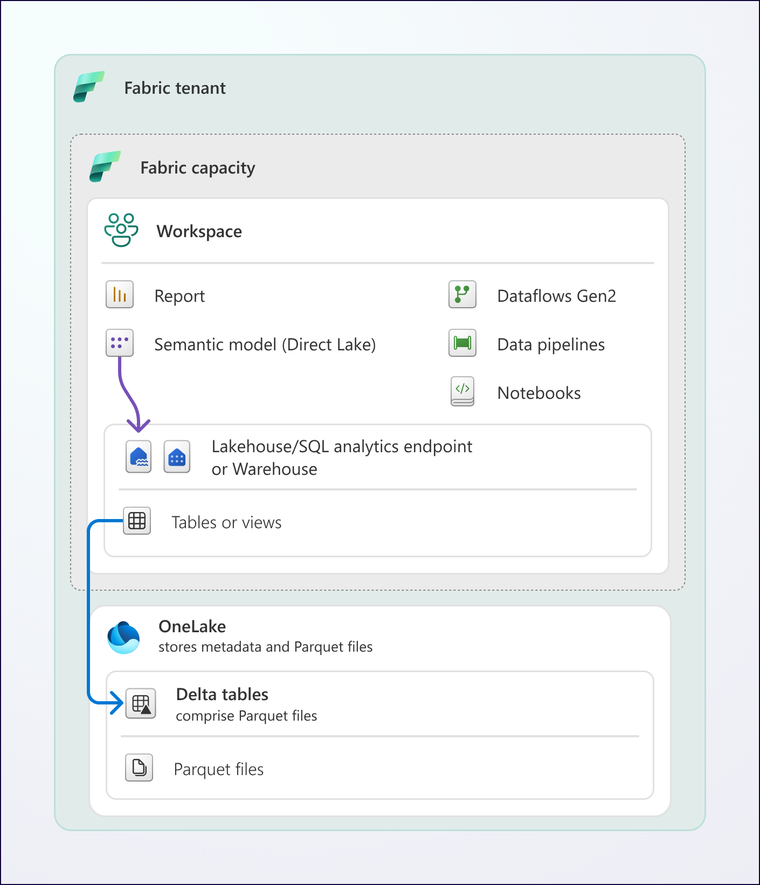
Direct Lake is a third option that only exists in Microsoft Fabric. The model reads Delta tables in OneLake straight into memory when they're needed, using the same VertiPaq engine as Import. You get Import-like speed without copying the data on a schedule.
How does Direct Lake work?
When data lands in a lakehouse or warehouse, it's stored in OneLake as Delta tables. A Direct Lake semantic model points at those tables. Instead of a full data refresh, it does what Microsoft calls framing: a metadata-only refresh that tells the model which version of each table to use. Framing takes seconds, not the minutes or hours an Import refresh can take.
When someone opens a report, the columns they need are loaded from OneLake into memory and stay there while they're used. Columns nobody touches are never loaded.
Direct Lake on OneLake or Direct Lake on SQL?
There are now two flavours, and the choice matters.
- Direct Lake on OneLake can use tables from one or more Fabric items, natively or through shortcuts, and can be combined with Import tables in a composite model. It never falls back to DirectQuery. It doesn't read SQL views, and security defined on the SQL analytics endpoint doesn't apply, so you secure the model or OneLake itself.
- Direct Lake on SQL endpoints uses a single Fabric item through its SQL analytics endpoint. It can read views and respects SQL row-level, column-level and object-level security. When it can't serve a query in Direct Lake mode, for example a non-materialised view, it falls back to DirectQuery, which is slower. You can turn fallback off, in which case those queries fail instead.
For most new models built on a well-designed gold layer, Direct Lake on OneLake is the cleaner choice. If you depend on SQL views or SQL-level security, use Direct Lake on SQL and keep an eye on fallback.
What are the Direct Lake limits?
Direct Lake has guardrails that depend on your capacity size. These are the ones that catch people out:
- F2 to F8: up to 300 million rows per table, a 10 GB model on disk and about 3 GB of memory.
- F16 and F32: the same row limit, with 20 GB and 40 GB models and 5 GB and 10 GB of memory.
- F64 and above: 1,500 million rows per table at F64, rising with the SKU, with no model size limit and 25 GB of memory at F64.
- Files and row groups: up to 1,000 Parquet files and row groups per table below F64, and 5,000 at F64. Too many small files is the most common cause of trouble.
When a table goes over a guardrail, Direct Lake on OneLake fails to refresh until the table is optimised, and Direct Lake on SQL falls back to DirectQuery. Regular table maintenance (optimise and vacuum) in your pipelines prevents most of this. Our guide to sizing Fabric capacity helps you pick the right SKU.
Other things to know
- Direct Lake needs a Fabric capacity. Power BI Premium P SKUs are being retired; see moving from Premium to Fabric capacity.
- It refreshes through cloud connections only, so on-premises gateway sources must land in OneLake first.
- Calculated columns behave differently, and some data types aren't supported. Do the transformation work in the gold layer, not in the model.
- Direct Lake models can't be created in My Workspace.
When should you use Direct Lake?
Use Direct Lake when the data already lives in a Fabric lakehouse or warehouse, the volumes make Import refreshes slow, or people need figures shortly after the data lands. It suits a medallion architecture where the gold layer is designed for reporting.
Stick with Import for small models from sources outside Fabric, or where you need Power Query transformations in the model. Mixed models with some Import and some Direct Lake tables are supported, so it isn't all or nothing. Microsoft's own advice is to prototype first, and we agree.
If you want help deciding whether Direct Lake suits your reports, or a review of a model that keeps falling back, get in touch or see our Power BI and Microsoft Fabric work.
Sources: Microsoft Learn, Direct Lake overview, updated November 2026.
Related reading
- How should you lay out a medallion architecture in Microsoft Fabric?
- Lakehouse, SQL endpoint or Fabric warehouse: which to use and when
- Power BI Premium to Fabric capacity: the move and the bill
- How to prepare a Power BI semantic model for Copilot
Maisie Hudson
Analytics Consultant
Part of the Hopton Analytics team, delivering governed analytics programmes for UK mid-market organisations.