
Bronze, silver and gold are the easy part. Where those layers physically live decides security, deployment and running effort. Seven medallion layouts in Microsoft Fabric, and how to choose between them.
The layers are the easy part
Bronze, silver and gold are well understood by now. Raw data lands in bronze. It is cleaned and conformed in silver. It is shaped for reporting in gold. If that is new to you, our guide to what each medallion layer is for is the place to start.
The harder decision is physical. Where do those three layers actually live in Microsoft Fabric? One lakehouse or several? Folders, schemas or separate items? A lakehouse or a warehouse for gold? One set of layers for the whole business, or one per department?
Those choices decide how security works, how changes are deployed, and how much effort the platform takes to run. They are also much harder to change later than the code that sits inside them. So it is worth choosing on purpose.
There are seven layouts in common use. They run from a single lakehouse at one end to fully separate layers for every department at the other.
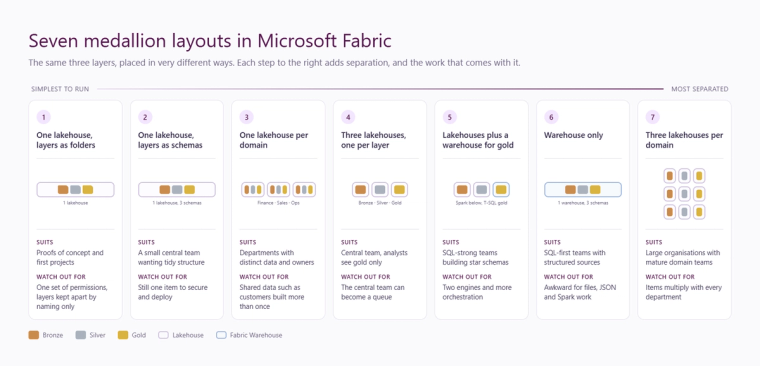
Seven medallion layouts in Microsoft Fabric
1. One lakehouse, layers as folders
Everything lives in a single lakehouse. Bronze, silver and gold are separated by folder and by a naming convention on the tables.
Suits: a proof of concept, a first project, or a small team working from one or two sources.
Watch out for: everyone with access to the lakehouse can see everything in it, raw bronze included. The naming convention is the only thing keeping the layers apart, and conventions drift as more people touch the platform.
2. One lakehouse, layers as schemas
Still a single lakehouse, but bronze, silver and gold are separate schemas inside it. Lakehouse schemas are now generally available in Fabric, so this is a tidy, supported way to organise tables without adding more items.
Suits: a small central team that wants clear structure with very little overhead. For a mid-sized business running one ERP, a CRM and a handful of spreadsheets, this is often the right place to start.
Watch out for: it is still one item. It sits in one workspace, it is deployed as one unit, and it shares one set of workspace permissions. OneLake security can narrow access within the lakehouse, but that is finer work to maintain than a clean boundary between items.
3. One lakehouse per domain
Each business area gets its own lakehouse, with the medallion layers inside it. Finance has one, sales has one, operations has one.
Suits: businesses where departments have distinct data, distinct owners and different rules about who can see what.
Watch out for: the data every department needs. Customers, products, the calendar and the organisation structure get built more than once unless someone owns them centrally. Reports that cross departments need data from several lakehouses. We cover how to handle that in our follow-up on domains and shortcuts.
4. Three lakehouses, one per layer
The layout most Fabric guidance draws. A bronze lakehouse, a silver lakehouse and a gold lakehouse, usually with source-specific schemas in the lower layers and business-friendly schemas in gold.
Suits: a central engineering team running standard, repeatable pipelines. Because each layer is its own item, permissions can follow the layers. Engineers work across all three. Analysts and report builders only ever see gold.
Watch out for: every change goes through the central team. As demand grows, that team can become a queue.
5. Lakehouses for bronze and silver, a warehouse for gold
Spark notebooks do the heavy lifting in lakehouses for bronze and silver. The gold layer is a Fabric Warehouse, where the star schema is built and maintained in T-SQL.
Suits: teams with strong SQL skills who want dimensional modelling in a familiar language, multi-table transactions, and a gold layer that SQL users and downstream tools can query like a traditional warehouse. Our comparison of the lakehouse SQL analytics endpoint and Fabric Warehouse goes into when that matters.
Watch out for: two engines means two skill sets to support, and one more hand-off to orchestrate and monitor.
6. Warehouse only
All three layers live in a Fabric Warehouse, separated by schema.
Suits: SQL-first teams whose sources are structured, such as ERP and CRM databases, with no files or semi-structured data to speak of.
Watch out for: files, JSON, API extracts and anything that Spark handles more naturally. If data science work is on the roadmap, it will usually want a lakehouse anyway.
7. Three lakehouses per domain
Full separation. Every business area owns its own bronze, silver and gold lakehouses and deploys them independently. This is the data mesh model taken all the way.
Suits: large organisations with mature domain teams, each with its own engineers and its own release cycle.
Watch out for: the arithmetic. Seven domains means 21 lakehouses, and the pipelines, deployments, permissions and monitoring that go with each of them. Cross-domain work needs careful orchestration. For a mid-sized business this is rarely the right answer.
Six questions that decide the layout
There is no best layout in the abstract. There is the one that fits how your business owns, protects and uses its data. These six questions settle it.
- Who owns the data? One central team, or departments with their own people who want to manage their own data?
- Who needs to be kept out of what? If HR, payroll or other sensitive data is in scope, it needs a hard boundary such as a separate item or workspace, not a naming convention.
- How much will it grow? Count the sources, departments and data volumes you expect over the next two to three years, not just the first project.
- How will people use it? Power BI semantic models in Direct Lake mode, SQL users querying directly, other tools reading a warehouse? Gold should be shaped for the way it is consumed.
- What does your team actually know? Spark and Python, T-SQL, or both? Choose the engine the people supporting the platform can support.
- How will you deploy and run it? Every extra item is another thing to put under source control, deploy through test and production, and monitor. That cost is real and it grows with every boundary.
What we usually recommend for a mid-sized business
Start with as few boundaries as the data allows, and add separation when there is a real reason for it. A real reason is a named owner, a security requirement, or a part of the platform that needs to change on a different timetable from the rest.
For most mid-market estates, built around an ERP such as Business Central, a CRM and a few other sources, that points to one of two layouts. One lakehouse with schemas works well when a small team builds and uses the platform. Three lakehouses, one per layer, is the better fit when sensitive data is involved or when a wider group of analysts needs gold without seeing anything underneath it. Our Business Central to Fabric medallion blueprint shows the second of those in detail.
Splitting by department comes later, if at all. Whichever layout you choose, keep development, test and production in separate workspaces. That is about safe change, not about layout, and it applies to every option above.
The layout is also one of the cheaper things to get right at the start. Adding a boundary later is usually a contained piece of work. Removing ten that nobody needed means rewriting pipelines, permissions and deployments. If you would like a second opinion on the layout before you build, our data platform team reviews Fabric designs as a matter of course, and you can get in touch to talk it through.
Related reading
Bronze, Silver, Gold: What Each Layer of a Medallion Architecture Is Actually For
Medallion architecture in practice: building a production-ready Lakehouse without the sprawl
From Business Central to Fabric: the medallion architecture blueprint
Lakehouse SQL analytics endpoint or Fabric Warehouse: which to use and when
Kiran Sahiba
Analytics Solutions Consultant
Part of the Hopton Analytics team, delivering governed analytics programmes for UK mid-market organisations.