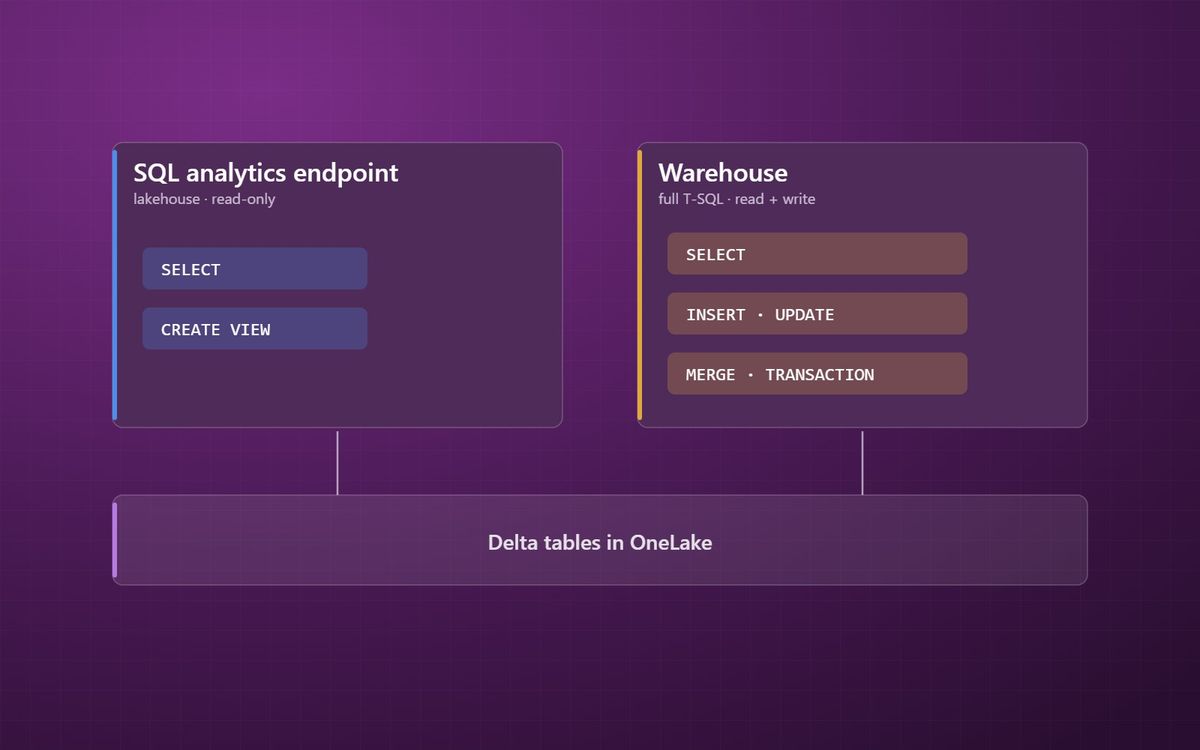
Fabric gives you two ways to work with data in SQL. One reads tables that Spark has written, the other lets SQL do the writing. Choosing between them is mostly about who builds the data and in what language.
Microsoft Fabric gives you two ways to work with your data in SQL, and the names do not make the difference obvious. Every lakehouse comes with a SQL analytics endpoint. Separately, you can create a Fabric Warehouse. Both use T-SQL, both store data as Delta tables in OneLake, and Power BI can read both.
This is the last post in our Fabric building blocks series, after notebooks, Dataflows Gen2 and pipelines. For the broader architecture question of lake versus warehouse, see data warehouse, data lake or lakehouse. This post is about the practical choice inside Fabric.
The lakehouse SQL analytics endpoint
When you create a lakehouse, Fabric creates a SQL analytics endpoint alongside it automatically. It lets anyone who knows SQL query the lakehouse's tables with T-SQL, and it is what many reporting tools connect to.
The key point is that it is read-only for data. You can create views, functions and security rules, but you cannot insert, update or delete rows in the tables through it. The tables are written by Spark notebooks, Dataflows Gen2, pipelines or mirroring. The endpoint is a SQL window onto data built by something else.
The Fabric Warehouse
A Fabric Warehouse is a full SQL data warehouse. You can create tables, load them, and run inserts, updates, deletes and merges in T-SQL, with stored procedures and transactions that span several tables.
It suits teams whose skills and existing code are in SQL, and workloads that were built on SQL Server, Azure SQL or Synapse dedicated pools. Much of that logic can move across with changes rather than being rewritten in Spark, which matters in a move from Synapse to Fabric.
How to choose
The choice is mostly about who builds the data and in what language.
- If your engineers work in Spark and Python, build in a lakehouse and use the SQL analytics endpoint for querying.
- If your engineers work in T-SQL, or you are moving existing SQL warehouse code, build in a Warehouse.
- If you need multi-table transactions, where several tables must update together or not at all, use a Warehouse.
- If you are mixing structured tables with files, images or semi-structured data, a lakehouse is the natural home.
Many estates use both. A common pattern is a lakehouse for Bronze and Silver, where Spark handles raw files and heavy cleaning, and a Warehouse for Gold, where SQL developers build the star schema. Because both store Delta in OneLake, a Warehouse can query lakehouse tables directly with cross-database queries, without copying anything.
One thing to plan for
The SQL analytics endpoint syncs its view of the lakehouse metadata automatically, but there can be a short delay between Spark writing a table and the endpoint seeing the change. For most reporting this does not matter. For processes that write and immediately read, it is worth knowing about and testing.
Where the series leaves you
Five posts in, you have the core Fabric building blocks: one lake, shortcuts and mirroring to bring data in, Delta tables underneath, a clear rule for which tool transforms what, and two SQL options for working with the results. The next step is how data should be loaded, which our loading patterns series covers.
If you are deciding how to lay out your own Fabric estate, our Microsoft Fabric team can help, and our guide to whether you need Fabric at all is a good place to start.
Build in the language your team knows, and let OneLake do the sharing.
Simon Devine
Founder, Hopton Analytics
Part of the Hopton Analytics team, delivering governed analytics programmes for UK mid-market organisations.