
SQL database in Microsoft Fabric is a transactional database built on the Azure SQL engine that replicates itself into OneLake automatically. What it is for, how it differs from Azure SQL Database, how it is billed, and where it fits in a mid-market data platform.
For years the rule was simple: applications write to a transactional database, and analytics copies the data somewhere else to report on it. That copy needs a pipeline, a schedule and someone to fix it when it breaks.
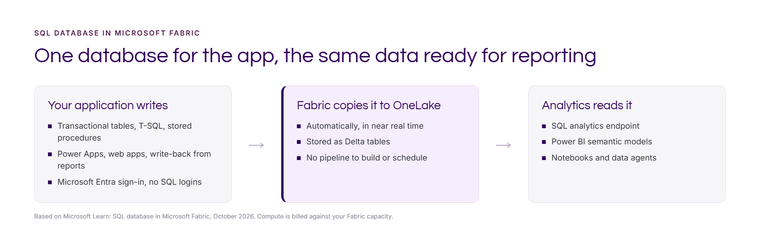
SQL database in Microsoft Fabric changes the shape of that. It's a transactional database that lives inside Fabric and copies its own data into OneLake automatically, in near real time. The application writes. The reporting reads. Nobody builds the bit in the middle.
What is SQL database in Microsoft Fabric?
It is an operational, transactional database built on the same SQL Database Engine as Azure SQL Database. You use T-SQL, stored procedures and the usual tools, including SQL Server Management Studio, Visual Studio Code and SqlPackage. It sits in a Fabric workspace alongside your lakehouses, warehouses and reports.
When you create one, Fabric also creates a SQL analytics endpoint, and the data is replicated into OneLake as Delta tables. From there, Power BI, notebooks and data agents can use it like any other Fabric data.
What is it for?
Microsoft lists several uses. These are the ones we see most often in mid-market businesses:
- Write-back from reports. Budgets, forecasts, comments and targets entered by users, stored properly rather than in a spreadsheet on SharePoint. Our planning and write-back page covers the wider options.
- Power Apps and small business applications. Approvals, logs, trackers and registers that need a proper database underneath, and need to appear in reporting straight away.
- An operational data store. Cleaned, joined data that other systems read from, which some call reverse ETL.
- AI applications. It supports vector data types, so it can store embeddings for retrieval alongside the business data they relate to.
How is SQL database in Fabric billed?
It runs on your Fabric capacity. There's no separate database price; its compute appears in the Fabric Capacity Metrics app with everything else. That's simple for small, intermittent workloads. For a busy application running all day, it means the database competes with your reporting for the same capacity, so size accordingly. Our Fabric capacity sizing guide explains how.
How is it different from Azure SQL Database?
Same engine, different home. The main differences:
- Authentication is Microsoft Entra only. No SQL logins. Good for security, but older applications that rely on SQL authentication need changes.
- No elastic pools. Fabric capacities and workspaces provide the isolation instead.
- Automatic replication to OneLake. With Azure SQL Database you can get similar results with mirroring into Fabric, but you set it up separately.
- Source control built in. SQL database supports Fabric Git integration and deployment pipelines, so database changes can follow the same path as the rest of your Fabric items. See CI/CD in Microsoft Fabric.
When is Azure SQL still the better choice?
- An existing application with SQL authentication, linked servers or features it depends on.
- A large, busy transactional workload where you want to scale and pay for the database on its own.
- A database that must run whether or not the Fabric capacity is paused or resized.
In those cases keep Azure SQL Database and mirror it into Fabric for reporting. Our Azure data engineering guide covers the Azure side.
How to start
Pick one small workload that currently lives in a spreadsheet or Microsoft List and feeds a report: targets, a budget, a register. Build it in SQL database in Fabric with a simple Power App or write-back visual in front. You'll see the pattern working end to end within a couple of weeks.
If you'd like help choosing between SQL database in Fabric, Azure SQL and mirroring, get in touch or see our data platform work.
Sources: Microsoft Learn, SQL database in Microsoft Fabric overview, updated October 2026.
Related reading
- Mirroring in Microsoft Fabric: replicating a database without building a pipeline
- Lakehouse, SQL endpoint or Fabric warehouse: which to use and when
- CI/CD in Microsoft Fabric: Git integration and deployment pipelines
- How do you get on-premises SQL Server data into Microsoft Fabric?
Kiran Sahiba
Analytics Solutions Consultant
Part of the Hopton Analytics team, delivering governed analytics programmes for UK mid-market organisations.