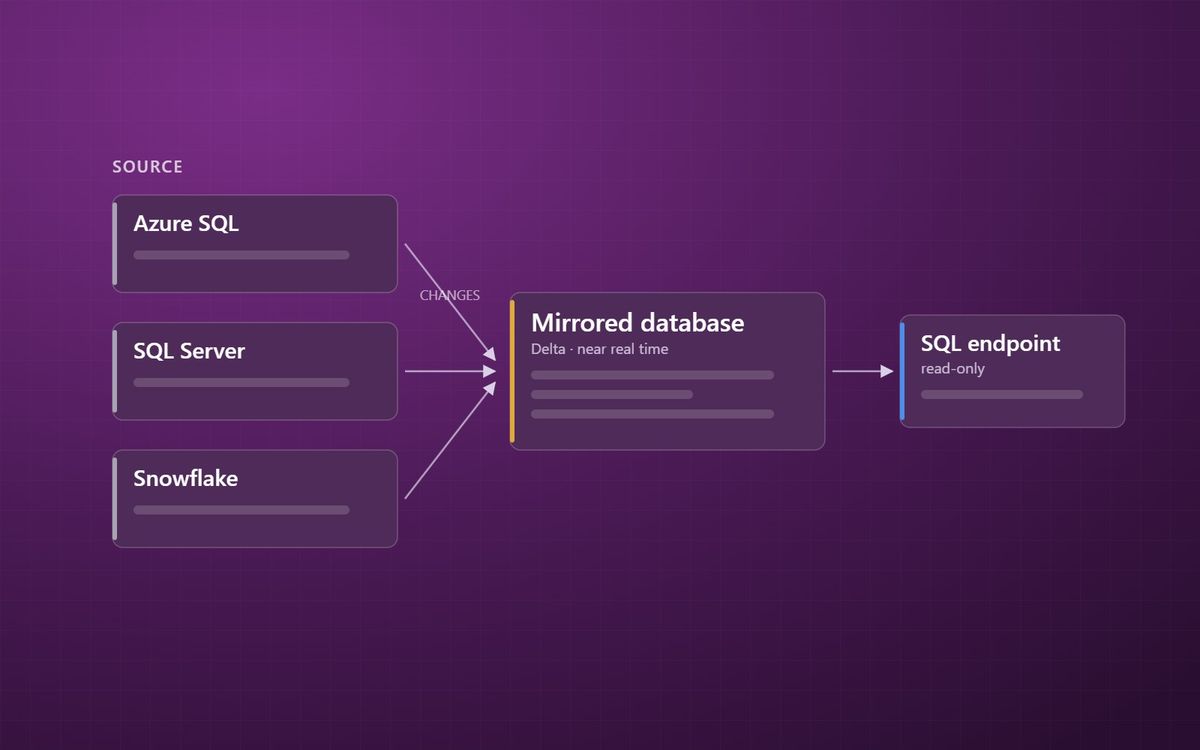
Mirroring keeps a near real-time copy of an operational database in OneLake, with no pipeline to build or schedule. It is one of the most useful parts of Fabric, and it is easy to misunderstand what it replaces.
The previous post covered OneLake and shortcuts, which bring files into Fabric without copying them. Operational databases need something different. They are not files, they change constantly, and nobody wants reporting queries running against the live system. That is what mirroring is for.
What mirroring does
Mirroring keeps a continuously updated copy of a source database inside OneLake. You point Fabric at the source, choose the tables, and Fabric takes an initial snapshot and then replicates changes as they happen, typically within seconds to minutes.
The copy lands as Delta tables, the open format we explain in Delta and Parquet in plain English. Fabric creates a SQL analytics endpoint over it automatically, so it can be queried with T-SQL straight away, and Power BI can read it in Direct Lake mode.
There is no pipeline to design, no schedule to maintain and no change-tracking logic to write.
Which sources can be mirrored
The list keeps growing. At the time of writing, generally available sources include Azure SQL Database, Azure SQL Managed Instance, SQL Server, Azure Database for PostgreSQL, Azure Cosmos DB, Snowflake, Oracle, Google BigQuery and SAP, with others such as Azure Database for MySQL and SharePoint lists in preview. Azure Databricks catalogues can be mirrored at metadata level, which works more like a shortcut.
There is also open mirroring. It lets a software vendor or your own developers write change data into Fabric through a published specification, and Fabric turns it into Delta tables. It is how partners add sources Microsoft does not cover natively.
What it costs
Mirroring has an unusual cost model. The compute Fabric uses to replicate changes does not consume capacity units. Storage for mirrored tables is free up to one terabyte for each capacity unit you have, so an F64 capacity includes 64 TB of free mirroring storage.
You pay for the queries: Power BI, SQL and Spark workloads that read the mirrored data use capacity in the normal way. And replication needs a running capacity, so pausing it pauses mirroring too. Our post on sizing Fabric capacity covers how to plan for that.
What mirroring does not replace
Mirroring gives you a faithful, current copy of the source. It does not give you a reporting model. The tables still have the source system's shape, which is usually the wrong shape for reporting. The cleaning, conforming and modelling still need to happen downstream.
Think of a mirrored database as a very good Bronze layer that builds itself. Two points to plan for:
- Mirroring reflects the source as it is now. If you need an untouched history of how records looked over time, keep it separately, as we describe in why we never let anyone touch the Bronze layer.
- Each source type has its own limitations on supported data types, table counts and configuration. Check them before promising anyone a date.
When to use it
Mirroring is usually the right first choice when a supported database is the source and people want data that is minutes old rather than a day old. Where a source is not supported, or you need heavy reshaping on the way in, the other Fabric tools covered in notebooks, Dataflows Gen2 or pipelines take over.
For ERP sources such as Business Central, the extraction options are different again, and our Business Central analytics page covers those. For everything else, our Microsoft Fabric team can tell you quickly whether mirroring fits.
The best pipeline is often the one you did not have to build.
Simon Devine
Founder, Hopton Analytics
Part of the Hopton Analytics team, delivering governed analytics programmes for UK mid-market organisations.