Most mid-market estates still have a SQL Server in a cupboard or a data centre. Here are the three ways to get its data into Fabric, and how to choose.
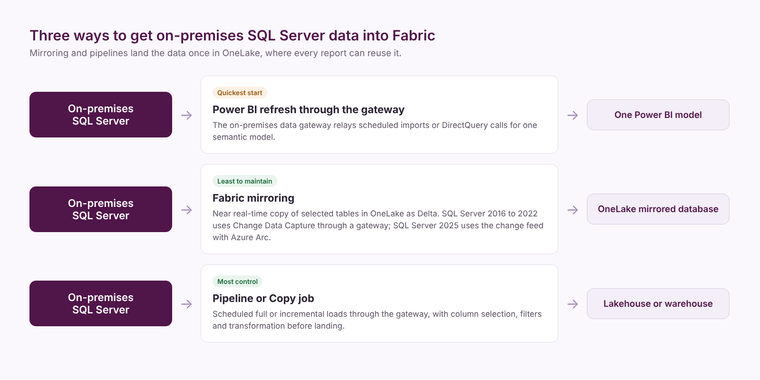
You get on-premises SQL Server data into Microsoft Fabric in one of three ways: Power BI reads it directly through an on-premises data gateway, Fabric mirroring replicates the tables into OneLake continuously, or a Fabric pipeline or Copy job lands the data on a schedule. The gateway is the quickest start, mirroring is the least work to keep running, and a pipeline gives you the most control over what lands and when.
Route one: Power BI through the gateway
The on-premises data gateway is a small service installed on a machine that can see your SQL Server. Power BI semantic models use it to import data on a schedule or query it live with DirectQuery. It is how most businesses first get SQL Server data into Power BI, and for a single model over a few well-indexed tables it is enough.
It stops being enough when several reports each pull the same tables, when refreshes start to lock tables the line-of-business application needs, or when you want to combine SQL Server data with cloud systems in one model. At that point the data needs to land in one place, once.
Route two: Fabric mirroring
Fabric mirroring keeps a near real-time copy of selected SQL Server tables in OneLake, as Delta tables, without you building a pipeline. Microsoft's documentation covers SQL Server 2016 to 2022, which mirror using Change Data Capture through an on-premises or virtual network data gateway, and SQL Server 2025, which uses the newer change feed and needs the instance connected to Azure Arc.
Two points matter commercially. Microsoft states that the Fabric compute used to replicate data into OneLake is free, and that mirrored storage is free up to a limit based on your capacity size; querying the mirrored data from SQL, Power BI or Spark is charged against the capacity as normal. And because mirroring copies tables as they are, you still need a silver and gold layer to turn application tables into reporting tables.
Mirroring suits operational databases where you want everything current and the source schema is reasonably stable. Check that CDC is acceptable to whoever supports the application before you switch it on.
Route three: a pipeline or Copy job
A Fabric pipeline, or the simpler Copy job, extracts tables or query results through the gateway and lands them in a lakehouse or warehouse on a schedule, either in full or incrementally using a watermark column. It is the right choice when you only want some columns, when you need to filter or join before landing, when the source cannot have CDC enabled, or when a nightly load is all the business needs.
Or move the database itself
If the SQL Server is due for replacement anyway, moving it to Azure SQL Managed Instance or Azure SQL Database removes the gateway altogether and opens up the Azure SQL mirroring options. That is an infrastructure decision with its own business case; it is worth asking before you invest in plumbing around a server that is about to be retired. Our data platform page sets out how we approach that choice.
How to choose
- One model, a few tables, no other sources: gateway refresh.
- Operational reporting that needs current data, stable schema, CDC allowed: mirroring.
- Selective, scheduled or transformed loads, or CDC not allowed: pipeline or Copy job.
Whichever route lands the data, the reporting quality comes from what you build next: a model with agreed definitions, tested against the source. If you want a second view of your options, our free audit starts there.
Related reading
Microsoft Fabric vs Azure Synapse: what UK mid-market teams need to know
The data engineering layer that decides everything
James Morley
Analytics Solutions Consultant
Part of the Hopton Analytics team, delivering governed analytics programmes for UK mid-market organisations.