
CI/CD in Microsoft Fabric means changes are versioned in Git and promoted from development to test to production rather than edited live. How Git integration, deployment pipelines, variable libraries and fabric-cicd fit together, and a setup that works for a small team.
In most mid-market Fabric and Power BI estates, changes are made directly in production. Someone edits a semantic model on a Friday afternoon, a measure breaks, and on Monday the finance pack shows the wrong number with no record of what changed or how to put it back.
CI/CD, short for continuous integration and continuous delivery, is the fix. Every change is saved in source control, tested somewhere safe and then promoted to production deliberately. It used to need a dedicated DevOps engineer. In Fabric, most of it is built in.
What does CI/CD look like in Microsoft Fabric?
Microsoft's CI/CD platform for Fabric is built on the Fabric REST APIs, with several tools layered on top. You don't need all of them.
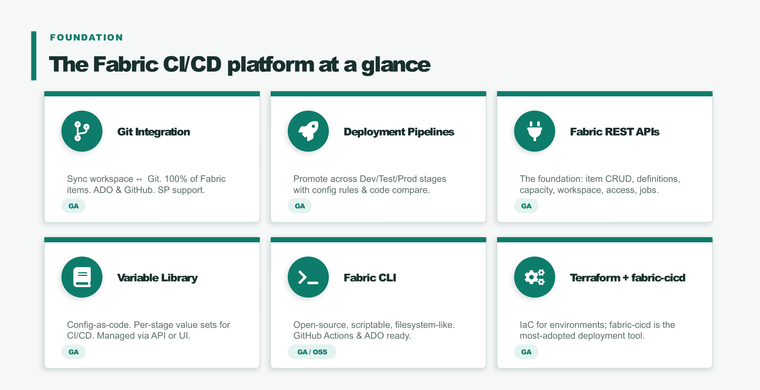
- Git integration. Connects a workspace to a branch in Azure DevOps, GitHub or GitHub Enterprise (cloud versions). Items such as notebooks, pipelines, lakehouses, warehouses, SQL databases, dataflows, Real-Time Intelligence items and semantic models and reports are saved as files in the repository.
- Deployment pipelines. Promote content from one workspace to the next, by default Development, Test and Production, with between two and ten stages. Items are paired across stages so a deployment updates the right item rather than creating a copy.
- Variable library. Define values once, such as a lakehouse ID or a connection, and set a different value for each stage. This replaces the find-and-replace that used to break deployments.
- Fabric CLI and Terraform. For scripting and for building the workspaces and capacities themselves as code.
- fabric-cicd. An open source Python library for deploying items from a repository. Microsoft calls it the most widely adopted deployment tool for Fabric CI/CD.
Is Git integration supported for every Fabric item?
Not yet. Most data engineering, data factory, warehouse, database and Real-Time Intelligence items are supported. Semantic models, reports and paginated reports are supported in preview. Unsupported items in a connected workspace are simply ignored by Git, not deleted. Check Microsoft's list before relying on it for a particular item type.
One date worth knowing: since 12 February 2026, deployment pipelines no longer support semantic models that haven't been upgraded to enhanced metadata. Older models need upgrading before they can be promoted.
A setup that suits a small team
Large enterprises run elaborate branching strategies with automated tests and approvals. A team of two or three analysts doesn't need that. This is the setup we usually recommend:
- Three workspaces per domain: development, test and production, each on the right capacity. Development can sit on a smaller capacity that pauses out of hours.
- Development connected to Git. Everyone works in a feature branch or their own development workspace, and changes are merged into the main branch through a pull request that someone else reviews.
- A deployment pipeline from development to test to production. Test is where finance or operations checks the numbers before anything reaches the board pack.
- Variable libraries for anything that differs by stage, so nobody edits connection details by hand during a release.
- A short release note on every deployment: what changed, who approved it, and how to roll back.
Once that's working and the team grows, add automated checks with fabric-cicd in Azure DevOps or GitHub Actions. Our post on the pipeline ran is not the same as the data is right covers the testing and observability side.
Why it matters more now
Copilot in Fabric and AI coding tools mean more changes are made, faster, by more people. That's good for speed. Without source control and a review step, it also means more unreviewed changes reaching production. CI/CD is how you keep the speed and keep the numbers right. Microsoft's own sessions at Ignite 2026 put governing Fabric at scale alongside the AI features for that reason.
It's also what stops workspace sprawl taking hold as more teams build in Fabric.
If you want help setting up CI/CD for your Fabric estate, or tidying one that's grown without it, get in touch or see our Microsoft Fabric work.
Sources: Microsoft Learn, CI/CD in Microsoft Fabric, Introduction to deployment pipelines and Git integration, updated September to November 2026.
Related reading
- The Fabric rollout that quietly goes wrong: workspace sprawl and shadow BI
- Microsoft Fabric governance in 2026
- The pipeline ran is not the same as the data is right
- SQL database in Microsoft Fabric: what it is and when to use it
James Morley
Analytics Solutions Consultant
Part of the Hopton Analytics team, delivering governed analytics programmes for UK mid-market organisations.