
Splitting a Fabric platform by department gives clear ownership, but shared data such as customers gets built three times. How Fabric domains and OneLake shortcuts give each team its own data while keeping one copy of what everyone shares.
Splitting by department sounds tidy. It has a cost.
In our look at seven ways to lay out a medallion architecture in Fabric, three of the seven split the platform by business area. The appeal is clear. Finance owns finance data, sales owns sales data, and nobody waits on a central team to make a change.
The cost is the data that everyone needs. Customers, products, the calendar, the cost centre structure. If each department builds its own copy, you end up with three versions of the customer list and a meeting about which one is right. That is the problem a data platform was supposed to solve in the first place.
So the real question is not whether to split. It is how to give each department what it owns while keeping one copy of what everyone shares. Microsoft Fabric has two features that do most of the work: domains and OneLake shortcuts.
Domain, workspace, lakehouse: three different things
These words get used loosely, and the confusion leads to poor designs. They mean different things in Fabric.
- A domain is a governance grouping. It gathers workspaces under a business area such as Finance or Operations, with its own domain admins, some settings that can be managed at that level, and a way for people to filter the OneLake catalog. Domains can have subdomains. A domain holds no data itself.
- A workspace is the working boundary. It is where roles are assigned, where Git integration is connected, and which capacity the work runs on.
- A lakehouse or warehouse is where the data actually sits.
That distinction matters, because you can use Fabric domains without splitting your data at all. Grouping workspaces by business area helps people find what they need in the catalog and gives each area a clear owner. It costs nothing, and it is worth doing from day one. Our guide to Fabric governance in 2026 covers the catalog and the other controls that sit alongside it.
Sharing data without copying it
A OneLake shortcut is a pointer. It makes a table or folder that lives somewhere else appear inside your lakehouse, as if it were stored there. The somewhere else can be another lakehouse in another workspace, or external storage such as Azure Data Lake Storage or Amazon S3.
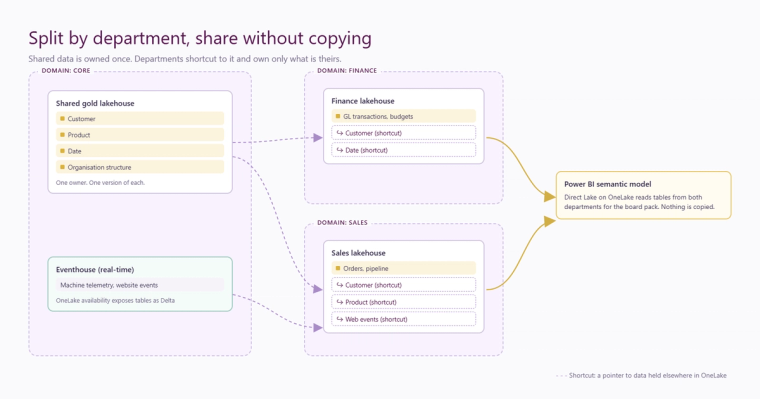
For a split platform, that changes the picture. The finance lakehouse can hold a shortcut to the customer table in a shared gold layer. Finance reads the same Delta files that everyone else reads. There is no copy, no extra pipeline, and nothing to fall out of date. If you want the detail, our explainer on OneLake and what a shortcut actually is walks through it.
Shortcuts are not a free pass on security. For most access paths, permissions are checked against the source data, so the team that owns a table stays in control of who can read it. The exact behaviour differs between Spark, the SQL analytics endpoint and Power BI, so test it with a real, non-admin user before you rely on it.
Own the shared data once
The pattern that works is simple to describe. A small shared area, owned by one central team, holds the conformed data that every department uses: customer, product, date, organisation structure, and any other reference data that has to mean the same thing everywhere. Departments shortcut into it. They build and own only the data that is genuinely theirs.
This keeps the benefit of departmental ownership without the arguments. It also gives you one obvious place to apply data quality and governance rules to the data that matters most.
Write down who owns each gold table, in the catalog or somewhere just as visible. When a number is questioned, the first thing anyone needs to know is who to ask.
Reports that cross departments
Board packs and management accounts rarely respect department lines. They need sales, finance and operations data side by side.
There are two good ways to handle that. Power BI semantic models using Direct Lake on OneLake can bring in tables from more than one lakehouse or warehouse. Alternatively, a shortcut brings the tables a report needs into one place, and the model reads from there. Either way, the data is not copied. Our article on Direct Lake cold starts and the residency ladder explains how those models behave under load, which is worth understanding before a large cross-department model goes live.
Where real-time data fits
Streaming data, such as machine telemetry, sensor readings or website events, usually does not belong in a bronze, silver and gold flow run by scheduled notebooks. In Fabric it normally arrives through an Eventstream and lands in an Eventhouse, where KQL databases are built to query it within seconds.
It does not have to stay apart from everything else. With OneLake availability switched on, Eventhouse tables are exposed in OneLake in Delta format. A lakehouse can shortcut to them, and they can feed silver and gold like any other source. Transformation can also happen inside the Eventhouse itself, using update policies, when the data needs shaping as it arrives.
Before building any of this, ask whether the business needs the data in seconds or simply by the start of the next day. The second is far more common, and far cheaper. We make that case in you do not need real-time data, you need right-time.
A sensible order for a mid-sized business
- Group workspaces into Fabric domains from the start. It is free and it makes the catalog usable.
- Keep the data itself in one central layout until a real need to split appears: a named owner, a security requirement, or a different pace of change.
- Build shared data such as customers, products and dates once, in one place, with one owner.
- When a department does need its own data, give it its own lakehouse and shortcut the shared data in rather than copying it.
- Record who owns every gold table, and test shortcut permissions with a real user before go-live.
None of this needs a large team. It needs a few decisions made early and written down. If you are planning a Fabric platform and want to get the structure right before the build starts, our data platform team can help, or you can get in touch to talk it through.
Related reading
How should you lay out a medallion architecture in Microsoft Fabric? Seven layouts and how to choose
OneLake explained: one copy of your data, and what a shortcut actually is
You Do Not Need Real-Time Data. You Need Right-Time.
James Morley
Analytics Solutions Consultant
Part of the Hopton Analytics team, delivering governed analytics programmes for UK mid-market organisations.