
Direct Lake is sold as import-speed performance with no import refresh. That is mostly true, and the exception matters. Here is why the first query of the morning can still crawl, and what in your ETL quietly makes it worse.
Direct Lake is usually explained as the best of both worlds: import-mode speed without an import refresh. That description is fair, and it leaves out the part that generates support tickets. The first query of the morning can still be slow. Performance can regress after an ETL change that looked harmless. A model that was fast in testing can be sluggish in production on the same data.
None of this is a flaw. It is a consequence of how Direct Lake works, and it is predictable once you understand two mechanisms, framing and transcoding, and the residency ladder they move columns along.
Framing: cheap, metadata-only, and not the slow part
Framing is what binds a Direct Lake semantic model to a specific version of the underlying Delta tables. When you refresh, the model reads the Delta log and updates its pointer to the latest committed version. It is a metadata operation, no data is copied, and it is fast. That is the whole appeal.
Two things follow that catch people out:
- Because the model is bound to a specific Delta commit version, that version has to survive. If a vacuum operation removes the files the model is framed against, users get query errors rather than slow queries. Vacuuming has to be a scheduled, coordinated step, not something run ad hoc.
- Framing can be incremental. Where only part of a Delta table has changed, Direct Lake keeps the in-memory data that is still valid rather than throwing everything away. This is a significant performance feature, and it is the thing your ETL design can accidentally destroy.
Transcoding: where the cold start latency actually lives
Framing updates the pointer. Transcoding is what happens when a query needs data that is not in memory yet.
On a cold query, Direct Lake converts Parquet column chunks into the VertiPaq format the engine works in. It merges the local Parquet dictionaries of each column chunk into one global dictionary per column, loads chunks into column segments, builds join indexes for relationships, and applies any Delta deletion vectors.
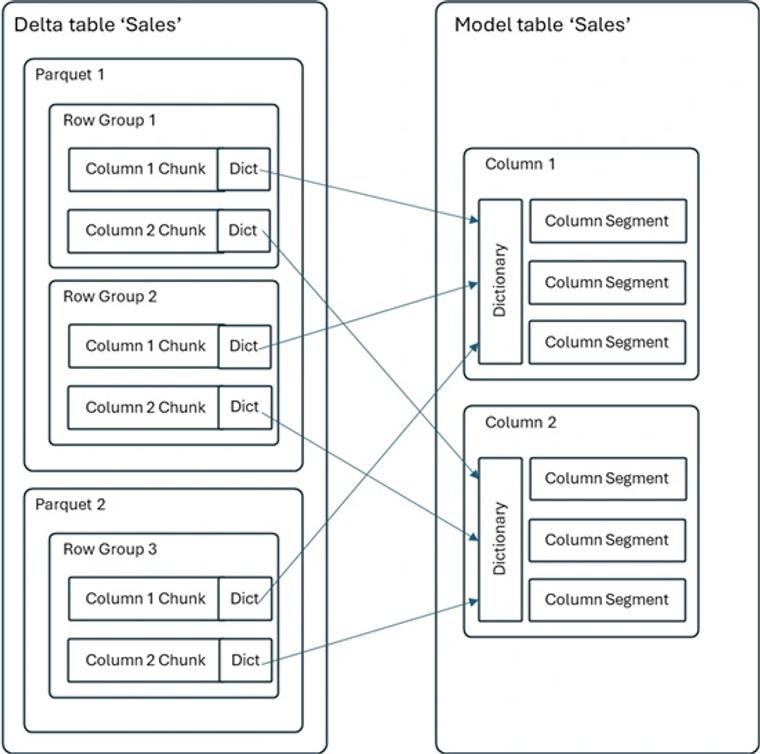
This is on-demand and per column: only the columns the query touches are loaded. Which explains the morning slowness. Nobody has queried the model since the overnight refresh, nothing is resident, and the first user's query pays the transcoding cost for every column it touches, including the key columns needed to build join indexes. The second user, running a similar query, finds the columns already loaded and gets the performance everyone expects. The model was never broken. The first person simply paid for everyone.
The residency ladder
Microsoft names four states, with increasingly better performance from cold to hot.
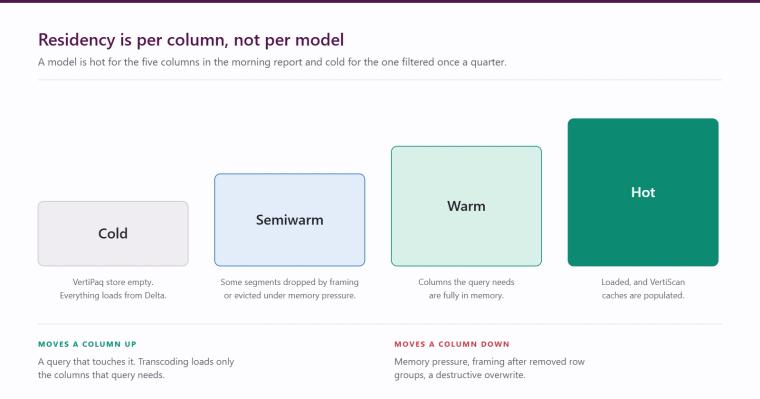
- Cold. The VertiPaq store is empty. Everything a query needs is loaded from the Delta tables. This is the state after a model first loads, after a destructive refresh, or after the model reloads onto a different Fabric cluster node, which can happen without warning under compute or memory demand.
- Semiwarm. Some column data has been dropped but not all. It occurs during framing when row groups have been removed, and under memory pressure when the engine unloads segments and join indexes to make room.
- Warm. The column data a query needs is fully loaded into memory.
- Hot. The data is loaded and the VertiScan caches are populated, so queries hit the caches. This is what users think of as normal Direct Lake performance.
The useful mental model is that a model is not uniformly in one state. Residency is per column. A model can be hot for the five columns in the executive report and stone cold for the column somebody filters on once a quarter.
What quietly breaks residency
This is the part worth bookmarking, because the symptom is always the same complaint: "it was fine last month".
- A destructive load prevents incremental framing. If your pipeline overwrites a table rather than appending or merging into it, every framing operation invalidates the in-memory data, and a model that was warm goes fully cold after each refresh. Switching a table from overwrite to merge is frequently the single highest-impact performance change available on a Direct Lake estate, and it is an ETL change, not a model change.
- Memory pressure causes eviction. Under load the engine unloads column segments to free memory, then reloads them on the next query. Direct Lake performance problems and capacity sizing problems are very often the same problem wearing a different hat.
- File layout matters more than people expect. Many small Parquet files mean more chunks to merge and more dictionaries to reconcile at transcode time.
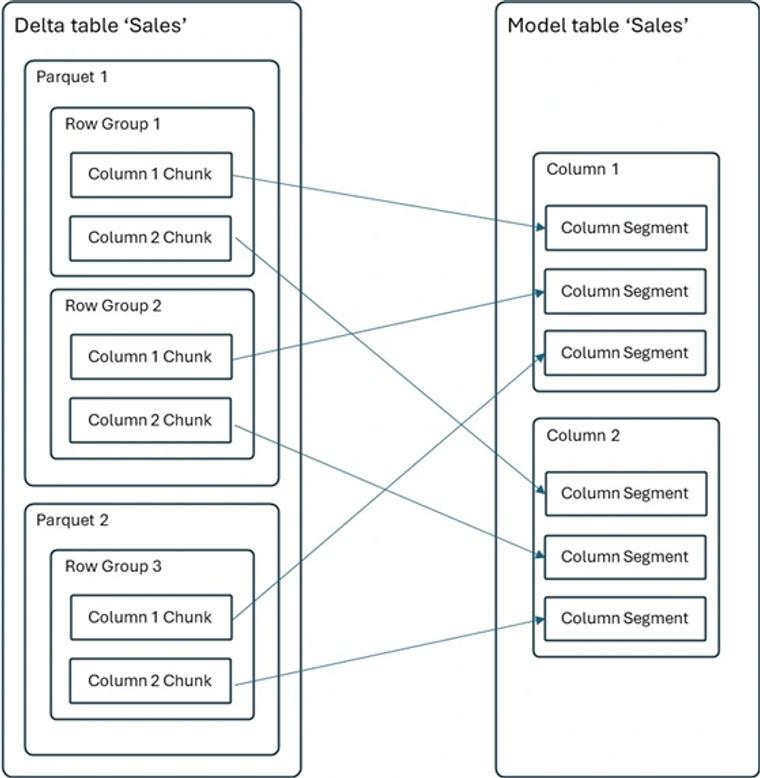
Consolidating files and applying V-Order improves compression quality, and well-compressed V-Ordered data loads faster. The engine can also compute directly over compressed data in some cases, skipping decompression entirely. Without that encoding, VertiPaq has to convert values on the way in, which costs time on exactly the first query you did not want to be slow.
When a model regresses after a pipeline change, work through this order:
- Did the load pattern change from merge to overwrite?
- Did file counts or sizes change materially?
- Was V-Order applied during optimisation?
- Is the capacity under memory pressure at the time of the complaint?
One of those four explains it nearly every time.
Direct Lake on SQL and Direct Lake on OneLake
There is one more distinction worth getting right at design time, because it changes what failure looks like.
Direct Lake on SQL can fall back to DirectQuery against the SQL analytics endpoint when it cannot serve a query from memory. That sounds like a safety net, and it is, but fallback queries are slower and the engine builds hybrid query plans that carry overhead even when fallback is not triggered. Microsoft's own guidance is to disable DirectQuery fallback where possible, precisely to avoid those hybrid plans.
Direct Lake on OneLake never falls back. If the data cannot be served from the Delta tables the query fails rather than silently becoming slow. For a production model a clear failure is usually easier to govern than an unpredictable slowdown, but it does mean the underlying data layout and guardrails have to be right. Choosing between them is an architecture decision, not a toggle.
The practical summary
Direct Lake is fast when the columns people query are resident, loads are incremental, files are consolidated and V-Ordered, and the capacity has memory to spare. It is slow on the first query after a refresh, and unpredictable when any of those four conditions is not met.
If the first report of the morning is slow and that matters to your audience, the answer is usually a small warm-up query scheduled after the refresh, not a redesign. If performance regressed after a pipeline change, look at the load pattern first.
We build and maintain Fabric estates for mid-market organisations across the UK and Ireland as a Microsoft Solutions Partner. If Direct Lake performance is a live issue, our free audit covers model and capacity health, and you can talk to us about the specifics. The Microsoft Fabric page sets out how we approach platform design more broadly.
Related reading
Business Central reporting options explained: Native, Power BI direct, Jet, and Fabric
Pyramid, Power BI or Fabric: Which One, and When
Power BI reports can now write back: what that actually changes
James Morley
Analytics Solutions Consultant
Part of the Hopton Analytics team, delivering governed analytics programmes for UK mid-market organisations.