
OData web services, API v2.0, custom API pages and queries. How Business Central exposes data, how Power BI reads it, and when to extract instead.
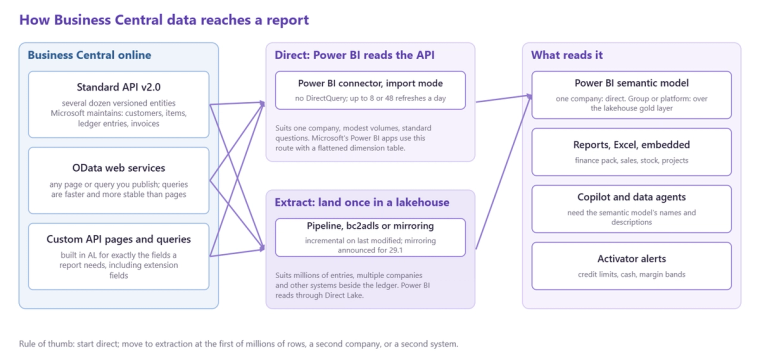
The OData API in Business Central is the way Business Central online exposes its tables to the outside world for reporting and integration: a set of REST endpoints, speaking the OData protocol, through which Power BI, Fabric pipelines and other tools read customers, items, ledger entries, invoices and anything else published as a web service, filtered and paged over HTTPS. There are three flavours. The standard API v2.0 is a fixed set of several dozen entities Microsoft maintains, versioned so they do not break. OData web services are any page or query in Business Central that an administrator publishes, which exposes exactly what that page shows. Custom API pages and queries are built in AL by a developer to expose precisely the fields a report needs, with a version of their own. Power BI's Business Central connector reads the first two, and a Fabric pipeline can read all three. This post explains what each is for, how reporting uses them, and the point at which a reporting estate should stop reading the APIs directly and extract to a lake instead.
Flavour one: the standard API v2.0
Microsoft publishes a versioned REST API with entities such as customers, vendors, items, salesInvoices, purchaseInvoices, generalLedgerEntries, journals, dimensions and companies. It is stable across Business Central releases, documented, and the default choice for integration and for a first Power BI model. Its limitation is coverage: it exposes the common entities, not every table, and not custom fields unless an extension adds them to the API. For a finance report over the ledger and the subledgers it is enough; for warehouse, manufacturing or custom tables it usually is not.
Flavour two: OData web services
Any page or query object in Business Central can be published as a web service from the Web Services page, and it then appears as an OData endpoint that returns the fields the page shows, with $filter, $select, $top and paging. This is the quickest way to expose something the standard API lacks, including custom fields, and it is what most Jet, Excel and early Power BI connections used. The cost is fragility: a page is designed for a user, not a pipeline, it carries calculated fields that are expensive to evaluate for every row, and a change to the page changes the endpoint. Publishing a query object rather than a page is faster and more stable, because a query is set-based and returns only the joined fields it defines.
Flavour three: custom API pages and queries
A developer can build API pages and API queries in AL with their own publisher, group and version, exposing exactly the fields a report needs, including fields from extensions, as a stable contract that survives upgrades. For a reporting estate that depends on custom tables, this is the right answer: the report reads an endpoint designed for it rather than a user page bent to the purpose. It is a small development task, usually a day or two per entity, and it is often done by the Business Central partner rather than the analytics partner.
How Power BI uses them
The Power BI connector for Business Central lists the standard API entities and any published web services per company and reads them in import mode; it does not support DirectQuery. That is fine for a single company and a model of modest size, which is what Microsoft's own Power BI apps for Business Central do, with one important detail: they read a flattened dimension table maintained by a job inside Business Central rather than the raw dimension set entries, because the raw structure does not join well through an API. Microsoft's Power BI apps for Business Central explains that job, and Business Central dimensions in Power BI explains the modelling behind it.
Where direct API reading stops working
Three things push a reporting estate off the APIs and into a lake. Volume: a full refresh of millions of ledger entries through paged HTTP calls is slow and runs into Microsoft's published operational limits on requests. Multiple companies: the API is per company, so a group reads every endpoint once per entity, and consolidation has to happen somewhere. Other systems: nothing in the Business Central API knows about the CRM or the warehouse system. At that point the pattern is an incremental extraction, keyed on the last modified timestamp, into a Fabric lakehouse through a pipeline, bc2adls, or, once Microsoft's announced mirroring reaches public preview, a continuous replica, with Power BI reading the lake through Direct Lake. Getting your Business Central data into Power BI: the options compares those routes.
Practical rules
Prefer the standard API where it has what you need, publish queries rather than pages when it does not, commission custom API pages for anything that depends on extensions, always filter and select on the server rather than pulling whole tables, make every load incremental, and keep the API credentials in a service account with read access only. Our Business Central analytics page describes the extraction and model we build on top, and the free audit will tell you whether your estate should still be reading the APIs directly.
Related reading
Business Central to Power BI: the complete guide to reporting beyond the built-in tools
Business Central to Fabric in zero ETL steps: what the new mirroring preview means
Business Central dimensions in Power BI
James Morley
Analytics Solutions Consultant
Part of the Hopton Analytics team, delivering governed analytics programmes for UK mid-market organisations.