
Microsoft Agent 365 is the control plane for AI agents: one register of every agent, who owns it, what it can reach and what it costs. What it does, which parts come free with Microsoft 365, what the paid licence adds, and when a mid-market business needs it.
A year ago most businesses had no AI agents. Now many have a dozen without quite meaning to: a Copilot Studio agent someone built for HR, a Sales Order Agent in Business Central, a Fabric data agent for the finance team, and a couple of third-party agents bought with other software. Nobody has a full list, and nobody is sure what each one can reach.
Microsoft Agent 365 is Microsoft's answer to that. It's one of the main themes of Microsoft Ignite 2026, and it's worth understanding before your agent count grows.
What is Microsoft Agent 365?
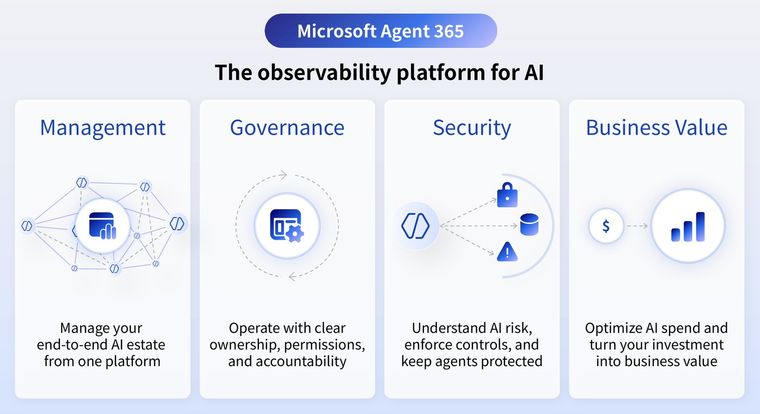
Microsoft describes Agent 365 as the observability platform for AI: a control plane to discover, manage, govern and secure agents, including agents built on other platforms and by third parties. It sits in the Microsoft 365 admin centre and covers four areas: management, governance, security and business value.
What does Agent 365 do?
- An agent registry. A list of Microsoft, partner and in-house agents, with an owner, usage and risk for each. Agents published through Microsoft 365 with a Microsoft Entra Agent ID appear automatically. Agents from other platforms can be brought in too.
- Access control. Microsoft Entra controls what each agent can reach, and admins decide which tools, MCP servers, data and users each agent can use.
- Monitoring and an agent map. Analytics on what agents do and how much they're used, with a visual map of how they connect.
- Cost control. Copilot Credit spend by user, group, agent and service, with spending limits.
- Security and compliance. Microsoft Defender for threats and risk signals, and Microsoft Purview for audit, data loss prevention and retention over agent activity.
What comes free, and what needs a licence?
This is the part most people miss. Some of Agent 365 is included with Microsoft 365 Enterprise, Business, Education and Frontline plans at no extra cost:
- The agent registry inventory
- Basic governance actions
- Lifecycle rules for agents
- Bringing agents from other platforms into the registry
The deeper controls need an Agent 365 licence or Microsoft 365 E7: policy templates, observability, tool control, conditional access and access packages for agents, and the Purview, Defender and Intune controls for agents. Microsoft lists Agent 365 at $15 per user a month in the US on an annual commitment, and it's included in Microsoft 365 E7. Check UK pricing with your licensing partner. Microsoft says it works best with Microsoft 365 E5 already in place.
Who needs the paid version?
Most mid-market businesses should start with the free registry and use it properly before buying anything. The paid version earns its place when:
- Agents act on sensitive data such as payroll, customer records or contracts, and you need to show who can reach what.
- You have agents from several platforms and need one set of policies across them.
- Agent costs in Copilot Credits are growing and you need limits by team or service.
- You're in a regulated sector and auditors are asking how AI decisions are controlled. Our post on the EU AI Act and the UK position covers why that question is coming.
What to do now
- Open the agent registry in the Microsoft 365 admin centre and see what's already there. Most businesses find agents they didn't know about.
- Give every agent an owner and a one-line description of its job.
- Check what each agent can reach. Agents usually inherit the access of the person or service that runs them. If your SharePoint is overshared, so are your agents. See Copilot readiness and oversharing.
- Set a rule for new agents: who can build them, where, and who approves anything that touches company data.
Agents are only as trustworthy as the data they reach. If your agents answer questions about numbers, those answers should come from a governed semantic model or a Fabric data agent, so a figure is the same whichever agent gives it.
If you want help getting a view of your agents and the data they use, get in touch.
Sources: Microsoft Learn, Overview of Microsoft Agent 365 and the Microsoft Agent 365 service description; Microsoft Agent 365 product page, read November 2026.
Related reading
- Copilot Studio, Fabric data agent or Microsoft Foundry: which to use
- Agent sprawl: why ten clever agents add up to less than one good workflow
- Microsoft Purview for mid-market data governance
- As AI starts to act, governance cannot be the top layer
Simon Devine
Managing Director
Part of the Hopton Analytics team, delivering governed analytics programmes for UK mid-market organisations.