
A Fabric data agent lets people ask questions of your warehouse, lakehouse or Power BI semantic model in plain English, and can be used from Microsoft 365 Copilot, Copilot Studio and Foundry. What it needs, its limits, and how to set one up so the answers hold up.
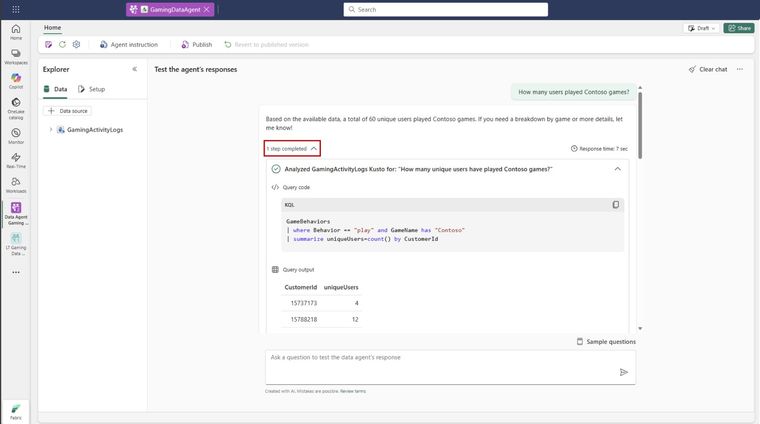
A Fabric data agent is a conversational layer over your own data in Microsoft Fabric. Someone types "which customers bought less this quarter than last?" and the agent works out which tables to use, writes the query, runs it with that person's permissions and returns the answer, with the steps it took.
It is generally available, it works with data you already have in Fabric, and it can be called from Microsoft 365 Copilot, Copilot Studio, Teams and Microsoft Foundry. Used well, it's the most practical way to put AI over business numbers. Used badly, it's a confident guesser.
What is a Fabric data agent?
Microsoft describes data agents as configurable, standalone AI items you create in a Fabric workspace. That's the difference from Copilot in Fabric, which is built in and preconfigured. A data agent is something you design: you choose the data, write the instructions and give it examples.
What can a Fabric data agent read?
A data agent can use up to five data sources in any combination:
- Lakehouses and warehouses
- Power BI semantic models
- KQL databases from Real-Time Intelligence
- Mirrored databases
- Ontologies from Fabric IQ
It is read only. It writes SQL, DAX or KQL queries to answer questions, but never changes data. It does not read unstructured files such as PDFs or Word documents, it currently works in English only, and responses are capped at 25 rows and 25 columns. For questions about documents, you need a different pattern, which we cover in AI over your documents on Azure.
What does a Fabric data agent need?
- Paid Fabric capacity F2 or above, or Power BI Premium P1 or above with Fabric enabled.
- Tenant settings for Copilot and data agents enabled, including cross-geo processing and storage for AI where your capacity is outside the US or EU. UK capacities fall into this group.
- Read access for the people using it. The agent queries with each user's Microsoft Entra identity, so row-level and column-level security still apply.
- The agent and its data in the same region. A mismatch causes queries to fail.
How to set one up properly
Creating the item takes minutes. Making it reliable takes thought. This is the order we follow.
- Start with one business area. Sales, or stock, or debtors. Not "the whole data platform". Pick the data source that already has trusted, well-named tables.
- Select only the tables that matter. In the explorer, tick the fact and dimension tables people actually ask about. Leave staging and technical tables out.
- Write the instructions like a briefing for a new analyst. You have up to 15,000 characters. Explain what the business calls things, which table is authoritative for what, how the financial year works and what to do when a question is ambiguous.
- Add example queries. For lakehouses, warehouses and KQL databases you can add up to 100 example question and query pairs per source. They teach the agent your patterns. Semantic models don't take example queries, so put the effort into the model itself. Our guide to preparing a semantic model for Copilot covers that.
- Test with real questions. Use 20 questions from the people who'll use it, with known answers. Check the steps, not just the number.
- Publish with a clear description. Publishing creates a published version separate from your draft. The description matters: Copilot and other orchestrators read it to decide when to call your agent.
Where to use it: Copilot, Teams and Foundry
Once published, a data agent can be used inside Fabric, added to Microsoft 365 Copilot, connected to Copilot Studio agents or called from Microsoft Foundry. That last route is how you build a broader agent that combines numbers from Fabric with other tools. Our post on building an agent on Fabric data with Foundry covers what has to exist first.
What it won't do
Microsoft is clear that data agents are for conversational insight, not full data exports, machine learning or root-cause analysis. They answer "what" well. "Why" still needs a person, or a purpose-built model.
The honest prerequisite
A data agent is only as good as the tables underneath. If your gold layer has three customer tables and two definitions of revenue, the agent will use whichever it finds first. Get the medallion layout and naming right and the agent gets far better with very little extra effort.
If you'd like help building a data agent that your finance or operations team will trust, get in touch or see our Microsoft Fabric work.
Sources: Microsoft Learn, Fabric data agent concepts and Create a Fabric data agent, 2026.
Related reading
- How to prepare a Power BI semantic model for Copilot
- AI agent on Fabric data with Microsoft Foundry: what has to exist first
- How should you lay out a medallion architecture in Microsoft Fabric?
- Can a CFO sign off a number that AI produced?
James Morley
Analytics Solutions Consultant
Part of the Hopton Analytics team, delivering governed analytics programmes for UK mid-market organisations.