
Microsoft Purview covers data security, governance and compliance across Microsoft 365, Fabric and AI. Most mid-market businesses already own part of it. What Business Premium covers, what needs E5 or pay-as-you-go, how it applies to Fabric and Copilot, and a sensible order to switch things on.
Microsoft Purview is one of those products most businesses already pay for and rarely use. It sits behind Microsoft 365, it reaches into Fabric and Power BI, and it's now the main way Microsoft controls what Copilot and AI agents can do with your data.
It's also confusing: dozens of features, several licences and a mix of per-user and pay-as-you-go billing. Here's a plain guide for mid-market businesses, with what you probably already own and where to start.
What is Microsoft Purview?
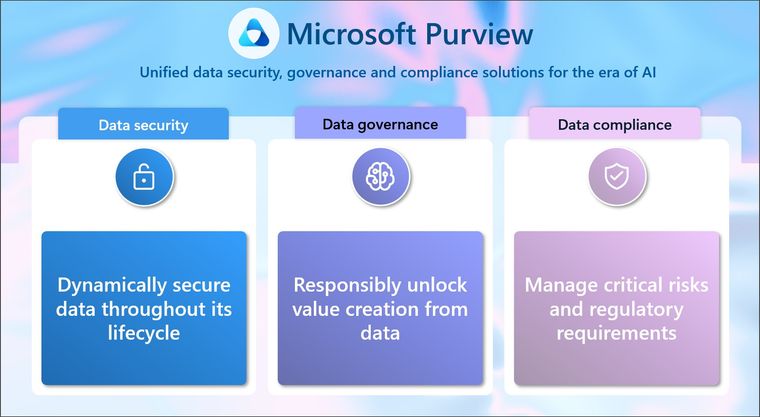
Microsoft groups Purview into three areas:
- Data security: sensitivity labels, data loss prevention, insider risk management and related tools.
- Data governance: the Data Map and Unified Catalog, which describe what data you have, where it lives, who owns it and how good it is.
- Data compliance: audit, eDiscovery, Compliance Manager, retention and records management.
What does Microsoft 365 Business Premium include?
Many mid-market businesses are on Business Premium. According to Microsoft's service description, it includes:
- Manual sensitivity labels. People can label documents and emails, for example Confidential or Internal Only.
- Data loss prevention for Exchange, SharePoint and OneDrive. Rules that stop sensitive information such as bank details or national insurance numbers being shared where it shouldn't be.
- Audit (Standard), retention policies and Compliance Manager.
- Data loss prevention for Copilot prompts, which Microsoft makes available to all Copilot and Copilot Chat users.
What needs E5 or an add-on?
- Automatic labelling of documents based on their content.
- Endpoint, browser and Teams data loss prevention.
- Data loss prevention that stops Copilot processing labelled files and emails.
- Audit (Premium).
These come with Microsoft 365 E5 or the Purview add-ons. For Business Premium customers there's a Purview Suite add-on, capped at 300 seats. Governance of data outside Microsoft 365, such as Fabric, Azure SQL or other clouds, is billed pay-as-you-go through an Azure subscription, by the number of assets governed.
How does Purview work with Microsoft Fabric and Power BI?
This is where Purview meets reporting. In Fabric you can:
- Apply sensitivity labels to every Fabric item. The label follows the data when it's exported to Excel, PowerPoint or PDF through supported routes.
- Use data loss prevention on structured data in lakehouses, warehouses, databases and semantic models, with policy tips and alerts when sensitive data is found.
- Audit all Fabric activity, including Copilot and data agents.
Microsoft is clear that the OneLake catalog remains the main place to govern Fabric day to day. Purview adds the security and compliance layer across Microsoft 365 and Fabric together. Our post on Fabric governance in 2026 covers the Fabric side.
Purview and AI
Purview is now Microsoft's main control for AI. Its data security posture management for AI shows how Copilot and other AI tools are used, runs regular oversharing assessments on your busiest SharePoint sites, and offers ready-made policies to stop sensitive data appearing in prompts and answers. Microsoft is replacing the original version with a new one, currently in preview. If you're rolling out Copilot, start with our Copilot readiness guide.
Where should a mid-market business start?
- Agree three or four labels. Public, Internal, Confidential and Highly Confidential is enough for most. More than five and people stop using them.
- Label the obvious places first. HR, payroll, board and client contract sites, plus the Fabric workspaces and semantic models that hold finance and customer data.
- Switch on one data loss prevention rule for the sensitive information that matters most to you, in test mode first, so you see what it would catch before it blocks anything.
- Turn on audit and check it's recording. You'll need it the first time someone asks who saw a file or what an agent did.
- Give data an owner. Labels and rules work only when someone is responsible for each area. Our working glossary for data governance helps here.
None of this needs a large project. Most of our clients get the essentials in place in a few weeks and build from there.
Where we help
We help businesses put governance around their Microsoft data estate: labels and access on the data that matters, governed semantic models, Fabric workspaces set up properly, and controls for Copilot and agents. If you'd like help with Purview or wider data governance, get in touch or start with a free data assessment.
Sources: Microsoft Learn, Learn about Microsoft Purview, Use Microsoft Purview to govern Microsoft Fabric, Data Security Posture Management for AI, Microsoft Purview billing models and the Microsoft Purview service description, 2026. Licence inclusions can change; check with your licensing partner.
Related reading
- Copilot readiness: fix oversharing in SharePoint before you roll out Microsoft 365 Copilot
- Microsoft Fabric governance in 2026
- Microsoft Agent 365 explained
- AI, your data and UK data protection: what a leader needs to get right
Shauna Duffy
Director of Professional Services
Part of the Hopton Analytics team, delivering governed analytics programmes for UK mid-market organisations.