
Microsoft now offers three main ways to build an AI agent: Copilot Studio, Fabric data agents and Microsoft Foundry. They overlap, they connect to each other, and they are billed differently. What each is for, who builds in each, and how to choose for a mid-market business.
Ask three Microsoft partners where to build an AI agent and you may get three answers: Copilot Studio, a Fabric data agent or Microsoft Foundry. All three are real options, they overlap, and they connect to each other. The choice matters, because each is built by different people, uses data in different ways and is billed differently.
Here's how we decide, and why the answer is often "two of them, working together".
Copilot Studio: agents that follow a business process
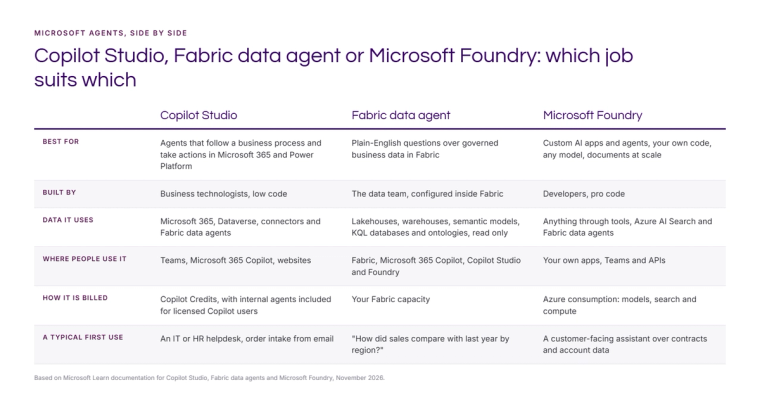
Copilot Studio is Microsoft's low-code tool for building agents and agent flows. It's designed for business technologists rather than developers, and its agents live where people already work: Teams, Microsoft 365 Copilot and websites.
Microsoft now describes Copilot Studio agents in terms of harnesses. The Microsoft Copilot harness handles reasoning-heavy, multi-step business processes and can create Word, Excel, PowerPoint and PDF files. The customer conversation harness handles predictable customer chat and voice with escalation to a person. The standard harness handles structured, rule-based conversations.
Use Copilot Studio when the job is a process: taking an order from an email, answering HR or IT questions from policy documents, or triaging requests and creating records in Dynamics 365 or Dataverse. Agents are billed in Copilot Credits, and people with a Microsoft 365 Copilot licence can build internal agents without extra licences. Our post on Copilot Studio Auto or a pinned model covers model choice.
Fabric data agent: questions about your numbers
A Fabric data agent answers plain-English questions about structured data in Microsoft Fabric: lakehouses, warehouses, Power BI semantic models, KQL databases and ontologies. It writes and runs read-only queries with each person's own permissions, so row-level security still applies, and it shows the steps it took.
Use it when the question is "what does the data say?": sales against last year, stock by warehouse, overdue debt by customer. It runs on your Fabric capacity rather than Copilot Credits, and it's built by the data team who already understand the tables. On its own it can't take actions or read documents. That's deliberate.
Microsoft Foundry: custom agents and AI applications
Microsoft Foundry, previously Azure AI Foundry, is the pro-code platform. Developers build agents and AI applications with a choice of more than 10,000 models, their own code, tools, evaluation and monitoring. It's where you build search over large document sets with Azure AI Search, assistants for customers or suppliers, and anything that needs to sit inside your own application.
It's billed as Azure consumption: models, search and compute. It gives you the most control and needs the most engineering. Our post on AI over your documents on Azure shows a typical pattern.
They work best together
The three aren't competitors so much as layers. A Fabric data agent can be added to Microsoft 365 Copilot, connected to a Copilot Studio agent or called from Foundry. That means the numbers can come from one governed place, while the process or the application sits in whichever tool suits it.
Two patterns we see often:
- An operations assistant in Teams. Built in Copilot Studio, it answers policy questions from SharePoint and calls a Fabric data agent for figures, so "how many orders are late this week?" gets the same answer as the report.
- A customer-facing assistant. Built in Foundry, it searches contracts with Azure AI Search and calls a Fabric data agent for account figures, with every answer cited.
How to choose
Three questions settle most decisions:
- Is it a process, a question about numbers, or an application? Process points to Copilot Studio, numbers to a Fabric data agent, an application to Foundry.
- Who will build and look after it? If it's a business team with some technical support, Copilot Studio. If it's your data team, a data agent. If it's developers, Foundry.
- How do you want to pay? Copilot Credits, Fabric capacity or Azure consumption. Most businesses already pay for at least one of these, which often decides the first build.
Whatever you choose, keep a list of the agents you have, who owns each one and what data it can reach. That's what Agent 365 is for, and it's what stops agent sprawl.
If you'd like help picking the right starting point, get in touch or see our Microsoft AI and Copilot work.
Sources: Microsoft Learn documentation for Copilot Studio and its agent harnesses, Fabric data agents and Microsoft Foundry, 2026.
Related reading
- Fabric data agents: what they are and how to set one up
- AI agent on Fabric data with Microsoft Foundry: what has to exist first
- Microsoft AI isn't one product. It's five decisions
- Agent sprawl: why ten clever agents add up to less than one good workflow
James Morley
Analytics Solutions Consultant
Part of the Hopton Analytics team, delivering governed analytics programmes for UK mid-market organisations.