
Real-Time Intelligence in Fabric has no separate licence, but streaming runs all day, so it uses capacity all day. How Eventstreams, Eventhouse and Activator are metered, a worked example in pounds for a small always-on workload, and the settings that keep the bill under control.
Real-Time Intelligence is one of the most useful parts of Microsoft Fabric for operations teams, and one of the easiest to under-budget. There's no separate licence. It runs on your Fabric capacity like everything else. The catch is that streaming doesn't run in a nightly window. It runs all day, every day, so it uses capacity all day, every day.
Here's how each part is metered, a worked example in pounds, and the settings that keep the cost where you expect it. If you're new to the components, start with our guide to Real-Time Intelligence in Fabric.
How Real-Time Intelligence uses Fabric capacity
Everything in Fabric is measured in capacity units, or CU. A Fabric F2 gives you 2 CU, an F4 gives you 4, and so on. In UK South, pay-as-you-go capacity works out at about 16p per CU hour, which is why an F2 costs about £231 a month and an F4 about £463, falling to £138 and £275 with a one-year reservation. Our Fabric cost guide has the full table.
Real-Time Intelligence draws on that capacity in three places.
Eventstreams: getting events in
Microsoft publishes the rates for Eventstreams in CU hours:
- A flat charge of 0.222 CU hours for every hour events are flowing. If nothing flows for two hours, the flat charge stops.
- 0.342 CU hours per GB of data in and out, including 24 hours of retention.
- Processing from 0.778 CU hours per hour if you filter, aggregate or transform events, scaling up with throughput and complexity.
- 0.611 CU hours per vCore hour for built-in connectors to sources such as databases and other clouds. Event Hubs, IoT Hub and custom endpoints don't use this meter.
Eventhouse: storing and querying events
Eventhouse compute is metered as uptime: the number of virtual cores in use multiplied by the seconds it's active. It scales automatically, and it can suspend when nobody is using it. Storage is billed separately in two tiers: a faster cache for recent data you query often, and standard OneLake storage for everything else.
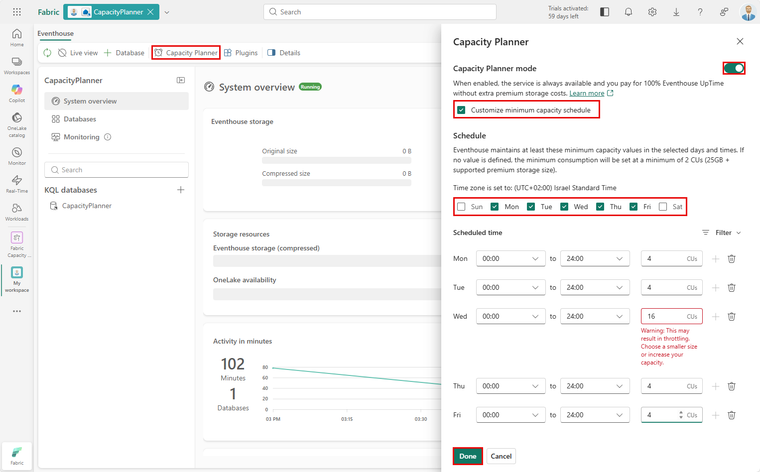
The setting that matters most is the capacity planner, previously called always-on. It stops the Eventhouse suspending, so queries are instant, but it means you pay for uptime around the clock. You can also set a minimum capacity by hour of the week, so it's warm during the working day and can drop back overnight and at weekends. The smallest minimum is 2 CU.
Activator: alerts and actions
Activator charges a small flat amount for each active rule, 0.02222 CU hours per hour, plus tiny amounts per event processed and per calculation. Ten rules running all month come to about 162 CU hours. One detail to know: pausing a rule doesn't stop it listening for events. Only deleting it does.
A worked example
Take a small but realistic workload: production line telemetry from one site, 10 GB of events a day, a simple transformation, an Eventhouse kept on all the time at the minimum, and ten alert rules.
- Eventstream: about 162 CU hours flat, 103 for data and 568 for processing, so about 833 CU hours a month.
- Eventhouse kept on at 2 CU: about 1,460 CU hours a month.
- Activator, ten rules: about 170 CU hours a month.
That's about 2,460 CU hours a month, or an average of about 3.4 CU running continuously, before anyone opens a report. At pay-as-you-go rates that's roughly £390 a month of capacity. In practice it means an F4 is the smallest capacity that fits, and an F8 is more comfortable once reporting and other workloads share it. On one-year reservations that's £275 to £550 a month.
This is an illustration, not a quote. Your volumes, transformations and query patterns will differ, and Microsoft can change consumption rates with notice.
How to keep the cost down
- Don't keep the Eventhouse always on unless you need instant queries at 3am. Use a minimum capacity schedule for working hours instead.
- Set the cache to the period people actually query. If dashboards look back seven days, cache seven days, not ninety.
- Filter early. Drop events you don't need in the Eventstream rather than storing and processing them.
- Delete test and stale Activator rules. Paused rules still cost.
- Separate the streaming workload onto its own capacity or workspace if it competes with month-end reporting. Fabric's workspace surge protection can also stop one workspace using more than its share.
- Watch the Capacity Metrics app weekly for the first month. A line running close to 100% means throttling is coming.
Before any of this, check you need real-time at all. Right-time data on an hourly schedule is far cheaper and answers most questions. Our wider guide to controlling Azure and Fabric costs covers the rest of the bill.
If you'd like help sizing a real-time workload, or a review of one that costs more than expected, get in touch or try our Fabric Licensing Calculator.
Sources: Microsoft Learn, Real-Time Intelligence consumption, Eventstream capacity consumption, Activator capacity usage and Eventhouse capacity planning, 2026; Microsoft UK Fabric pricing.
Related reading
- Real-Time Intelligence in Microsoft Fabric explained
- How to control Azure and Fabric costs on a data platform
- Sizing Microsoft Fabric capacity without overpaying or throttling
- You do not need real-time data. You need right-time
Vikram Muman
Analytics Optimisation Consultant
Part of the Hopton Analytics team, delivering governed analytics programmes for UK mid-market organisations.