
Real-Time Intelligence is the part of Microsoft Fabric for data in motion: Eventstreams, Eventhouse, Real-Time dashboards and Activator. What each piece does, the use cases that justify it for a mid-market business, and when right-time batch is enough.
Most reporting runs on data loaded every night or every hour. That's fine for a monthly board pack. It isn't fine when a freezer warms up, a production line slows, a payment fails or a delivery runs late. For those, the value of the data drops by the minute.
Real-Time Intelligence is the part of Microsoft Fabric built for that kind of data: events arriving continuously from machines, apps, websites and databases. It lets you capture them, store them, query them, show them on a live dashboard and trigger an action, all inside Fabric and alongside the rest of your data.
What is Real-Time Intelligence in Microsoft Fabric?
Microsoft describes it as an end-to-end solution for event-driven scenarios and data in motion. It isn't only for huge volumes. A few thousand events an hour from a warehouse floor qualifies just as much as millions from a website.
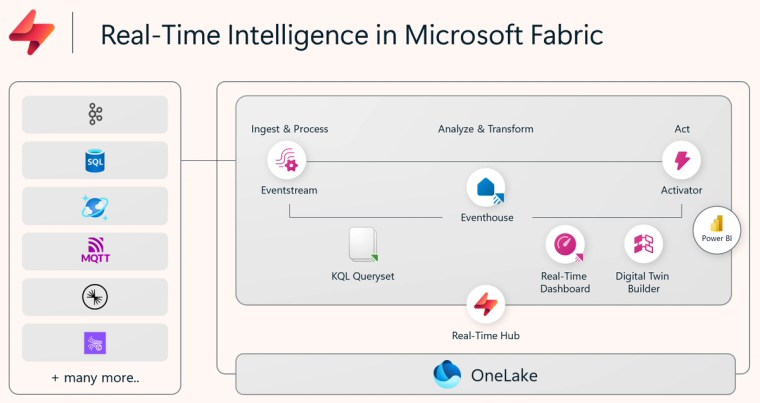
The pieces and what each one does
- Real-Time hub. A catalogue of the event streams available to you, from Fabric itself, Azure and other sources, including change data capture from Azure SQL, Cosmos DB and PostgreSQL.
- Eventstreams. No-code ingestion and routing. Bring in events from Kafka, Event Hubs, MQTT devices, Amazon Kinesis or Google Pub/Sub, then filter, aggregate over time windows, remove duplicates and send them where they need to go.
- Eventhouse. The store for time-based data, built on the same engine as Azure Data Explorer. You query it with KQL, or with T-SQL, and it has built-in anomaly detection. Its data can be made available in OneLake, so the rest of Fabric can use it.
- Real-Time dashboards and Power BI. Live tiles that refresh in seconds, plus Power BI reports for the wider audience.
- Activator. Rules that watch the data and act when something happens: send a Teams message or email, start a pipeline or notebook, or trigger a Power Automate flow.
When does a mid-market business need it?
The honest answer is less often than vendors suggest. We've written before that most businesses need right-time data, not real-time. Real-Time Intelligence earns its place when three things are true: the data arrives as events, a decision depends on minutes rather than hours, and someone or something will act on it.
Typical examples we see:
- Manufacturing and food production. Line speeds, stoppages, temperatures and yields, with an alert when a line drifts out of tolerance.
- Cold storage and logistics. Sensor readings and vehicle positions, with an alert before stock is at risk rather than after.
- E-commerce and retail. Orders, payments and stock movements during peaks, so a failing payment route or a stock-out is spotted while it can still be fixed.
- Digital services. Application events and errors, with anomaly detection to flag unusual patterns.
If a nightly or hourly load answers the question, use that. It's cheaper and simpler. The mirroring and pipeline options cover most needs.
What it costs
Real-Time Intelligence runs on your Fabric capacity like everything else, so there's no separate licence. But streaming workloads run all the time, not in a nightly window, so they consume capacity continuously. Size for the steady load plus peaks and watch the Capacity Metrics app. Our guide to sizing Fabric capacity explains how.
How it connects to AI
Eventhouse data can be queried by Fabric data agents, so an operations manager can ask "which lines had more than three stoppages this shift?" in plain English. We cover that in Fabric data agents. It also feeds anomaly detection and, where needed, machine learning models in Fabric.
How to start
Pick one stream and one decision. Connect it through an Eventstream, land it in an Eventhouse, build one Real-Time dashboard and one Activator rule. Run it for a month and see whether people act on it. If they do, extend. If they don't, you've learned that cheaply.
If you'd like help deciding whether real-time is worth it for you, get in touch or see our Microsoft Fabric work.
Sources: Microsoft Learn, What is Real-Time Intelligence in Microsoft Fabric, 2026.
Related reading
- You do not need real-time data. You need right-time
- When to use shortcuts, mirroring, pipelines or dataflows in Fabric
- Sizing Microsoft Fabric capacity without overpaying or throttling
- Fabric data agents: what they are and how to set one up
Kiran Sahiba
Analytics Solutions Consultant
Part of the Hopton Analytics team, delivering governed analytics programmes for UK mid-market organisations.