
Azure and Fabric bills creep up quietly: capacities sized for a peak, clusters left running, full reloads every night. Where data platform costs come from, the lever for each one, and a simple monthly routine that keeps the bill under control.
Data platform bills rarely jump. They creep. A capacity sized for month-end runs at that size all month. A development workspace sits on a production-sized capacity. A pipeline reloads five years of history every night because that's how it was first built. Each one is small. Together they add up to a bill nobody planned for.
The good news is that cost control on Azure and Fabric is mostly a habit, not a project. Here is where the money goes on a typical mid-market data platform, the lever for each, and a monthly routine to keep it in check.
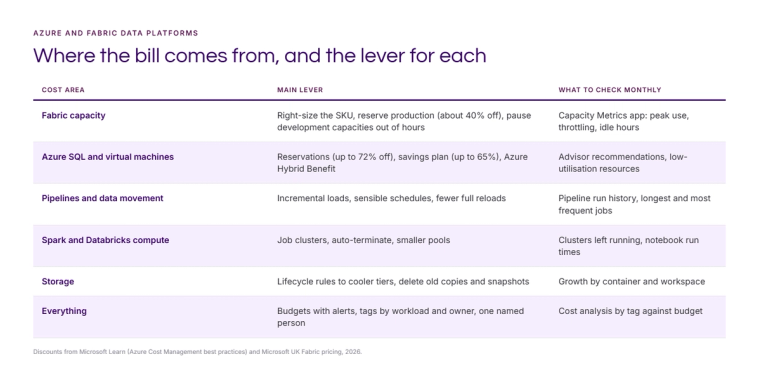
Fabric capacity: usually the biggest line
For most of our clients on Fabric, capacity is the largest cost. Three levers make the biggest difference.
- Right-size the SKU. Look at the Fabric Capacity Metrics app over a full month, including month-end. If you rarely pass 50% of capacity, try the next size down. If you throttle every morning, the answer may be moving the heavy refresh rather than buying a bigger SKU. Our capacity sizing guide walks through it.
- Reserve production. A one-year reservation is about 40% cheaper than pay-as-you-go in UK South. An F64 drops from £7,405 to £4,404 a month. Reserve the steady production load; keep development on pay-as-you-go so it can be paused.
- Pause what isn't working. Pay-as-you-go capacities can be paused and resumed. A development capacity that only runs in office hours runs for about 30% of the hours in a week, and costs about 30% as much. See stop paying for Fabric capacity you do not use.
Azure SQL and virtual machines
If your platform still includes Azure SQL databases, virtual machines for gateways or integration runtimes, or older Synapse resources, the usual Azure levers apply. Microsoft quotes savings of up to 72% with reservations, up to 65% with a compute savings plan, and up to 55% on SQL Database with Azure Hybrid Benefit if you already own SQL Server licences. Azure Advisor flags under-used virtual machines and suggests reservations based on the last 30 days.
Pipelines and data movement
The cheapest data is the data you don't move twice. Most pipeline cost comes from full reloads that could be incremental, schedules more frequent than anyone needs, and copies of the same data in several places. Load changes, not everything. Ask who actually looks at the report before running it every 15 minutes. And where a source can be mirrored or shortcut rather than copied, do that. Our Fabric decision guide covers the options.
Spark and Databricks compute
Clusters left running are the classic surprise. Use job clusters or Fabric's on-demand Spark sessions for scheduled work, set auto-terminate on anything interactive, and size pools for the job rather than the worst case.
Storage
Storage is cheap per gigabyte, which is why nobody watches it. Old snapshots, duplicate exports and raw files nobody reads add up. Set lifecycle rules to move older data to cooler tiers and delete what you no longer need. In Fabric, regular table maintenance also keeps Delta tables lean, which helps Direct Lake performance too.
Budgets, tags and one named person
None of the above sticks without visibility. Microsoft's own cost management guidance comes down to three things: visibility, accountability and optimisation.
- Tag every resource with the workload, the environment and an owner, and enforce tagging with Azure Policy.
- Set budgets with alerts at 50%, 80% and 100% for each workload, so a spike is noticed in days, not at the end of the month.
- Make one person accountable. Not the whole IT team. One named person who reviews cost against budget every month.
A monthly routine that takes an hour
- Review cost by tag against budget in Azure Cost Management.
- Check the Fabric Capacity Metrics app for peak use, throttling and idle time.
- Read the Azure Advisor cost recommendations.
- List the five most expensive pipelines and ask whether each needs to run as often.
- Agree one change for next month and record the saving.
This is part of what our Orbit service watches for clients, alongside performance and data quality. If you'd like a review of your own Azure or Fabric bill, get in touch or see our data platform work.
Sources: Microsoft Learn, Azure Cost Management best practices; Microsoft UK Fabric pricing, 2026.
Related reading
- How much does Microsoft Fabric cost? UK prices in 2026
- Sizing Microsoft Fabric capacity without overpaying or throttling
- Stop paying for Fabric capacity you do not use
- Azure data engineering: what to hand a consultancy, what to keep and what it should cost
Vikram Muman
Analytics Optimisation Consultant
Part of the Hopton Analytics team, delivering governed analytics programmes for UK mid-market organisations.