Finance and Operations holds the numbers, but getting them into Power BI at scale is a choice between three routes. Here is what each one does, where it breaks, and which to pick.
You report on Dynamics 365 Finance and Operations in Power BI by choosing one of three routes: reading the OData data entities directly, exporting tables continuously with Azure Synapse Link for Dataverse, or linking the tables into Microsoft Fabric with Link to Fabric. The first suits a handful of small reports. The second and third are how you report at transaction scale, and for most mid-market businesses starting now, Link to Fabric is the simpler of the two.
Why the obvious route stops working
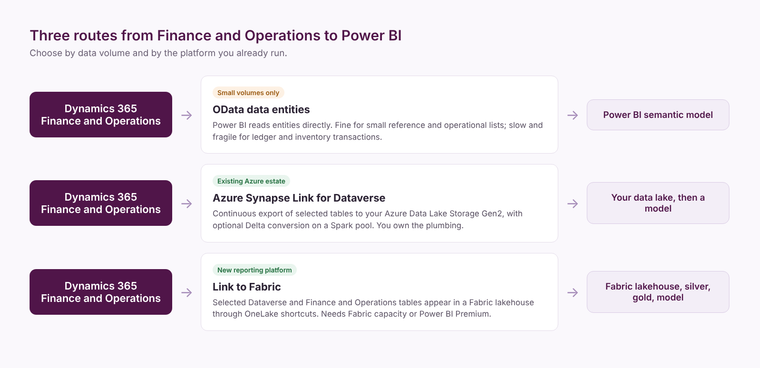
Power BI can connect to Finance and Operations through its OData endpoint and read the data entities, the same entities used for integration and Excel. For a few hundred rows of reference data, or a small operational list, that is fine. For general ledger lines, inventory transactions or sales lines it is slow, it competes with the users working in the system, and large refreshes fail part way through. Most teams discover this the month the business grows.
The embedded Power BI analytical workspaces inside Finance and Operations are useful for operational views in the application itself. They are not where a finance director builds a group management pack that also needs CRM, payroll or budget data.
Azure Synapse Link for Dataverse
Azure Synapse Link continuously exports the Finance and Operations tables you select into Azure Data Lake Storage Gen2, optionally with an Azure Synapse workspace converting them to Delta format. Microsoft documents it as generally available for Finance and Operations from version 10.0.36, and recommends it to anyone who was planning to use the older Export to Data Lake feature.
It suits a business that already runs an Azure data platform and wants the raw tables in its own storage account. The trade-off is that you own the plumbing: the storage account, the Spark pool that converts the files, and the pipelines that turn raw tables into something a report can use. Delta conversion consumes Spark compute, so it carries a running cost on top of the storage.
Link to Fabric
Link to Fabric does the same job with less to build. From the Power Apps maker portal you select the Dataverse tables, and the Finance and Operations tables if your environment is linked to them, and Fabric creates a lakehouse with shortcuts to that data in OneLake. Microsoft states that a Power BI Premium licence or Fabric capacity is required, that the capacity does not need to be in the same Azure region as your Dataverse environment, and that only the tables you select consume storage.
From there the work is ordinary Fabric work: a silver layer that cleans and joins the tables, a gold layer shaped for reporting, and a semantic model on top. If you are new to that layering, our Microsoft Fabric page explains how we build it.
Which one to choose
- A few small operational reports: OData data entities, with incremental refresh where the entity allows it.
- An existing Azure estate with its own lake and pipelines: Azure Synapse Link, landing into the storage you already govern.
- A new reporting platform, or one that will combine Finance and Operations with other systems: Link to Fabric, then a medallion build on top.
Whichever you pick, the hard part is not the extraction. It is agreeing which ledger accounts, dimensions and legal entities make up each number the board sees, and building that once in the model rather than in every report. Our free audit is a quick way to see which route fits the estate you already have.
What it costs
OData costs nothing extra but costs you reliability. Synapse Link costs Azure storage plus the Spark compute for Delta conversion. Link to Fabric needs a Fabric capacity, which for most mid-market reporting starts at a small F SKU; the Fabric licensing calculator gives an indicative size. In every case the larger cost is the build: the model, the definitions and the testing that makes finance trust the output.
Related reading
Migrating from Azure Synapse to Microsoft Fabric: a practical guide for UK teams
Microsoft Fabric vs Azure Synapse: what UK mid-market teams need to know
Fabric licensing: per user or capacity?
Kiran Sahiba
Analytics Solutions Consultant
Part of the Hopton Analytics team, delivering governed analytics programmes for UK mid-market organisations.