
Most businesses want AI that can answer questions from their own contracts, policies and procedures. On Azure that means retrieval with Azure AI Search and Microsoft Foundry. How it works, the difference between classic and agentic retrieval, and why the numbers should come from somewhere else.
The most common AI request we hear isn't about dashboards. It's "can we ask questions of our documents?" Contracts, policies, procedures, tender responses, technical manuals. The answers are in there somewhere, and people spend hours finding them.
The technique behind this is called retrieval-augmented generation, or RAG. Instead of hoping a model already knows your business, you find the relevant passages in your own documents first and give them to the model with the question. The model answers from your content and cites where it found it.
How does RAG work on Azure?
On Azure, the retrieval part is Azure AI Search, and the agent or app sits in Microsoft Foundry, the platform previously called Azure AI Foundry. Microsoft now offers two approaches.
- Classic RAG. One search per question, combining keyword and vector search with semantic ranking, then the top results go to the model. It's generally available and Microsoft still recommends it where you need only GA features.
- Agentic retrieval. A model first plans the question, splits it into sub-questions, runs them in parallel across one or more knowledge sources and returns structured results with citations. Microsoft recommends it for new builds. The query planning part is currently in preview.
Agentic retrieval introduces three objects: knowledge sources (a search index or a SharePoint site), a knowledge base that brings them together, and a retrieve call your app makes. Foundry IQ builds on this as a managed knowledge layer in the Foundry portal, creating permission-aware knowledge bases for agents.
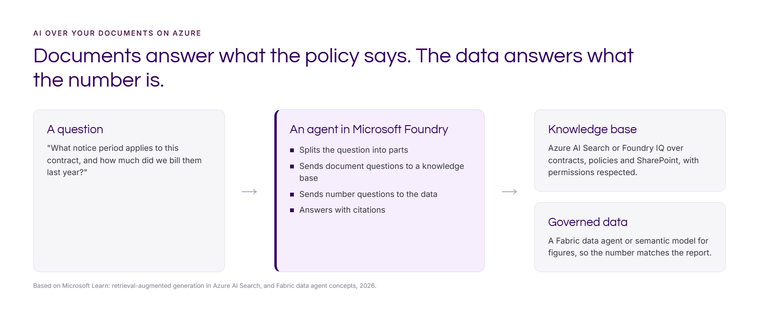
Documents answer what the policy says. The data answers what the number is.
This is the mistake we see most often. Someone builds an assistant over documents, then asks it for last quarter's sales. It finds a board paper from March, quotes a figure from it and presents it as the answer. It looks right. It isn't current, and it doesn't match the report.
The fix is to send each kind of question to the right place. Questions about documents go to the knowledge base. Questions about numbers go to governed data, such as a Fabric data agent or a semantic model, so the figure matches the report finance already trusts.
Where RAG projects go wrong
- Out-of-date and duplicate documents. If there are four versions of the travel policy, the assistant will find all four. Retrieval is only as good as the library. Decide what's authoritative and archive the rest.
- Permissions. An assistant that ignores document permissions is a data leak with a friendly interface. Classic RAG supports document-level security trimming and agentic retrieval supports access control at knowledge source level. Design it in from the start. Our Copilot oversharing guide covers the SharePoint side.
- Poor chunking. Documents are split into chunks before indexing. Split a contract clause in half and the answer comes back half right. Test with real questions and adjust.
- No evaluation. Keep a list of questions with known answers and run it after every change to documents, prompts or models. Foundry includes evaluation tools for this.
- Personal data. If documents contain personal data, the usual UK GDPR duties apply. See AI, your data and UK data protection.
Should you build it, or use Copilot?
If your documents live in SharePoint and the people asking already have Microsoft 365 Copilot, try Copilot and a SharePoint agent first. It respects permissions and needs no build. Build your own on Azure AI Search and Foundry when you need control over sources outside Microsoft 365, specific answer formats, an assistant for customers or suppliers, or a combination of documents and governed numbers. Our Copilot cost guide helps with that comparison.
How to start
Pick one document set with a clear owner and a clear question people ask every week. Index it, test it with 20 real questions, and measure how long people spent finding answers before. If it saves time and the answers hold up, add the next set. If you want numbers in the same assistant, read building an agent on Fabric data with Foundry.
If you'd like help building AI over your documents and data that people can trust, get in touch or see our applied AI and machine learning work.
Sources: Microsoft Learn, Retrieval-augmented generation in Azure AI Search (updated August 2026) and What is Microsoft Foundry (updated September 2026).
Related reading
- AI agent on Fabric data with Microsoft Foundry: what has to exist first
- Fabric data agents: what they are and how to set one up
- Getting your data ready for AI
- The real risk with AI isn't the model. It's how you use it.
Shauna Duffy
Director of Professional Services
Part of the Hopton Analytics team, delivering governed analytics programmes for UK mid-market organisations.