
Fabric Apps let you build and host web apps inside Microsoft Fabric, on the same governed data as your reports. What operational and data apps are, what changed at FabCon Barcelona, and where to use them first.
For three years Microsoft Fabric has been the place your data lands, gets modelled and gets reported on. With Fabric Apps it also becomes somewhere people do their work: entering figures, correcting records and approving changes, in apps that sit on the same governed data as your reports.
Fabric Apps first launched in June 2026, and Microsoft added a round of enhancements at FabCon Europe in Barcelona in September. This post explains what they are, how they work, and where a mid-market organisation should and should not use them.
What are Fabric Apps?
A Fabric App is a workspace item for building and running browser-based web apps inside Microsoft Fabric. Microsoft hosts the app, users sign in with their Microsoft Entra ID, and the app's data sits in Fabric alongside everything else. Each app comes with a SQL database in Fabric, authentication and security as standard.
Underneath is Rayfin, an open-source SDK and command-line tool. Developers, or the coding agents they work with, define the app's data and backend in code and deploy it to Fabric with a single command.
Two kinds of app
Operational apps
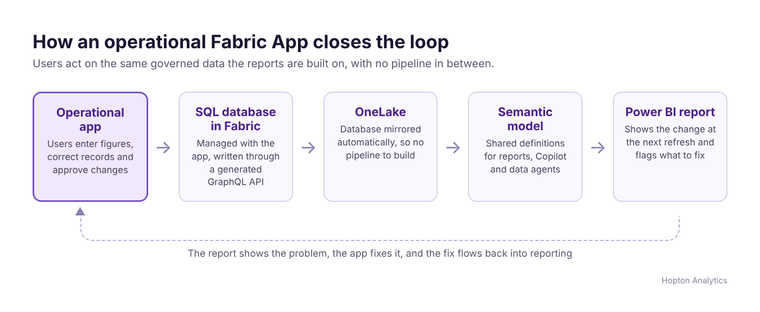
This is the default template. It creates a managed SQL database as part of the app, and the app reads and writes through a generated GraphQL API. The database is mirrored into OneLake, so whatever users enter is available to your lakehouses, semantic models and reports without a pipeline.
Data apps
The second template connects to a published Power BI semantic model and queries it in DAX, with no database of its own. We have covered data apps in detail already, in What Fabric data apps change, and what they don't and Power BI report or data app: choosing well. This post concentrates on operational apps, because they are what turns Fabric into an application platform.
Why this matters: closing the loop
Most reporting estates have a gap at the end. The report shows a problem, and the fix happens somewhere else: a spreadsheet, an email, or a Power App bolted on with Power Automate and a SQL endpoint. Fabric Apps close that loop on one platform. A user changes a forecast in an operational app, the change lands in the database, mirrors to OneLake, and the next report refresh shows it. Copilot and data agents read the same data.
It also answers a question many people asked when SQL database arrived in Fabric: why put a transactional database inside an analytics platform? Apps are the reason.
What changed at FabCon Barcelona
- Direct connections to Fabric warehouses, SQL databases, lakehouses and Power BI semantic models, without copying data and keeping existing permissions.
- Backend functions written in TypeScript.
- A secret store for keys and connection details.
- PostgreSQL support.
- Private-by-default access.
- Built-in usage and performance metrics.
Microsoft also announced Apps in Power BI, which generates an app from a semantic model in Power BI Desktop and runs it on Fabric Apps. We cover that separately in Apps in Power BI: what you can build from a semantic model.
Where we would use Fabric Apps first
- Targets, budgets and forecasts that live in spreadsheets today and get pasted into reports. For full planning with versions and approval stages, a dedicated planning tool such as accoTOOL may still fit better.
- Master data upkeep: product hierarchies, customer groupings and mappings that reports depend on but nobody owns.
- Exceptions and approvals: reviewing flagged records, correcting them and recording who signed them off.
- Decisions on model output: a planner accepting or adjusting a forecast that a model has proposed.
Where we would not, yet
Fabric Apps are code-first. There is no drag-and-drop canvas, and most Power BI developers do not write TypeScript and React. Microsoft expects coding agents to do much of the writing, which brings its own questions: who reviews the generated code, who maintains it next year, and what the agent usage costs. An operational app also creates new business data, so somebody has to own it, decide how long it is kept and make sure it is backed up, exactly as they would for any other system.
Check the practicalities before you plan around them. Under Microsoft's current documentation, Fabric Apps need Fabric capacity on the workspace and consume capacity units from it, a Fabric administrator has to enable the workload in tenant settings, and it is not yet available in every region. If capacity cost is the concern, our Fabric licensing calculator helps you size it.
Power BI, Power Apps or Fabric Apps?
A simple rule we use with clients:
- Power BI reports stay the default for reading and exploring data. They are mature, consistent and what most users need. For small amounts of write-back inside a report, look at translytical task flows.
- Power Apps remain a sound choice where your data lives in Dataverse or Microsoft 365 and citizen developers build the app. See how Power BI and Power Apps work together.
- Fabric Apps fit when the data the app creates belongs in your Fabric estate and needs governing like everything else in it.
What to do now
Pick one spreadsheet process that feeds your reports and that people complain about. Map who enters the data, who approves it and which reports use it. That is a good first Fabric App, and a small one. If you would like help choosing it, or want to know whether your estate is ready, book a free audit.
Related reading
- Microsoft Fabric implementation
- Power BI reports can now write back: what that actually changes
- FabCon Europe 2026: what to adopt now, what to watch, and what to leave alone
- Microsoft managed apps are on by default. Here is what to switch off before anyone builds one
James Morley
Analytics Solutions Consultant
Part of the Hopton Analytics team, delivering governed analytics programmes for UK mid-market organisations.