
Power BI Desktop can now generate an app from a semantic model you already trust, one that takes input and writes data back. What it does, what the Pro and PPU offer includes, and what to check before the preview reaches you.
At FabCon Europe in Barcelona, Microsoft showed Power BI doing something new: building an app. You start in Power BI Desktop from a semantic model you already trust, describe the app you want in plain English, and Power BI generates it. Unlike a report, the app can take input and write data back.
It is one of the more practical announcements of the year for organisations that run on Power BI, and the licensing is unusually generous. It also arrives with a few loose ends. Here is what it does and what to check before you plan around it.
What are apps in Power BI?
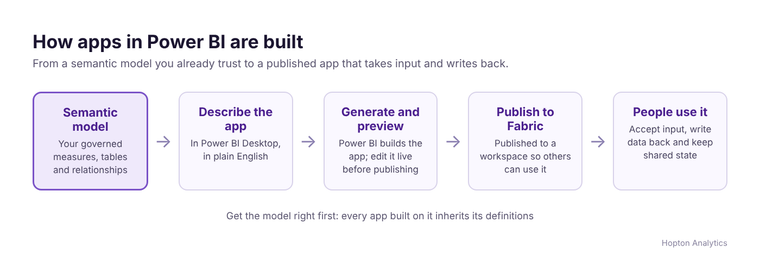
The flow is simple. In Power BI Desktop you pick a semantic model, describe the app, let Power BI generate it, then preview it and edit it live before publishing it to Fabric. Microsoft says these apps can:
- accept input from users
- write data back
- keep shared state, so everyone sees the same entries
- support operational workflows, such as review and approval steps
Each app runs on Fabric Apps, which provides a SQL database in Fabric, sign-in and security. If an app outgrows the person who made it, it can be handed to developers or IT and extended without a rebuild.
What the Pro and PPU offer includes
Microsoft said the preview would arrive in the weeks after the announcement on 28 September 2026, for Power BI Pro, Premium Per User (PPU) and Fabric capacity customers. It also said Pro and PPU customers get Fabric Apps and Fabric database capabilities at no additional cost, up to 1 GB per app.
That last point is the headline, because it puts apps within reach of organisations that have never bought Fabric capacity. Treat it as a promise to confirm, not something to budget on yet. Microsoft's current Fabric Apps documentation still lists Fabric capacity on the workspace as a prerequisite, and region availability is limited. The Pro and PPU route may come with its own rules when it reaches your tenant.
1 GB per app is plenty for targets, forecasts, comments and approvals. It is not a place to run a transactional system.
What you could build
- Monthly targets and forecasts entered against the same measures your reports use, instead of a spreadsheet someone pastes in.
- Variance commentary, where budget holders explain the numbers and finance approves the wording before the board pack.
- Data corrections, where users flag and fix the records that make a report wrong, with a record of who changed what.
- Simple requests and approvals tied to a KPI, such as a discount or a stock transfer.
Why your semantic model matters even more
The app starts from your semantic model. If its tables are badly named, its measures disagree with finance, or nobody has written descriptions, the generated app inherits all of it. The same is true of Copilot, which now reads your models through Fabric IQ. We made this point in Microsoft Fabric IQ: definitions first, and it applies doubly here.
What to check before the preview reaches you
- 1Tenant settings. Decide who can create apps. Restrict it to a security group for the preview rather than the whole organisation.
- 2Workspaces and capacity. Agree which workspaces apps will live in, and confirm whether your tenant needs Fabric capacity for them.
- 3Data ownership. Data written back by an app is new business data. Agree who owns it, how long it is kept and how it reaches your reports.
- 4Publishing rights. Decide who can publish an app for others to use, and who reviews it first.
- 5The hand-off. Agree in advance when an app becomes business-critical and moves to IT, so it does not become the next unsupported spreadsheet.
Apps, translytical task flows or Power Apps?
Translytical task flows add write-back to a report, and suit a button or a short form on a page people already use. Apps in Power BI suit a dedicated screen with its own workflow. Power Apps remain the better fit when the data belongs in Dataverse or Microsoft 365 rather than your data estate.
What to do now
List the spreadsheets that feed your Power BI reports today. The ones with clear owners and a monthly rhythm are your first candidates. If you would like a second opinion on which to start with, or on whether your semantic models are ready, book a free audit.
Related reading
- Power BI consultancy
- Power BI reports can now write back: what that actually changes
- Your semantic model just became more important, not less
- FabCon Europe 2026: what to adopt now, what to watch, and what to leave alone
Maisie Hudson
Analytics Consultant
Part of the Hopton Analytics team, delivering governed analytics programmes for UK mid-market organisations.