
Copilot Managed Runtime reaches general availability between mid-November and mid-December 2026, and app building in Cowork leaves Frontier. The controls for Cowork, Code and Copilot Studio, the separate licence to run apps, and what to set before rollout reaches you.
Microsoft moved Copilot Managed Runtime to general availability at Ignite on 17 November. It's the platform that hosts the apps people build with Copilot Cowork, Copilot Code and Copilot Studio, inside your own Microsoft 365 tenant. The worldwide rollout began in mid-November and Microsoft expects it to be complete by mid-December 2026.
The change that matters most is in Cowork. App building there is no longer limited to the Frontier programme. Once the rollout reaches your tenant, anyone with Cowork can build an app and share it, unless an administrator has decided otherwise.
Nick DeCourcy, who works on Copilot adoption, set the controls out clearly on LinkedIn this week. This is our take on what they mean for a mid-market business, checked against Microsoft's message centre post MC1558033 and Microsoft Learn.
What is Copilot Managed Runtime?
Copilot Managed Runtime is a Microsoft-operated host for internal business apps. Apps run inside your tenant, sign people in with Microsoft Entra ID, follow your Conditional Access policies, and inherit the connector, sharing and content rules of the environment they sit in. People open them from one place, the Copilot Managed Runtime portal.
Whichever tool builds the app, it lands in the same place under the same rules. Each maker gets a personal environment, created the first time they build. Administrators can see every draft and published app under Apps, then All apps, in the Microsoft 365 admin centre, and can block or delete any of them.
What changes at general availability?
- Copilot Managed Runtime stops being a preview feature.
- App building in Copilot Cowork leaves Frontier. Licensed users can build apps without being enrolled.
- Environment routing is switched on. If your tenant has no routing rules, makers go to personal environments in the default environment group. Existing rules stay as they are.
- Personal environments inherit the default group's policies, and makers can't override them.
- Sharing an app gives people access to the app, not to the data underneath it.
Copilot Code is still in Frontier. Microsoft's Ignite Book of News says Code is planned for general availability in December.
Each way of building has its own control
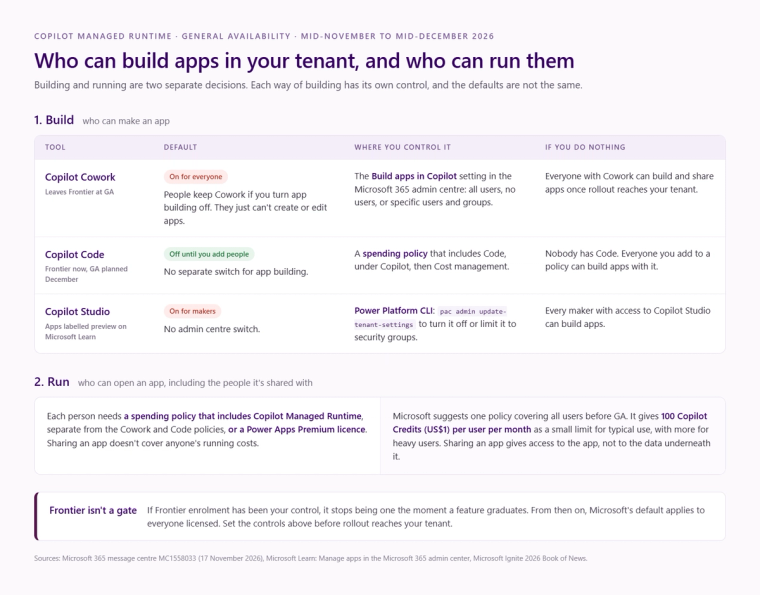
This is where people get caught out. There isn't one switch for app building. There's one per tool, they live in different places, and they default differently.
Copilot Cowork: on for everyone by default
The control is the Build apps in Copilot setting in the Microsoft 365 admin centre, under Copilot, then Settings. You can set it to all users, no users, or specific users and groups. Turning it off doesn't take Cowork away from anyone. People keep Cowork for everything else. They just can't create or edit apps.
If you do nothing, everyone with Cowork can build and share apps as soon as the rollout reaches your tenant.
Copilot Code: off until you add people
Code has no separate switch. Only people in a Copilot spending policy that includes Code can use it, and anyone who can use it can build apps with it. You set this under Copilot, then Cost management.
Nick makes a fair point here. Access to Code and access to app building in Code come as one. You can't give someone Code for other work without also letting them build apps.
If you do nothing, nobody has Code. Everyone you add to a policy can build apps.
Copilot Studio: on for makers, controlled from the command line
There's no admin centre switch for app building in Copilot Studio. To turn it off, an administrator runs this with the Power Platform CLI:
pac admin update-tenant-settings --setting-name powerPlatform.powerapps.enableManagedAppsMcsPreview --setting-value 'off'
To limit it to certain people instead, set powerPlatform.powerapps.enabledGroupsManagedAppsMcsPreview to one or more Microsoft Entra security group IDs. Copilot Studio caches the setting for up to 15 minutes.
Microsoft Learn still labels apps in Copilot Studio as preview, although a Microsoft product lead said this week that they are now generally available. The control is the same either way. We covered it in more detail in Microsoft managed apps are on by default.
If you do nothing, every maker with access to Copilot Studio can build apps. The Copilot Managed Runtime CLI and SDK, which developers and coding agents use, are off by default.
Running an app is a separate decision
Building and running are paid for separately. Everyone who runs an app, including the people it's shared with, needs either a Power Apps Premium licence or a spending policy that includes Copilot Managed Runtime. That policy is separate from the ones for Cowork and Code. Sharing an app doesn't cover anyone's running costs.
Microsoft's advice before general availability is to create one spending policy covering all users with Copilot Managed Runtime included. It gives 100 Copilot Credits (US$1) per user per month as a small limit that covers typical use, with higher limits for groups that use apps heavily. Skip this and people will build apps their colleagues can't open. Our guide to what Microsoft 365 Copilot costs in the UK explains how Copilot Credits work.
Frontier was never a gate
This is the point worth taking from Nick's post. Plenty of businesses have treated Frontier enrolment as their control. Only the people in Frontier get the new thing. That works until a feature graduates. Then it reaches everyone who is licensed for it, and whatever default Microsoft chose applies. For Cowork app building, that default is on.
So line up your settings and spending policies with the tools you actually want people to use. Do it before the rollout reaches your tenant, not after.
Who can build is only half the question
The settings decide who can build. They don't decide whether what gets built shows the right numbers. An app built in Cowork in ten minutes can pull sales from a spreadsheet, a SharePoint list or a Power BI model, and it looks just as convincing whichever it used. Two people asking for margin this month can end up with two apps and two answers.
The answer is the same as for Copilot generally. Keep the figures leadership relies on in a governed semantic model, point apps at that, and use the connector policy in the default environment group to limit what apps can reach. Check your SharePoint permissions too, because an app can only be as careful as the access behind it. For apps that need to show official figures, apps in Power BI and Fabric Apps are the sturdier route.
What to do this week
- 1Decide who should build apps in Cowork, and set Build apps in Copilot to match.
- 2Check who is in spending policies that include Copilot Code.
- 3Decide on app building in Copilot Studio, and set it with the Power Platform CLI.
- 4Create a spending policy that includes Copilot Managed Runtime, for everyone who will run apps.
- 5Review the default environment group: which connectors and MCP servers apps can use, who apps can be shared with, and what external content they can load.
- 6Look at the apps already built during the preview, under Apps, then All apps.
- 7Tell people where apps live, what they're for, and where the official numbers come from.
None of this is hard. It just needs someone to own it before the default does.
If you'd like help setting it up, or connecting apps to figures your finance team already trusts, our Microsoft AI and Copilot work starts with the data. You can also ask us for a free data assessment.
Sources: Nick DeCourcy on LinkedIn, November 2026; Microsoft 365 message centre MC1558033; Microsoft Learn: Manage apps in the Microsoft 365 admin center; Microsoft Ignite 2026 Book of News.
Related reading
- Microsoft managed apps are on by default. Here is what to switch off before anyone builds one
- Copilot Code in Microsoft 365 Copilot: what it builds and the settings to check
- What does Microsoft 365 Copilot cost in the UK? Licences, Copilot Credits and what to budget for
- Agent sprawl: why ten clever agents add up to less than one good workflow
- Can a CFO sign off a number that AI produced?
Simon Devine
Managing Director
Part of the Hopton Analytics team, delivering governed analytics programmes for UK mid-market organisations.