
Business Central now has Copilot features across finance, sales and purchasing, plus agents that turn emails into sales quotes and vendor invoices into purchase drafts. What each one does, how Copilot Credits are charged, what it costs in practice and the data you need right first.
Business Central has had Copilot features for a couple of years. What's new in 2026 is agents: Copilot that doesn't wait to be asked. The Sales Order Agent reads customer emails and builds quotes. The Payables Agent reads vendor invoices and prepares purchase drafts. Both work on their own, inside limits you set, and hand over to a person before anything is final.
For finance and operations teams that live in Business Central, this is the most practical AI Microsoft has shipped. It's also where clean master data suddenly matters more than ever. Here's what's available, what it costs and what to get right first.
What Copilot features are in Business Central?
Microsoft lists these Copilot capabilities, available in all country versions including the UK and Ireland, with language support varying by feature:
- Bank account reconciliation assist. Suggests matches between bank statement lines and ledger entries.
- Analysis assist. Builds analysis views on lists using plain-English instructions.
- Sales line suggestions. Proposes lines on sales orders from history and context.
- Map e-documents to purchase order lines. Matches incoming electronic invoices to the right order lines.
- Marketing text suggestions. Drafts item descriptions, with an option to publish them to Shopify.
- Autofill, summarise records, substitute items and number series suggestions. Smaller helpers across the system.
- Chat. From version 29, the Microsoft Copilot experience inside Business Central.
What do the Business Central agents do?
- Sales Order Agent. Monitors a mailbox you choose, reads customer emails and attachments, finds the customer from the sender's contact details, matches items, checks availability and creates a sales quote. It can convert the quote to an order depending on your settings. Every outgoing message is reviewed by a named Business Central user before it's sent.
- Payables Agent. Monitors a mailbox for PDF vendor invoices and credit notes, creates inbound e-documents, extracts the data and prepares unposted purchase invoices or credit memos for a supervisor to check. It never posts. It doesn't handle approval flows or anomaly detection, so your existing controls stay in place.
- Expense Agent (preview). Processes uploaded receipts.
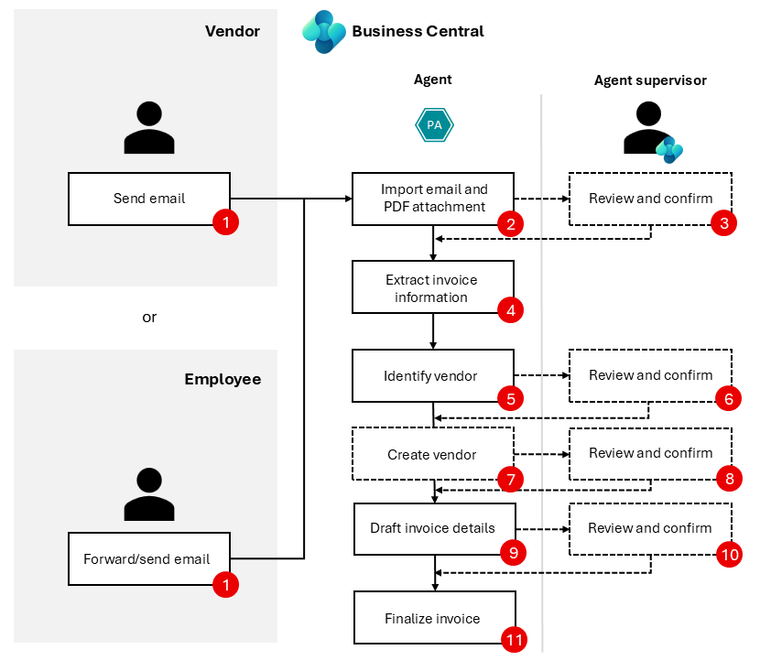
What do Business Central agents cost?
The Copilot features above are part of Business Central. The agents are billed in Copilot Credits, the same unit Microsoft uses for Copilot Studio. Microsoft publishes the rates per action:
- Payables Agent: 50 credits to process an invoice, plus 5 per invoice line. Emails without a valid invoice cost nothing.
- Sales Order Agent: 2 credits to analyse an email, 5 for an attachment with sales data, 5 for an availability check, 5 to create or update a quote or order, and 2 for a response email.
- Expense Agent: 50 credits per receipt.
Microsoft's own example is 100 invoices a month with three lines each, which comes to 6,500 credits. A Copilot Credit capacity pack in the UK is £153.80 a month for 25,000 credits, so that example works out at about £40 a month. You can also pay as you go through an Azure subscription linked to your Power Platform environment, and both can run together. When credits run out, the agent stops until more are available, so set an alert.
Our guide to what Copilot costs in the UK covers credits in more detail.
How do you switch them on and control them?
Admins use the Copilot & agent capabilities page in Business Central. Features show as active or inactive, split into preview and generally available. Copilot itself is a system feature and can't be switched off entirely, but each capability can be deactivated, and access is controlled per user with permission sets.
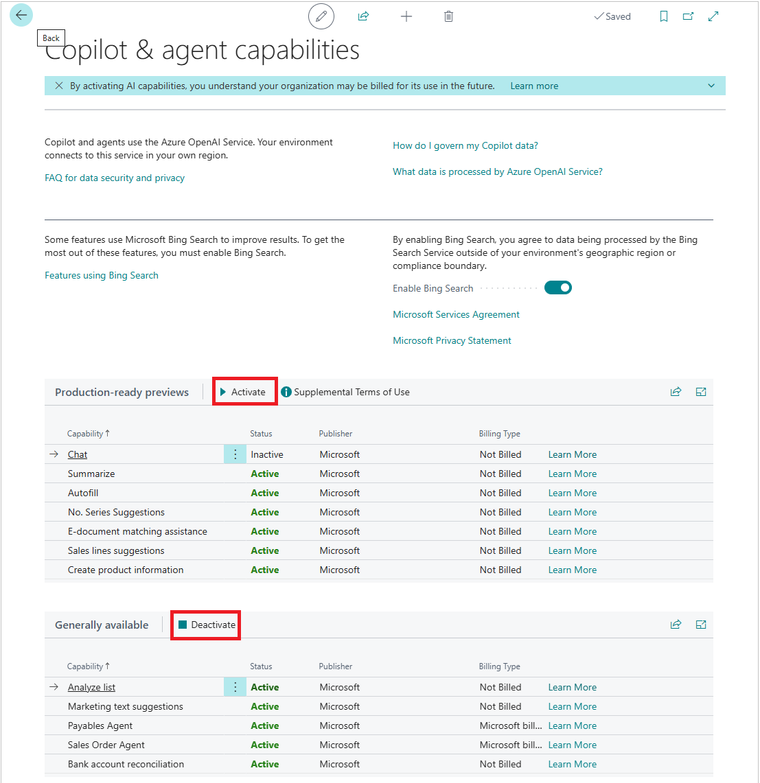
There's also an Allow data movement setting. It appears when a capability may process data in a different Azure geography. Turning it off makes those capabilities unavailable. For UK and Irish businesses, read Microsoft's data movement page before you decide, and record the decision.
What to get right before you switch agents on
Agents act on your data without someone checking every step, so the quality of that data decides how well they work.
- Customer contacts. The Sales Order Agent finds customers by the sender's email address on contact cards. Missing or shared email addresses mean missed or misdirected quotes.
- Item master data. Clear descriptions, units of measure and references customers actually use. If customers order by their own part numbers, set up item references.
- Vendor records. The Payables Agent matches invoices to vendors. Duplicated vendors and out-of-date bank details cause exceptions.
- Supervisors and limits. Name who reviews agent output, set limits on mailboxes and volumes, and agree what happens when credits run out.
Where reporting fits
Agents speed up transactions. They don't tell you whether margin is slipping or which customers are buying less. That's still reporting, and it's where most Business Central customers struggle. Our posts on the reports a finance team needs and Business Central dimensions in Power BI cover that side, and our Business Central analytics page explains how we help.
If you want help getting Business Central data ready for agents, or reporting that keeps up with them, get in touch.
Sources: Microsoft Learn, Business Central Copilot and agent capabilities, Sales Order Agent, Payables Agent, consumption-based billing and region and language availability, updated 2026.
Related reading
- What does Microsoft 365 Copilot cost in the UK?
- The Business Central reports a finance team needs
- Business Central dimensions in Power BI
- Copilot Studio, Fabric data agent or Microsoft Foundry: which to use
Isobel Bowers
Analytics Consultant
Part of the Hopton Analytics team, delivering governed analytics programmes for UK mid-market organisations.