
Same expression language, different platform. The real differences between Azure Data Factory and Fabric pipelines, and a rule for choosing in 2026.
The difference between Azure Data Factory and Fabric Data Factory pipelines is not the pipeline. The canvas, the activities and the expression language are close to identical, and about nine in ten Data Factory activities exist in Fabric. The differences are in everything around the pipeline: how it reaches on-premises and private data, how it transforms data, how it is deployed, and how it is billed. Those differences decide which one you should build on in 2026, and the short answer is that new work belongs in Fabric unless you depend on SSIS packages or a Microsoft-managed virtual network, and existing Data Factory estates should move when there is a business reason rather than because Microsoft has said so. Here is what actually changed.
What is the same
A Fabric pipeline is an Azure Data Factory pipeline that has moved house. Copy activity, ForEach, If, Lookup, Web, stored procedure, notebook and script activities are all there; the expression syntax is almost unchanged; schedule, event and interval-based triggers are all available, with file event triggers now native and the trigger framework shared with Activator. The connectors overlap heavily. Someone who has built in Data Factory will be productive in Fabric on day one, which is why the migration conversation is rarely about retraining.
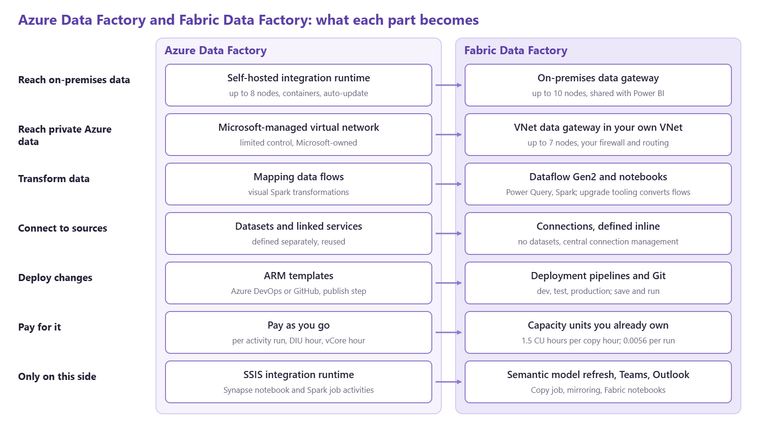
Gateways: the self-hosted integration runtime becomes the on-premises data gateway
Data Factory reaches on-premises SQL Server, file shares and private networks through the self-hosted integration runtime. Fabric uses the on-premises data gateway, the same gateway Power BI, Power Apps and Logic Apps already use, so a business that has one for Power BI refresh can often reuse it. The gateway supports up to ten nodes against the runtime's eight, can change region, throttles CPU and memory and has recovery keys; the runtime supports container images, auto-update and Private Link for control traffic, which the gateway does not. For private Azure sources, Data Factory's Microsoft-managed virtual network is replaced by a virtual network data gateway deployed inside your own VNet, up to seven nodes, with your own firewall, NSG and routing control. That is a gain in control and a loss in convenience, and it is the one area where a security team should be in the room.
Transformation: mapping data flows become Dataflow Gen2
This is the biggest practical change. Data Factory's mapping data flows, the visual Spark-based transformations, do not exist in Fabric as such. Their job is done by Dataflow Gen2, which is Power Query, with Microsoft's upgrade tooling converting supported mapping data flows into Dataflow Gen2 transforms and a Spark-based transformation activity in preview. For most mid-market pipelines that is an improvement, because the people who maintain the transformations already know Power Query from Power BI. For heavy Spark transformations the honest answer is a Fabric notebook, which Data Factory never had as a first-class activity. Notebooks, Dataflows Gen2 or pipelines sets out which to use for which job.
Things that only exist on one side
Data Factory has the Azure-SSIS integration runtime and the SSIS activity; Fabric's equivalent is still listed by Microsoft as to be determined, with an SSIS-in-Fabric offering in preview, so a business with a large SSIS estate should not move those packages yet. Data Factory has Synapse notebook and Spark job activities; Fabric has its own notebooks. Fabric adds activities Data Factory never had: Dataflow Gen2, Outlook and Teams notifications, and semantic model refresh, which removes the awkward Power BI API call most Data Factory teams wrote by hand. Fabric also has Copy job for incremental and change-data-capture movement, and mirroring for replicating operational databases without a pipeline at all, which our decision guide covers.
Authoring and deployment
Fabric removes datasets and linked services. Connection properties sit inline on the activity, and linked services become connections managed centrally. There is no publish step and no debug mode; you save and run, and you are always in interactive mode. Deployment moves from ARM templates in Azure DevOps or GitHub to Fabric deployment pipelines (development, test, production) with Git integration behind them. Teams that invested in a mature ARM-based release process will find the Fabric model simpler but less flexible, and should plan the move rather than assume it.
Billing: pay per run becomes capacity units
Data Factory bills per activity run, per data integration unit hour of copy and per vCore hour of data flow, as pay-as-you-go line items. Fabric bills everything against the capacity you already own: a copy activity consumes 1.5 capacity unit hours per throughput resource hour, and every other activity run consumes 0.0056 capacity unit hours, with no separate charge for external or pipeline activities. On a UK South capacity at £0.1585 per capacity unit hour, a non-copy activity run costs under a tenth of a penny, and a copy that runs for thirty minutes on one throughput resource costs around twelve pence. The practical effect is that pipelines are rarely what fills a capacity; Spark and Direct Lake queries are, which is why the capacity guide matters more than the pipeline pricing page.
Which to use in 2026
Build new pipelines in Fabric. Microsoft has said that new features will not be backported to Data Factory or Synapse pipelines, and the two have separate roadmaps, so a new Data Factory pipeline is built on a platform that is standing still. Keep existing Data Factory pipelines where they are if they work, and move them when one of three things happens: the data they land is moving into OneLake and the copy step becomes redundant; the mapping data flows need changing and the upgrade tooling can convert them; or the Data Factory bill and the Fabric capacity are being paid side by side for no reason. Stay on Data Factory, for now, if you depend on SSIS packages or on the Microsoft-managed virtual network. If you are unsure which camp you are in, our free audit looks at the estate and tells you.
Related reading
When to use shortcuts, mirroring, pipelines or dataflows in Fabric
Notebooks, Dataflows Gen2 or pipelines: choosing the right Fabric tool for each job
Orchestration is not scheduling: how pipelines survive at scale
What is Microsoft Fabric? What it replaces and how it sits with your Azure estate
Kiran Sahiba
Analytics Solutions Consultant
Part of the Hopton Analytics team, delivering governed analytics programmes for UK mid-market organisations.