
Microsoft Fabric explained in plain English: the one platform that replaces separate warehouse, pipeline and BI tools, and what still lives in Azure.
Microsoft Fabric is a single, software-as-a-service analytics platform that brings data integration, data engineering, a warehouse, real-time analytics, data science and Power BI together on one copy of your data, billed through one capacity. In practice it replaces the separate Azure services most businesses stitched together for reporting (Data Factory, Synapse, a data lake, Stream Analytics and Power BI Premium) with one product and one bill. It does not replace your operational systems, your identity and security layer, or Azure itself. This post answers the four questions we get asked most: what Fabric actually is, what it replaces, whether it can replace a separate warehouse and BI tool, and how it fits with the Azure you already run. Microsoft reported more than 40,000 paying Fabric customers in July 2026, up more than 60% in a year, so this is no longer an early-adopter decision.
What Fabric is, in one paragraph
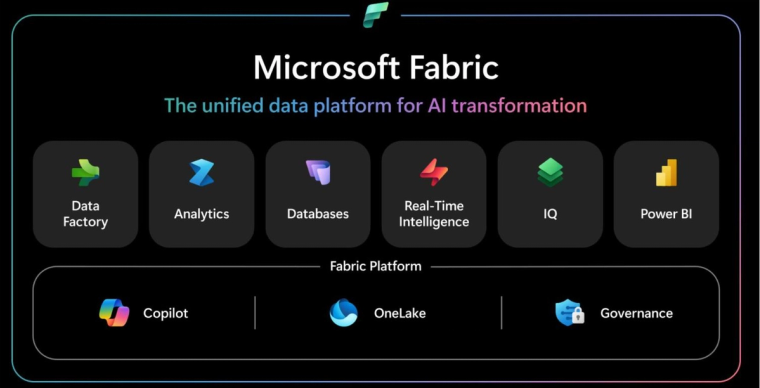
Fabric is a set of workloads that share one storage layer and one compute meter. The storage layer is OneLake, a single lake for the whole organisation where every table is stored once in the open Delta Parquet format, whichever engine wrote it. The workloads are Data Factory for moving and transforming data, Data Engineering for Spark and lakehouses, Data Warehouse for SQL, Real-Time Intelligence for streaming and event data, Data Science for machine learning, Databases for operational SQL inside Fabric, and Power BI for reporting, with Fabric IQ and the ontology layer added in 2026 to describe the business meaning on top. The compute meter is a capacity, bought as an F SKU (F2 upwards, doubling at each step) or, since the on-demand option announced at FabCon Europe in October 2026, paid per hour used, and every workload draws from it. The practical consequence is that a pipeline, a notebook, a warehouse query and a Power BI report all run against the same tables without copying data between services. Microsoft's own overview groups the workloads as Data Factory, Analytics, Databases, Real-Time Intelligence, IQ and Power BI, sitting on a platform of Copilot, OneLake and governance.
What Fabric replaces
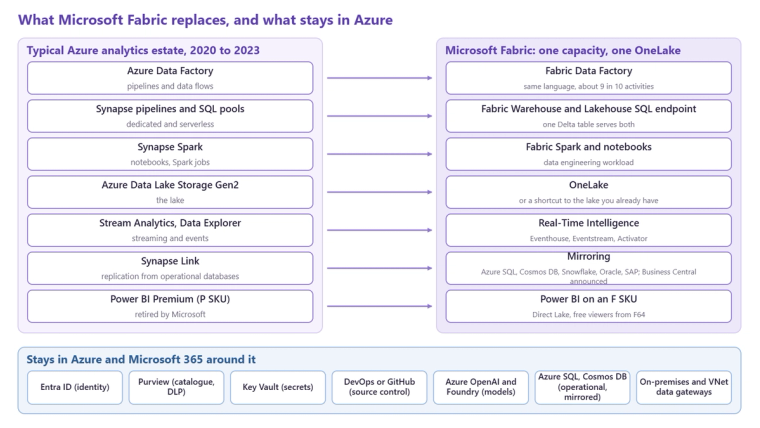
If you drew a typical Azure analytics estate from 2020, each box maps to a Fabric workload. Azure Data Factory becomes Fabric Data Factory, with the same expression language and about nine in ten of the same activities; our comparison of the two goes through the differences. Synapse pipelines, dedicated SQL pools, serverless SQL and Synapse Spark become Fabric pipelines, the Fabric warehouse, the lakehouse SQL endpoint and Fabric Spark. Azure Data Lake Storage Gen2 becomes OneLake, or stays where it is and is exposed through a shortcut. Stream Analytics and Data Explorer become Real-Time Intelligence. Power BI Premium P SKUs became F SKUs when Microsoft retired them. Synapse Link becomes mirroring, which replicates Azure SQL, Cosmos DB, Snowflake, Databricks, Oracle and SAP sources into OneLake without a pipeline, with Business Central mirroring announced for a 29.1 update.
Can Fabric replace a separate warehouse and BI tool?
Yes, and for most mid-market businesses that is the point. The warehouse and the BI layer are both inside Fabric, so a business running a SQL warehouse plus Power BI, or a lakehouse plus a BI tool, can run both on one capacity with no data movement between them. Power BI's Direct Lake mode reads the Delta tables in OneLake directly, which removes the import refresh that a separate warehouse and BI tool need. The honest qualification is scale and specialism: a business with heavy Spark engineering at very large volumes, or a committed Databricks or Snowflake estate, may keep that engine and use Fabric for the semantic layer and reporting, which is what our Fabric, Databricks and Snowflake comparison walks through. For a company whose questions are about finance, sales, operations and customers across a handful of systems, Fabric on its own is enough.
What Fabric does not replace
Fabric is an analytics platform, not an application platform. Your ERP, CRM, warehouse management and e-commerce systems stay where they are and feed it. Microsoft Entra ID remains the identity layer; Fabric uses it rather than replacing it. Microsoft Purview remains the governance catalogue and data loss prevention engine, extended into Fabric rather than duplicated by it. Azure Key Vault still holds secrets. Azure DevOps or GitHub still hold source control, connected to Fabric through Git integration and deployment pipelines. Azure OpenAI and Foundry still host the models an AI agent runs on, while Fabric holds the governed data the agent reasons over. Operational databases such as Azure SQL and Cosmos DB stay operational; Fabric mirrors them for analytics rather than taking them over.
How Fabric sits with the Azure you already run
Three patterns cover most estates. First, if you have an existing data lake in ADLS Gen2, you do not migrate it; you create a OneLake shortcut to it and Fabric reads it in place. Second, if you have existing Data Factory or Synapse pipelines, they keep running, and you move them when there is a reason to, using Microsoft's upgrade tooling for eligible pipelines; new features are not being added to Data Factory or Synapse, so the direction is clear even if the timing is yours. Third, on-premises sources connect through the on-premises data gateway, and private Azure sources through a virtual network data gateway deployed in your own VNet, so a Fabric rollout does not require opening anything to the internet. The licensing side is simpler than the old estate: one capacity replaces several service bills, Power BI Pro licences are still needed to author content, and from F64 upwards report viewers need no paid licence at all. Our capacity guide explains how to size it.
Where to start
If you are deciding whether Fabric is right for you, the test is not the feature list but the shape of your estate: more than one source system that needs to be reported together, a reporting layer somebody rebuilds in Excel, or an ambition to put AI agents over governed data. Do you need Fabric? is our short self-assessment, and Microsoft Fabric for the mid-market sets out when it is the wrong answer. If the answer is yes, our Microsoft Fabric page describes how we approach the build.
Related reading
Fabric capacity: a plain English guide to not getting a shock on your invoice
When to use shortcuts, mirroring, pipelines or dataflows in Fabric
Fabric, Databricks, Snowflake: a capability by capability comparison
Simon Devine
Managing Director
Part of the Hopton Analytics team, delivering governed analytics programmes for UK mid-market organisations.