
The Dataverse semantic model teaches Copilot and agents what your Dynamics 365 and Power Apps data means. How it is built, which experiences use it, how it differs from a Power BI semantic model, and what to tidy before you rely on it.
Ask Copilot a question about your Dataverse data and it has to work out what your tables and columns mean before it can answer. The Dataverse semantic model is Microsoft's way of giving it that understanding up front. It went into preview in June 2026, and Microsoft's roadmap lists general availability for November 2026.
If you run Dynamics 365 or Power Apps on Dataverse and you are switching on Copilot or building agents, this is the setting that decides how well they understand your business. Here is what it is, how it is built and what to tidy before you rely on it.
What is the Dataverse semantic model?
It is a layer that sits over your Dataverse tables and describes what the data means, so agents and Copilot can answer from business meaning rather than raw table and column names. Microsoft provisions it automatically once Dataverse intelligence is switched on, so there is nothing to build before you start. It is now part of Business Applications in Work IQ, the part of Microsoft 365 Copilot that understands business application data.
Microsoft says it improves accuracy, speeds up responses, cuts set-up time and keeps answers consistent when several agents share the same model.
How it is built
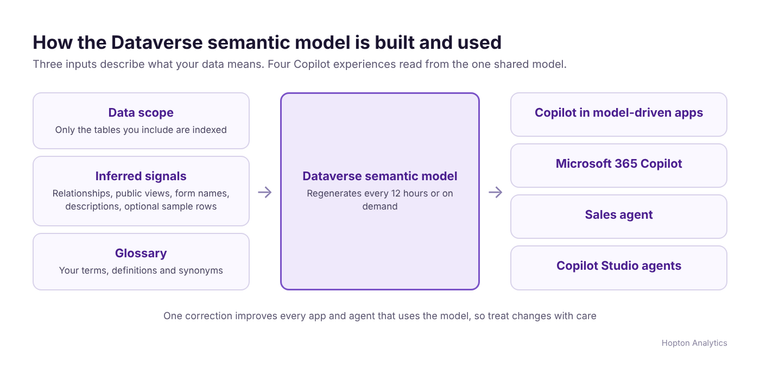
The model has three parts.
- 1A data scope. Only the tables you include are indexed and used.
- 2Signals inferred from what you already have. These are table relationships (one-to-many and many-to-many), public views and sub-grid views with their join conditions, form display names, table and column descriptions, and, if you switch them on, sample rows of data. Sample rows are off by default.
- 3A glossary that your makers curate, with a term, a definition and synonyms for each entry. This is where you teach it that "VP" means a particular job title, or that "key account" means a value in a specific column.
Some things are left out: system views such as Quick Find and Lookup views, personal views, and polymorphic relationships. The model regenerates every 12 hours, or on demand. The first build can take up to 2 hours, and later changes up to 30 minutes.
Where it is used
Four experiences use the model automatically:
- Copilot in model-driven Power Apps
- Microsoft 365 Copilot working with Dataverse data
- the Sales agent in Microsoft 365
- Copilot Studio agents that use Dataverse tables as a knowledge source
Because one model is shared, a correction you make improves every app and agent that uses it. It also means one careless change affects all of them.
How it relates to Power BI semantic models
They solve the same problem in different places. A Power BI semantic model describes your reporting data, and Fabric IQ uses it to ground Copilot's answers about your numbers. The Dataverse semantic model describes your operational business application data and sits on the Work IQ side. Microsoft has not documented a link between the two, so treat them as separate pieces that both need looking after. The principle is the same one we set out in Microsoft Fabric IQ: sort your definitions first: an AI answer is only as good as the definitions underneath it.
What you need
- A recent Dataverse version with Dynamics 365 apps enabled.
- The System Administrator role, or the Semantic Model role together with Environment Maker.
- The Microsoft 365 admin center setting that makes business applications data in Work IQ available to Copilot, switched on for everyone or for chosen groups.
- Copilot, Dataverse search and data availability in Microsoft Copilot enabled for the environment in the Power Platform admin center.
You will find the model in Power Apps under Discover all, then Semantic model.
What to check before you rely on it
- 1Descriptions. Table and column descriptions are one of the signals. If most of yours are blank, write them for the tables agents will use.
- 2Views. Public views and their joins teach the model how your data fits together. Remove or fix views that are out of date.
- 3Scope. Include only the tables agents should answer from. Leave out staging, integration and audit tables.
- 4Glossary. Add your organisation's own terms, abbreviations and synonyms, especially where your words differ from Microsoft's.
- 5Sample rows. Decide deliberately whether to switch them on, since they expose real data values to the model.
- 6Environment copies. In preview the model does not carry over when you copy or move an environment, and there is no ALM support yet. Microsoft plans ALM support for general availability.
What to do now
Pick the tables your first agent or Copilot use case depends on and get their descriptions, views and glossary into shape. It is an afternoon of work per area, and it will pay back every time someone asks Copilot a question. If you want help deciding where to start, or want the same discipline applied to your reporting data, book a free audit.
Related reading
- AI and analytics
- Fabric IQ and Copilot on your semantic model: a practical guide to conversational analytics
- Your semantic model just became more important, not less
- Power BI and Power Apps: how they actually work together
Shauna Duffy
Director of Professional Services
Part of the Hopton Analytics team, delivering governed analytics programmes for UK mid-market organisations.