
Microsoft Fabric policies, now in preview, let administrators enforce condition-based rules for external data sharing, item creation and workspace settings. Here is how tenant and capacity scopes work, why a single rule turns a policy into an allow list, and the order we would introduce them.
Most Fabric governance so far has been a choice between two blunt instruments. A tenant setting switches a feature on or off for everyone, or for one security group, and that is as fine-grained as it gets. Anything subtler, such as allowing external sharing only from two workspaces to two partner domains, has meant a written policy, a monthly review and a hope that people read it.
Microsoft Fabric policies, now in preview, are the first proper attempt to change that. They let an administrator write rules with conditions (which workspaces, which security groups, which sensitivity labels, which item types) and have Fabric enforce them, log the result and expose the whole thing through REST APIs and Git. This post explains how they work, what the three available policies do, the behaviour that catches people out, and what we would set up first.
Everything here is based on Microsoft's Fabric policies overview as it stands in October 2026. It is a preview feature, so expect the details to move.
What a Fabric policy is
A policy is a Fabric item. It is called a policy set, it lives in a workspace like a notebook or a lakehouse does, and it appears in the New item dialog alongside them. That one design decision explains most of what follows: because a policy is an item, it can be versioned in Git, deployed through CI/CD, created and edited through the REST APIs, and locked down with ordinary workspace permissions.
Each policy set has three parts.
- An admin scope, either Tenant or Capacity. You choose this when you create the item and it cannot be changed afterwards.
- A set of rules. Each rule has a system-generated ID, a display name and description, one or more conditions, and an effect. Conditions within a rule are combined with AND. The only effect currently available is Allow.
- An activation state. A policy set does nothing until an administrator activates it, and only one policy set can be active per scope at a time.
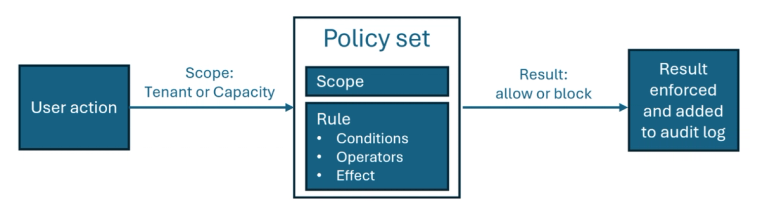
The evaluation runs in a fixed order. A user attempts a governed action. Fabric works out which scope applies, loads the active policy for that scope, and checks whether the policy has any rules. If it has none, the policy's default behaviour applies and evaluation stops. If it has rules, Fabric tests the conditions. A matching rule allows the action. No match blocks it. Either way the result is enforced and recorded in the Fabric audit logs.
Tenant scope and capacity scope
The two scopes map to the two kinds of administrator Fabric already has.
A Tenant policy applies across the whole organisation and can only be activated by a Fabric administrator. A Capacity policy applies to the workspaces assigned to a specific capacity and is activated by that capacity's administrator. A tenant administrator sees every scope in the Policies center; a capacity administrator sees only the capacities they look after.
This is useful in a mid-market estate where IT owns the tenant but a finance or operations team has its own capacity. The central team can set the organisation-wide rules and leave the capacity owner to decide, for example, which item types their own users may create. The two do not have to agree on everything, and neither has to wait for the other.
One workspace can hold policy sets for several scopes. Microsoft recommends a dedicated, secured administrative workspace for all of them, and that is sound advice. A policy set sitting in a shared project workspace is one accidental edit away from blocking production work.
Where you manage them
Active policies are managed from the Policies center, which sits on the Govern tab of the OneLake catalog. It shows policies grouped by scope, their status (set by an administrator or still on the system default) and the action type in force: Allow all, Blocked or Advanced. Rules are created, edited and deleted here, and the audit log is monitored from here too.
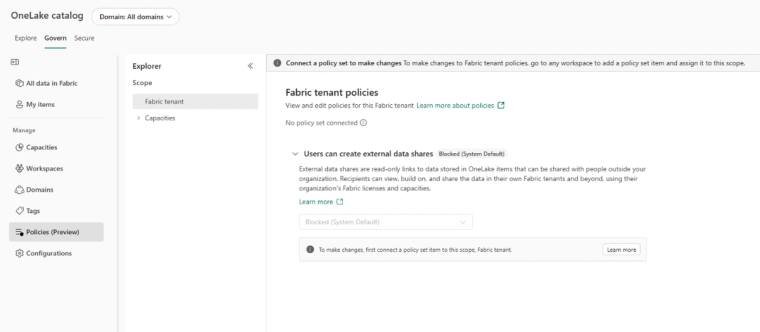
A policy set only appears in the Policies center once it has been activated. Until then it is just an item in a workspace, which is why the preview tenant setting that governs who can create policy sets matters. Creating one does nothing. Activating one changes behaviour for everybody in scope within about fifteen minutes.
The three policies available today
The preview ships with three policies. Each has a scope and a default that applies when the active policy has no rules.
- Allow external data sharing. Tenant scope. Default is Block all. This governs who can create external data shares, from which workspaces, and to which recipient email domains.
- Allow item creation. Capacity scope. Default is Allow all item types. This governs which item types users can create in the workspaces on that capacity.
- Allow workspace settings editing. Tenant scope. Default is Allow editing of all workspace settings. This governs which workspace administrators can change particular workspace settings.
The conditions you can use depend on the policy. Workspaces and security groups are available to all three, with a limit of 50 of each per rule. Sensitivity labels are available to selected policies and include a No label option, so you can write a rule that only applies to unlabelled items. Recipient email domain belongs to the external sharing policy, item type to the item creation policy, and workspace settings to the workspace settings policy.
ID-based conditions (security groups, workspace IDs, sensitivity labels) use two operators. AnyOf is true if the value matches any of the listed items. NoneOf is true only if it matches none of them. Any condition you leave unspecified evaluates to true.
The allow-list behaviour that catches people out
This is the part worth reading twice. The moment a policy set contains a single rule, it stops being a default and becomes an allow list. Anything that does not match a rule is blocked.
Microsoft's own example makes the consequence clear. Suppose you want to stop Dataflow Gen2 items being created in your two production workspaces by anyone outside a named group. You write one rule: security group AnyOf DataflowGen2-Creators, workspace AnyOf Prod-Analytics and Prod-Reporting, item type AnyOf DataflowGen2. Activate that alone and you have also blocked every other item type, in every other workspace on the capacity, for everyone. The policy now allows exactly one thing.
The fix is a second rule: workspace NoneOf Prod-Analytics and Prod-Reporting, with no other conditions. That rule matches any item creation outside the two production workspaces and allows it. Together the two rules say what you actually meant.
So the mental model is not "add a restriction". It is "describe everything that should be allowed, and accept that the rest is now blocked". For the external sharing policy that is comfortable, because its default is already Block all and any rule you add can only open something up. For item creation and workspace settings, whose defaults are Allow all, the first rule you write silently flips the posture of the whole scope. Test with a user who is in the security group and one who is not before you activate anything in production. Microsoft recommends exactly that, and we would go further and do it on a non-production capacity first.
Policies as code
Because a policy set is an item, the usual Fabric lifecycle tooling applies. Rules are stored as JSON. Microsoft's example for external sharing has a single rule with three conditions: Principal.UserAndSecurityGroup AnyOf two groups, Workspace.Id AnyOf two workspaces, and EDS.RecipientEmailDomain AnyOf two partner domains, with the effect Allow. Sharing is permitted only when all three are true.
That JSON can live in a Git repository, move through deployment pipelines and be managed by a service principal through the REST APIs. For an organisation that already treats its lakehouses and semantic models as code, governance rules can now sit in the same repository and go through the same review.
There is one deliberate exception. Activation cannot be done through Git. Someone with the right administrator role has to activate the policy set in Fabric. That is the right design, because it means a merged pull request cannot by itself change what thousands of users are allowed to do, but it does mean your release process needs a human step at the end.
Limits, cost and where it is available
The numbers to plan around are modest. A tenant-scoped policy can hold up to 100 rules and a capacity-scoped policy up to 50. Each condition can hold up to 50 values, and each rule up to 50 workspaces and 50 security groups. Changes take effect within fifteen minutes of activation.
Policies are included in the Fabric licence and do not consume capacity units, so there is no sizing conversation to have. If your capacity is already tight for other reasons, our guide to sizing Fabric capacity covers that separately.
Regional availability is the detail UK and Irish organisations should check first. At the time of writing the preview is not supported for capacities in West Europe, North Europe or West US. UK South and UK West are not on that list. If your capacities were provisioned in North Europe or West Europe, which is common for Irish tenants and for UK tenants set up before the UK regions matured, you will not see the feature yet.
What we would set up first
The temptation with a new governance feature is to model the whole organisation on day one. Resist it. Three steps get most of the value with little risk.
Start with external data sharing. Its default is Block all, so adding rules can only open controlled routes rather than close ones you forgot about. If you share OneLake data with an auditor, a group company or a logistics partner, write a rule that names the workspaces, the group of people allowed to share, and the partner domains. That is a governance control you can describe to a board in one sentence.
Then look at item creation on your production capacity. The question to ask is not "what should we ban" but "who should be allowed to create what, where". Write the allow rules for your production workspaces, add the NoneOf rule that leaves the rest of the capacity alone, and test with both kinds of user.
Leave workspace settings editing until you have a clear reason. Its default is permissive, the setting-by-setting conditions take some thought, and a mistake blocks workspace administrators from doing routine work.
None of this replaces the basics. Policies enforce decisions; they do not make them. If your estate has not yet agreed which workspaces are production, who owns them, or what a sensitivity label means, a policy set will codify the confusion. The workspace readiness checks we described earlier this year and our lightweight governance framework are the groundwork. Fabric policies are the first native tool that lets you enforce the result without a document nobody reads.
Hopton is a Microsoft Solutions Partner building and governing Fabric estates for organisations across the UK and Ireland. Our Microsoft Fabric and data platform pages describe how we approach platform build and governance, and our data governance FAQs answer the common questions. If you would like help deciding what to allow and what to block before you activate a policy set, talk to us or start with a free audit.
Related reading
Microsoft Fabric IQ: Sort Your Definitions First
Data model or ontology? What the meaning layer actually looks like on a Microsoft estate
James Morley
Analytics Solutions Consultant
Part of the Hopton Analytics team, delivering governed analytics programmes for UK mid-market organisations.