
Four weeks to establish, ten to sixteen to migrate, a month end in parallel. The BI migration timeline, and the rules that keep reporting running.
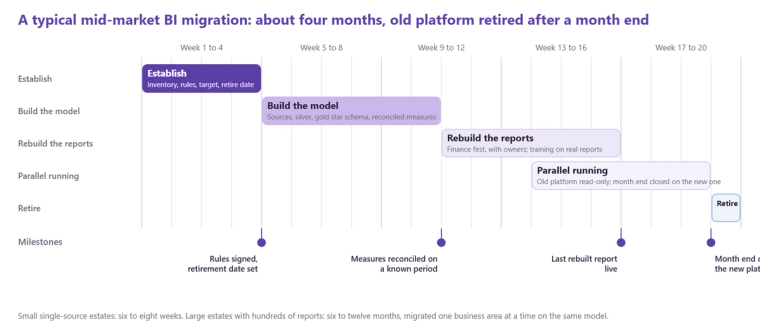
A BI migration for a mid-market business takes about four months end to end: a four-week Establish phase to inventory reports, extract the business rules and agree the target model, then ten to sixteen weeks to build the model and rebuild the reports that matter, with one to three months of parallel running that overlaps the end of the build. A small estate with one source and a dozen reports can be done in six to eight weeks. A large estate with hundreds of reports, several sources and complex security is a programme of six to twelve months, migrated one business area at a time. The same applies when the migration is driven by an ERP change rather than a BI tool change. Reporting keeps running throughout because the old platform is not switched off until the first month end has closed on the new one, and this post sets out the timeline and the rules that make that true.
Weeks one to four: Establish
The inventory comes first: every report, from usage logs and from owners, sorted into rebuild, convert temporarily, retire, or hand to its owner. Then the rules: every calculated field, load script transformation and security rule extracted into a definitions document and signed by finance, because this is the only point at which the old platform can still be asked what it does. Then the target: the star schema, the sources, the capacity, and the order of business areas. The output is a plan with a retirement date for the old platform in it. Should you rebuild or lift and shift? is the decision this phase makes report by report.
Weeks five to ten: the model
The shared model is built before any report: sources landed, silver conformed, gold star schema, measures defined once and reconciled to the old platform on a known period. For an ERP migration this is also where history from the old system is extracted and conformed with the new. This is the phase that tests the sponsor's patience, because nothing visible appears for several weeks, and it is the phase that makes everything after it fast. How do you migrate reporting from NAV to Business Central? shows the ERP version.
Weeks eleven to sixteen: the reports
The rebuild list is worked in priority order, finance first because month end is the acceptance test, each report built with its owner and reconciled to the old one. Converted reports, if any, are produced in parallel and flagged as temporary. Training runs here, on the real reports rather than on features.
Parallel running and the switch
From the first finance report onwards, both platforms are live. The rule is that the old platform becomes read-only, with no new reports built on it, and that the first month end is closed on the new platform with the old one open beside it for reconciliation. If the numbers agree, the old platform is retired on the date agreed in week four. If they do not, the discrepancy is a defect in the new model to be fixed, not a reason to extend parallel running indefinitely. One to three months is normal; longer than that usually means the retirement date was never really agreed.
The five rules that keep reporting running
Never switch the old platform off before a month end has closed on the new one. Keep the old platform read-only from the start of parallel running. Extract history from a retiring source before it is decommissioned, not after. Reconcile every rebuilt measure on a known period before anyone uses it for a decision. Give every retired report an owner who agreed to its retirement. A migration that follows those five does not lose reporting; most of the horror stories come from breaking the first one. The pipeline ran is not the same as the data is right covers the checks that support the fourth.
What stretches the timeline
Undocumented rules found late, an ERP go-live that moves, security that lives in someone's head, and a long tail of reports that nobody will agree to retire. None of them is technical. The Establish phase exists to surface all four before the build starts, which is why skipping it to save four weeks typically costs eight. How much does a migration cost? covers the budget side, and our free audit will give you a timeline for your own estate.
Related reading
Should you rebuild or lift and shift your reports when migrating BI platforms?
How do you migrate from QlikView to Power BI? Lessons learned the hard way
How long does a Microsoft Fabric implementation take?
Why we deliver analytics in fixed, outcome-based phases
Claire Harper
Projects Director
Part of the Hopton Analytics team, delivering governed analytics programmes for UK mid-market organisations.