
Three ways in, one copy of the tables, every engine reading it. How Business Central data lands in OneLake, what mirroring changes, and what sits on top.
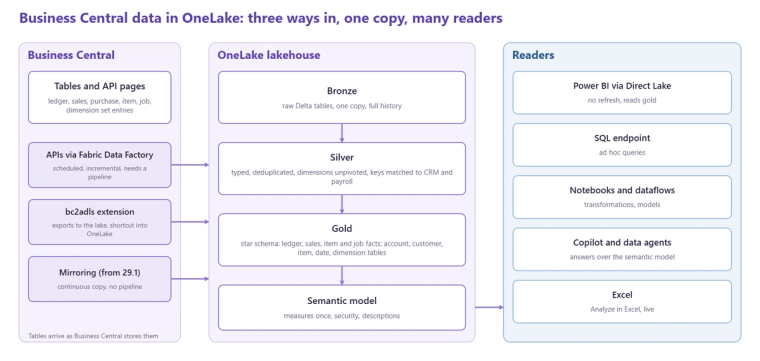
OneLake works with Business Central data by holding one copy of each Business Central table as a Delta table in a Fabric lakehouse, landed by one of three routes, Business Central's APIs through Fabric Data Factory, the bc2adls extension exporting to the lake, or, from release 29.1, mirroring, which keeps a continuous copy without a pipeline, and then letting every Fabric engine read that copy: notebooks and dataflows transform it, the SQL endpoint queries it, Power BI reads it through Direct Lake with no refresh, and Copilot and data agents reason over the semantic model built on it. The ERP's data is landed once, cleaned and conformed in silver, modelled into a star schema in gold, and nothing is copied again. For a single company with standard questions the standard Power BI connector is still enough; OneLake is the route when there is a group to consolidate, other systems to combine, a query load the API cannot carry, or an ambition to put AI over governed data. This post explains the three routes in, what mirroring changes, what sits on top, and what it costs.
Route one: the APIs through Fabric Data Factory
Business Central exposes its tables as API pages, and a Fabric Data Factory pipeline or Copy job reads them on a schedule, incrementally where the entity supports it, and writes Delta tables into a bronze lakehouse. It is the route most estates use today: it works on every Business Central version, it handles custom API pages, and it needs a pipeline to own. Its limits are the API's throughput and the eight to 48 refreshes a day that most people run. What is the OData API in Business Central and how is it used for reporting? covers the API side.
Route two: bc2adls
Microsoft's open-source extension exports Business Central tables to Azure Data Lake Storage, and a OneLake shortcut makes those files appear inside the lakehouse without copying them, or a pipeline converts them to Delta. It is the right route for large tables and full history, it runs inside Business Central rather than against the API, and it is supported by the community rather than as a product. OneLake in plain English explains shortcuts.
Route three: mirroring
Announced at FabCon Europe in October 2026 and expected in preview from release 29.1, mirroring for Business Central keeps a continuous copy of selected tables in OneLake as Delta tables, with no pipeline to schedule and changes arriving in near real time. It changes the landing step, which becomes configuration rather than engineering, and it does not change anything above it: the data still arrives as Business Central's tables, dimension set entries and all, and still needs the silver and gold layers before it is a report. How do you get real-time financial reporting from Business Central? covers what mirroring does and does not give you.
What sits on top
Silver: the tables cleaned, typed, deduplicated, with dimension set entries unpivoted into usable columns and keys matched to the CRM, payroll or project systems that land beside them. Gold: a star schema of ledger, sales, purchase, item and job facts with account, customer, item, date and dimension tables. The semantic model: measures defined once, security, descriptions, read by Power BI through Direct Lake. Above that, everything that reads the model: reports, Excel, Copilot, Fabric data agents and Fabric IQ. From Business Central to Fabric: the medallion architecture blueprint is the layer-by-layer version.
What it costs and when it is worth it
A Fabric capacity from £138 a month reserved for an F2, with an F4 to F16 typical for a first platform, OneLake storage at £0.0181 per gigabyte per month, and Power BI Pro at £10.80 per author. The build is ten to sixteen weeks after a four-week Establish phase. It is worth it when there is a group to consolidate, a second system to combine, a query load the API cannot carry, or AI on the roadmap, and not worth it for one company with standard questions. Business Central to Microsoft Fabric: when it is worth it is the test and how much does Business Central analytics cost? the figures. Our Business Central analytics page describes how we build it and the free audit will tell you which route in fits your estate.
Related reading
OneLake in plain English: one copy of your data, many tools
From Business Central to Fabric: the medallion architecture blueprint
How do you get real-time financial reporting from Business Central?
Business Central to Microsoft Fabric: when it is worth it
Kiran Sahiba
Analytics Solutions Consultant
Part of the Hopton Analytics team, delivering governed analytics programmes for UK mid-market organisations.