
Most Power BI developers know version control is good practice and have never started, because PBIX is a binary file and Git made it awkward. PBIP changes that, and the AI tooling Microsoft is building assumes you have made the switch.
Ask a room of Power BI developers whether they use source control and most will say they know they should. Ask why they do not and the answer is nearly always the same: it never worked properly. Which was true, and is no longer the main obstacle.
This post explains what changed with PBIP, what the Git workflow actually looks like end to end, how to set it up, and why the agentic AI authoring demonstrated at FabCon Europe 2026 treats PBIP as a prerequisite rather than a preference. It is written for developers who have not used source control before, so the Git concepts are explained rather than assumed.
Why PBIX and Git were a poor fit
A PBIX file is a single binary package. Git is very good at tracking text files line by line and effectively blind to what is inside a binary one. The consequences were familiar to anyone who tried:
- Committing a PBIX stored the whole file every time, so the repository grew quickly.
- A diff told you the file changed but not what changed, so review was impossible beyond "Dave says he added a measure".
- Two people working on the same report could not merge their work. One of them had to redo it.
- Because the semantic model and the report layout lived in the same opaque package, you could not separate a model change from a visual tweak.
So teams fell back on the file-naming convention everybody recognises: Sales Report v4 FINAL v2 Jamie EDIT.pbix. It is a version control system. It is just a bad one, with no history, no review and no way to answer what changed and why.
What PBIP changes
The Power BI Project format saves the same work as a folder of plain-text files rather than one binary package. The semantic model definition and the report definition are stored separately, as readable files describing tables, relationships, measures and visuals.
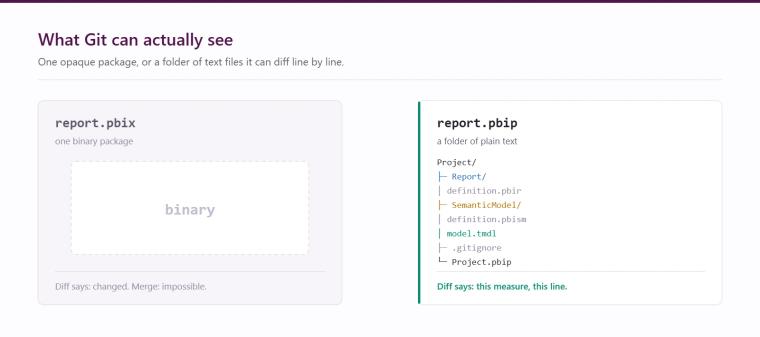
This single change makes everything else possible:
- Git can diff a measure change and show you the exact line.
- Two developers can work on different parts of a report and merge cleanly.
- A pull request can be reviewed by a colleague who reads what changed rather than opening the file and hunting.
- Because model and report are separate, a change to a DAX measure is reviewable on its own, without visual noise.
It also means the definition of your report is, finally, code. That has consequences beyond tidiness.
The workflow, in plain terms
For developers new to source control, here is the loop with the Git terms explained as they arrive.
- Clone. A repository is the project's folder with full history attached, stored centrally in Azure DevOps or GitHub. You clone it once to get a local copy on your machine.
- Branch. Before changing anything you create a branch: your own named copy of the project, for example add-margin-measures. Work on a branch cannot affect what anyone else sees until you choose to share it, which removes the fear of breaking a live report while experimenting.
- Work. Open the PBIP folder in Power BI Desktop and work normally. Desktop saves changes back into the project folder as text files.
- Commit. A snapshot with a short message explaining what you did and why. Good commit messages are the history your future colleague actually reads, so "add margin measures and fix date table relationship" beats "changes".
- Push. Send the branch and its commits to the central repository.
- Pull request. Ask for your branch to be merged into the main one. A colleague reviews the specific lines that changed, comments if needed, and approves. On merge your work becomes part of the main version, with a permanent record of what changed, when, and who approved it.
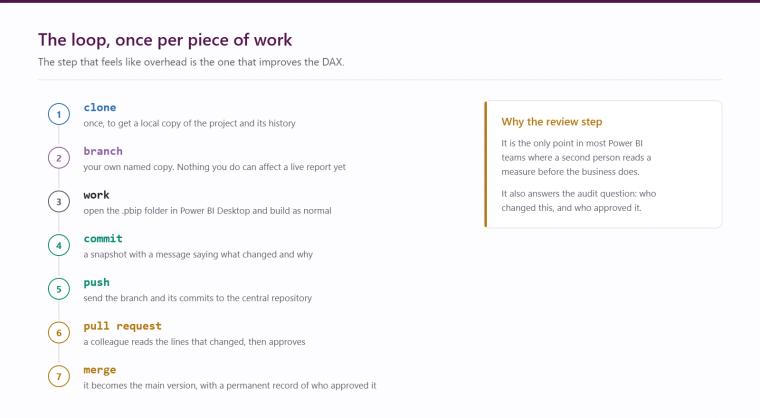
The step that feels like overhead at first, the pull request, is the one that most improves quality, because somebody reads your DAX before it reaches the business.
Setting it up
The setup is more straightforward than its reputation.
- Enable the Power BI Project format in Power BI Desktop under Options and settings, then Preview features, and save your report as a .pbip rather than a .pbix. You will get a folder, not a file.
- Create a repository in Azure DevOps or GitHub to hold it. Azure DevOps tends to suit organisations already in the Microsoft estate; GitHub suits teams working with external collaborators.
- In the Fabric workspace, use workspace settings to connect to that repository and branch. The workspace can then sync in both directions, so changes committed in Git can be applied to the workspace and changes made in the workspace can be committed back.
- Clone the repository locally, open the PBIP folder in Desktop, and work as normal.
The habit to build early is branching per piece of work rather than committing straight to main, because that is what makes review possible.
The honest caveats:
- Merge conflicts in report layout files are harder to resolve than conflicts in DAX.
- Large semantic models produce large definition files.
- The discipline of small, frequent commits takes a few weeks to become natural.
None of this outweighs the benefit, but it is work rather than magic.
Why this matters more now: AI needs code to read
Here is the part that turns version control from good hygiene into a strategic decision.
The agentic authoring workflows demonstrated at FabCon Europe 2026, and the broader direction Microsoft is taking with Fabric IQ, Copilot and MCP-based tooling, all depend on the report and model being readable as code. An AI agent in VS Code or a similar environment can open a PBIP project, read the semantic model definition, understand the measures and relationships, and make a structured change you review as a diff. It cannot do any of that with a binary PBIX. There is nothing for it to read.
PBIP is best understood as the prerequisite rather than the feature. Teams that adopt it now will be able to use AI-assisted authoring as it matures, with review and history already in place. Teams that stay on PBIX will not be excluded by a licensing decision; they will simply have no code for the tooling to work with, and will be adopting source control under pressure later rather than calmly now.
The same logic applies to governance. Once report definitions are in Git you can answer the questions auditors and finance directors actually ask: who changed this measure, when, what did it look like before, and who approved it. That is a data governance capability you get almost free as a side effect.
Where to start
Pick one report that matters but is not business-critical this week. Save it as a PBIP, put it in a repository, and run one change through the full loop: branch, commit, push, pull request, merge. The whole exercise takes an afternoon, and it converts source control from an abstract good practice into something your team has actually done once.
Hopton builds Power BI and Fabric estates for organisations across the UK and Ireland as a Microsoft Solutions Partner, and development standards like this are part of how we deliver. Our Power BI page covers the wider service, and if you want help putting proper development practice around an existing estate, the free audit is a good starting point or you can talk to us directly.
Related reading
Power BI reports can now write back: what that actually changes
Row-level security done right: when everyone should see only their own numbers
DEV, TEST, PROD: why business-critical Power BI needs somewhere safe to be wrong
Maisie Hudson
Analytics Consultant
Part of the Hopton Analytics team, delivering governed analytics programmes for UK mid-market organisations.