
"The numbers changed while I was looking at them" is one of the most corrosive complaints a data team can receive. Warehouse snapshots separate the stable reporting view from the live engineering layer, without duplicating anything.
There is a particular complaint that does more damage to trust than almost anything else: the numbers changed while somebody was looking at them. A finance analyst runs a report at 8:40, runs it again at 9:05 for a colleague, and the totals differ. Nothing is broken. The overnight pipeline was still finishing, or a mid-morning reload was underway. But the explanation rarely lands, because what the business heard was that the numbers are unreliable.
Warehouse snapshots in Microsoft Fabric are the clean answer. They let engineering work continue against the live warehouse while reporting users read a consistent, known-good state.
What a warehouse snapshot actually is
A warehouse snapshot is a read-only representation of a Fabric warehouse at a specific point in time. It is created as a child item of the parent warehouse and queried with ordinary SELECT statements.
The important mechanical detail is that it does not duplicate data. It creates no Parquet files and has no separate storage of its own, relying instead on the Delta versioning already present in the warehouse. You are not paying for a second copy and you are not waiting for one to be built.
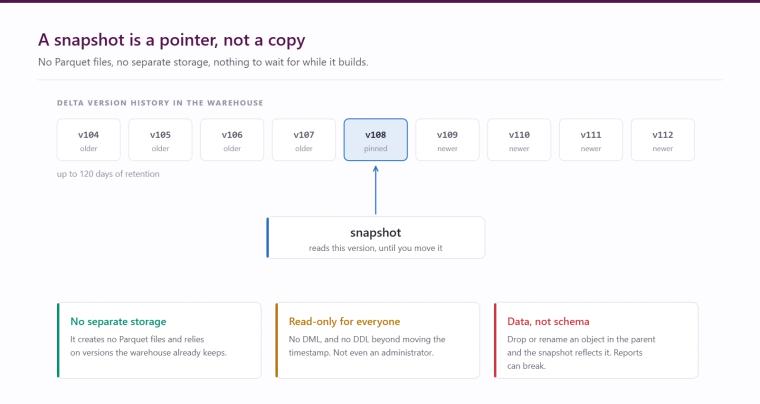
The snapshot datetime is set at creation and can be any point within the parent warehouse's configured retention period, up to 120 days in the past. That retention is inherited from the parent at creation time and cannot be configured per snapshot.
Creating one, and moving it forward
A snapshot is created against the parent warehouse with a chosen timestamp, either in the Fabric portal or through T-SQL. Users with administrator, member or contributor roles can create and manage them.
The operation that makes the pattern work is rolling the snapshot forward. You can update the snapshot's timestamp at any time, and the change completes instantly and atomically. Queries already running finish against the version they started with, so nobody sees a report half-change underneath them. A T-SQL query against the snapshot reports the timestamp of the data version being served, which is how you confirm what consumers are actually reading.
Reporting consumers connect through the snapshot's own SQL endpoint, or through a consistent warehouse connection string pointed at the past version. From the consumer's point of view it behaves like the warehouse, simply frozen at a known moment.
Why this matters operationally
Without snapshots the choice is between letting users read the warehouse while it is being written to, which produces the inconsistency above, or building a window where reporting is unavailable or stale while work completes. The first erodes trust, the second erodes usefulness.
With snapshots, engineering can run loads, backfills and corrections against the live warehouse throughout the day while reporting users continue to read yesterday evening's validated state. The reporting layer only moves when somebody decides it should, which is after the data has been checked rather than simply after it has arrived.
It is also a recovery tool. If an ETL process corrupts data, a snapshot taken before the run gives you a queryable version of the warehouse as it was, which is a considerably calmer position than reconstructing history under pressure.
The limitations that decide whether this fits
There are several, and one is decisive for many estates.
- Direct Lake is not supported. Warehouse snapshots require DirectQuery or Import mode in Power BI. If your reporting is built on Direct Lake semantic models over the warehouse, which is increasingly the default for Fabric estates, this pattern does not apply to those models as things stand. Check this first.
- Read-only for everyone, regardless of permission. No DML, and no DDL other than updating the snapshot timestamp. You cannot create views or table-valued functions inside a snapshot.
- Stability applies to data, not schema. If a table, view or stored procedure is dropped, renamed or altered in the parent warehouse, the snapshot reflects that structural change and reports can break even though the data is pinned. Objects modified after the snapshot timestamp become invalid in the snapshot.
- Security is inherited and live. Permissions come from the source warehouse, and GRANT, DENY, REVOKE and UNMASK changes apply immediately regardless of the snapshot timestamp. Somebody whose access is removed loses access to the snapshot at the same moment, which is correct behaviour but worth stating to anyone assuming a snapshot is a frozen copy in every sense.
- Not supported on the SQL analytics endpoint of a lakehouse, and cannot be used as a source for OneLake shortcuts. Restoring a warehouse does automatically restore its associated snapshots.
The pattern we use
Where the Direct Lake constraint allows it, the implementation is straightforward and worth standardising.
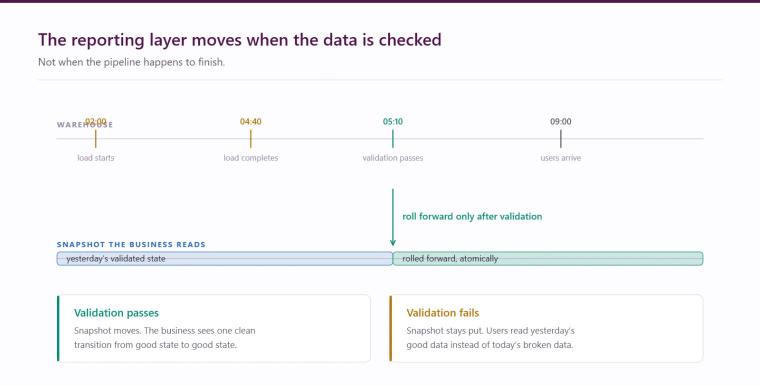
- Point your reporting consumers at the snapshot rather than the warehouse, permanently. They never query the live warehouse again, which removes the inconsistency problem by construction rather than by scheduling.
- Run the overnight pipeline against the live warehouse as normal.
- Validate: row counts against expectations, reconciliation of key totals, confirmation that critical loads completed.
- Only once validation passes, an automated step rolls the snapshot forward to the post-load timestamp.
The effect is that the business sees a single clean transition each morning from one validated state to the next. If the overnight run fails or validation does not pass, the snapshot is not rolled forward and users continue to read yesterday's good data rather than today's broken data. That is a far better failure mode than the usual one, where a failed load is discovered because someone in finance noticed the revenue figure looked odd.
For estates where Direct Lake is the reporting foundation, the equivalent discipline has to be achieved differently, usually through controlled framing after validation rather than snapshots. The principle is the same: the reporting layer should move when the data has been checked, not when the pipeline happened to finish.
Worth doing
Reporting instability during ETL windows is one of the most common complaints we hear on Fabric estates, and it is almost always treated as a scheduling problem when it is really an architecture problem. Snapshots, where they fit, fix it properly and cost nothing in storage.
Hopton builds and runs Fabric platforms for organisations across the UK and Ireland as a Microsoft Solutions Partner. Our data platform and warehouse and Microsoft Fabric pages set out how we approach this, and if reporting reliability is a live issue on your estate the free audit will give you an honest assessment. You can also get in touch to talk it through.
Related reading
Lakehouse or warehouse? The Azure architecture patterns that actually hold up
The Data Engineering Layer That Decides Everything
The pipeline ran is not the same as the data is right: observability for Azure data engineering
James Morley
Analytics Solutions Consultant
Part of the Hopton Analytics team, delivering governed analytics programmes for UK mid-market organisations.